Category Archives: toastmasters
Toastmasters: “Where Leaders Were Made”
The motto of Toastmasters used to be “Where Leaders are Made”
Or as I like to say:
“People join to learn public speaking
and stay to learn leadership.”
What seems to have been forgotten by Toastmasters International is that in the process of deliberately teaching Leadership driven by a dedicated Competent Leadership manual, Toastmasters had a baked-in process to perpetuate and build clubs. With the focus now exclusively on public speaking, once someone gets comfortable with that skill, they have no incentive to stick around and develop their leadership skills or pass those skills on to others. This is certainly a contributing factor to the decline in membership.
While Toastmasters International has dropped the focus of leadership, I am hearing more and more clubs are re-introducing the Competent Leadership Manual as a supplement to the Pathways program. There is practically no overlap and it is motivating members to take more meeting roles and club officer roles that they otherwise might not.
If your club is interested in doing this, here is the .pdf of the Competent Leadership manual.
The one thing that is missing is a convenient source for getting the CL .pdf printed as a manual (not just a stapled booklet). If you have a suggested source for printing, please share it in the comments.
The Essentials of the Pause Counter
I have slightly modified the Pause Counter form to encourage identifying missed pauses and clarifying the types of pauses. The updated form is at https://bit.ly/pausecounterform
A more in-depth discussion and video can be found at https://davidhablewitz.com/2024/02/27/power-of-the-pause/
If your club uses easy-speak.org to assign meeting roles, you can add the Pause Counter to your agenda following the instructions found in my article on adding Pause Counter to EasySpeak.
Take a moment to post your comments about how you have implemented the Pause Counter in your Toastmasters club and share this article and the Pause Counter Form & Guide with Toastmasters in other clubs near you.
For more on the topic, you might see what Vinh Giang has to say about the pause: https://youtube.com/shorts/-Cl8uKG3PuY?si=1Y05V2jy32jQmGkD
Toastmasters Pathways: A Case Study of Reverse Improvement?

The photo above has Bill Maher’s definition of the term Reverse Improvement. Watch the video below to hear how Bill Maher describes Reverse Improvement in colorful detail.
Do you think this term applies to what Toastmasters International has done to the education program that had successfully educated nearly 8 million people before TI converted to Base Camp and Pathways? Watch the video, (pardon the colorful language) and be sure to listen through to the end to get his conclusion. Then leave a comment to share your perspective.
Restoring the Focus on Leadership and Meeting Roles in Toastmasters
Yes, in Toastmasters, we give prepared and impromptu speeches to develop public speaking skills.
But many (most?) aspects of Toastmasters meetings are actually intended to build leadership skills.
Grammarian, Ah-Counter, & Evaluator all develop critical listening skills.
Timer, Speaker, Toastmaster, & Table Topics Master all develop time management skills.
Speech Evaluator, General Evaluator, & Grammarian all develop skills on giving feedback.
Toastmaster develops people management and meeting preparation skills.
Club officer roles give additional opportunities to learn and practice leadership skills and provide a template for running an organization.
Three ways we’re putting a focus on leadership back into our club:
- Paper signup sheet for meeting roles by the door at the meeting (to simplify the sign-up process)
- Personal meeting role record sheets (to track individual progress)
- Written evaluations for leadership roles (to provide feedback for improving)
Some clubs ask members to go online to their club website (easy-speak.org or toastmastersclubs.org) and pick a meeting role for each meeting. Other clubs have the Vice-President of Education (VPE) assign meeting roles for everyone in the website. We prefer to allow members to choose their role, but have had a problem with getting people to sign up on the website on their own. The solution we are going to try out is to have a paper sign-up sheet at the meeting.
Additionally, we’re providing a means for members to track their own progress on filling the different meeting roles. Yes, if your club uses Easy-speak.org, the VPE can pull this information from the website, but it is not easily accessed for all the members. So we’re exploring tracking this on a paper form.
Lastly, Toastmasters mantra is that the key to improving is in getting feedback after every speech or leadership activity. However, with Pathways, leadership roles are not addressed and no feedback is given for them. So we’re re-introducing giving each other written feedback when a member performs certain meeting roles to improve their leadership skills.
This is an experiment. Watch for updates on our progress!
Ted Lasso shows why we practice Table Topics
In this video clip, Ted lasso (from the Apple+ series “Ted Lasso”) shows his brilliance at giving anecdotes to answer questions in a much more appealing and meaningful way than just giving a straight answer. In Toastmasters we practice this in a game called Table Topics.
This scene from Season 2, Episode 1 is one of many brilliant speeches he gives in this series. He is answering a reporter’s question after the team mascot was killed when a player accidentally kicked the soccer ball into it during a match.
He really demonstrates how to effectively bring your audience on a powerful emotional journey that sways their hearts in a 1-2 minute speech.
Make this your goal in every table topics speech you give at Toastmasters and you will build your skills to be ready to give this kind of answer when it really counts: at your next press conference, job interview or a simple social gathering.
Also pay attention to his use of pauses. Learn more on this topic at https://davidhablewitz.com/2024/02/27/power-of-the-pause/
See more Toastmasters tips at my blog: https://davidhablewitz.com/category/toastmasters/
How to add Pause Counter to your Toastmasters Agenda in EasySpeak
If you watched my presentation or read my article on Pause Counter, then you may be ready to add the meeting role to your club’s agenda. If you use https://easy-speak.org for your club, follow this video:
When you create the role, I suggest you add the following link for the role
instructions: https://bit.ly/pausecounterform
This links to the google drive with the pause counter form which includes a description of the role.
The Power of the Pause: The Secret Sauce of Great Public Speaking
This presentation is all about a crucial tool in public speaking that is missing from Toastmasters:
The Pause.
In this presentation, I demonstrate the importance of pauses in everything from telling a joke to playing music. You may find it helpful to first download the Pause Counter form with the explanation of pause types so you have it to follow along while listening. http://bit.ly/pausecounterform
You can use this shortened URL to share an easy-to-remember link to this article:
https://bit.ly/PowerOfThePause
Pauses are found in many places. A long distance swimmer pauses between strokes to go further faster. In music, there may be many notes played at one time, but when a rest note is played, it stands alone. Driving in traffic, a stop sign creates a pause to add safety. When you look for them, you can find pauses everywhere in our world. Pauses are the natural substitute for that infamous Toastmaster Taboo: the filler word. Elimination of filler words is a good goal, but Toastmasters has put the focus on the problem, not the solution. What if, instead of focusing on what to avoid — the filler words — we focus on what we want in their place — pauses? If you focus on adding pauses, the filler words will naturally disappear.
Not all pauses are created equal. There are many different types of pauses which I have been able to separate into 2 categories: Incidental and Intentional.
Incidental pauses are those that come naturally and are used in conversational speech. They generally give the speaker a chance to breathe or to think. They are usually dictated by punctuation, such as commas, semicolons, periods, question marks. Incidental pauses are also used as a replacement for a filler word – or rather, a filler word is often used where a pause belongs. This is “the silent filler.” These pauses are essential to being clearly understood and a basic part of speaking. The Ah-counter in Toastmasters is essentially focused on these, but instead of listening for pauses, they are listening for when pauses are replaced with filler words.
Intentional pauses make up the second category of pauses. These are the pauses that serve a greater purpose than just giving the speaker time to breathe or think. These pauses add seasoning and spice to your words. Most people go through their day never using these pauses. But if you listen carefully, you will find that the most interesting people tend to use many of these pauses as a staple part of their vocabulary.
Types of Intentional Pauses
Here is a breakdown of the different types of intentional pauses that I have identified so far. I’m sure as you study and observe, you will come up with more of your own, either nuanced differences from these or entirely new styles of pauses. If you have an idea, post it in a comment.
Pre-emptive Pause: Pause before starting to speak. This allows the speaker to gather their thoughts as
well as draw in the attention of the audience. A powerful start to any speech. Extend this pause for 5 or more seconds to build anticipation in your audience. Remember in Toastmasters, the timer doesn’t start until you start talking.
Punchline Pause: Humor has more impact when a pause is made before delivering the punchline. Watch a few standup comedians online to see how they use pauses. A wonderful example can be found in this performance by Stomp entertainment group. Their silence is palpable and the pause itself even becomes the punchline.
Audience Pause: Also known as Laugh Pause and Applause Pause. This is used to give the audience
time to react. Generally, the larger the audience, the longer the Pause. Do not step on their reaction or
cut it short. Like popping popcorn – It’s not done until it slows down enough, but don’t overcook it.
Thoughtful Pause: Allows the audience time to digest what was just said. In storytelling, it allows them
time to use their imagination; in technical talks, it allows them time to understand.
Emphatic Pause: Used to add emphasis to what precedes or follows the pause.
Indefinite Pause: When Finished speaking or when waiting for the listener to respond. Do not speak again until the listener responds. It is very important to not give in and speak first if the audience doesn’t respond as quickly as you expect. Get comfortable with this one so you can let it get uncomfortable for the listener. This is especially useful in negotiations. This specific usage is described in the book “Never Split the Difference” by Chris Voss.
Here are a few more resources that I mentioned in my video presentation above. These are 3 winners of the International Speech Contest, so they should be a great way to practice counting the various pauses. Even among winning speeches, I think you will find a direct correlation between the number and length of the pauses and the perception of the speech. You can do this with any speech. For comparisons, try to use speeches of similar lengths. That is where contest speeches are handy. They are all 5-7 minutes. Also be aware that speeches given to an online-only audience won’t have any audience pauses. Those only occur with a live audience in the room. This is why talk shows are “filmed before a live studio audience” and why sitcoms have laugh tracks. This is also why I am a strong advocate for practicing your speaking before a live audience. If all you do is speak to a camera, you are missing out on the most important part of Public Speaking: the audience.
You might also check out the second video on my 2019 blog post showcasing the Stomp acting group video demonstrating pauses.
In fact, pauses can be treated as words in your vocabulary. The more types of pauses you learn, the more fluent your vocabulary will become. Shift the focus from what to avoid — filler words — to what you want to include — pauses — and watch how quickly your public speaking improves.
Call To Action:
– Share this with your Toastmasters club and friends.
– Create a Pause Counter meeting role for your club meetings.
– This is just getting started. Add your suggestions for growing Pauses in the comments below.
You might enjoy these related blog posts:
Video: Stomp performers are masters of body language and pauses
Video: 20 Things You Forgot About Giving Speeches in Person
Video: Worst (and Best) Practices for Giving Speeches Online
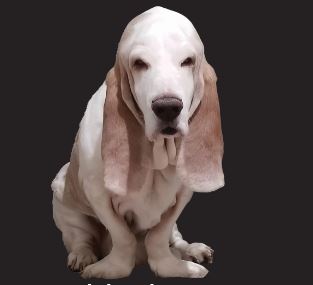
The Power of the Paws, inspired by and in memory of Freddy the Bassett.
20 Things You Forgot About Giving Speeches In Person
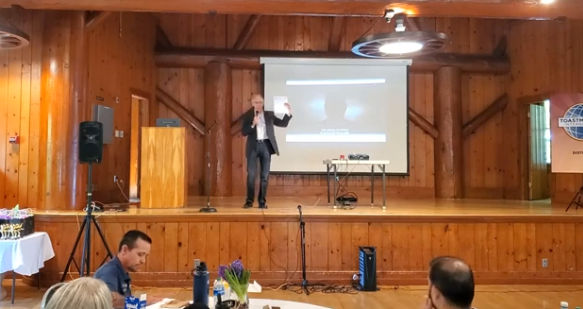
It has been 2 years since many of us have been able to give a speech to a live audience in person. Some of you may have NEVER given a speech anywhere except via your webcam. I’m going to tell you 20 fundamentally important things you have forgotten (or never knew) about giving a speech to a live audience. Also check out my video and article on The Worst (and Best) Practices for Giving Online Speeches.
The list below is just the bones. The video above contains the meat.
Basics
- Never leave an empty stage.
Like a relay racer handing off the baton, always shake hands to hand off the stage to the next speaker. - Take your name tag off before walking on stage.
- The clock doesn’t start until you do. Take a moment. Gather thoughts. Study the room.
- You don’t have to pin the timer. They will be sitting in an obvious place in the room.
Also, there is no gallery view when in person. - This one is for the audience: There’s no recording when it’s in person, so Take good notes.
You will get a printed agenda. Write on the back.
Stage use
- Stand up. You shouldn’t be sitting when you speak anyway.
- Body Language. Use your whole body from Head to Toe. (and dress appropriately from head to toe too)
- You’ll have a stage. Use all of it.
- Passage of time in our culture goes from audience Left to Right. That is Speaker’s Right to Left.
- Positional reference. You can refer to something by the place you talked about it on the stage.
(ex: at home, went to TM, realized I forgot something back at home)
Can be a person, place, time, mood, etc
Eye contact
- As you speak, Look around the audience naturally, deliberately, equally (front/back/left/right)
- Hold eye contact with individuals in the audience for about one sentence at a time. Not too long/short
- Keep your eyes off the ground (unless it is intentional)
- Don’t turn your back on the Audience.
- There’s no virtual background, no screen to share, don’t ask “Can you see my screen?” and you can’t turn your camera off.
Voice
- Project so the person in the back can always hear you without straining.
- Live voice is always more dynamic than listening through computer speakers. Use it!
- If you have a PowerPoint presentation – talk to the audience, not your slides.
- There is no mic to unmute. (unless you are using a microphone)
- Know your speech (doesn’t mean memorize), notes are OK, teleprompters aren’t.
BONUS 21. Unless you are deaf, waving your hands in the air is NOT applause. Please clap. That is what you will hear at the end of every speech. and if it’s an icebreaker it will be a standing ovation.
Fast recap:
Always shake hands before leaving the stage
Take your name tag off before going on stage
Pause before you start speaking
Get familiar with how the timing works
Be prepared to take notes
Stand up
Use your whole body and dress appropriately from head to toe
Use the whole stage
As you use the stage, time should flow from Audience’s Left to Right
Take advantage of Positional Reference
Make eye contact naturally, deliberately, equally Front/back/left/right
Hold eye contact for one sentence with any one person
Don’t look at the ground
Don’t turn your back
There’s no screen to hide or share and no virtual backgrounds
Project your voice so the person at the back can hear you without straining
Take advantage of the dynamic possibilities of live voice
Talk to the audience, not the PPT
There is no forgetting to unmute the mic
Know your speech.
Applaud loudly!
See you On Stage!

4 Things Tom Hanks does that they didn’t teach you in Toastmasters
I always thought Tom Hanks was a captivating speaker, but never analyzed carefully to figure out why. If you want to be a more interesting speaker, practice the 4 tips in this video. If you’re in toastmasters, you may have heard some of this, but not with this much detail (vocal variety, body language, eye contact) and there is more here that you might not have heard before:
1. story gap
2. emotional intrigue
3. inherit the character
4. audience inclusion
Watch it and tell me what you think in the comments. (disclaimer: I don’t know about or have anything to do with the promo at the end of the video.)
Also check out my analysis of how these unusual performers use body language and… the pause… to be more entertaining.
Worst (and best) Practices for Giving Online Speeches
If there is something people dread more than public speaking, it is probably speaking in front of a camera. But until we go back to meeting in person, we are stuck giving our speeches and presentations to a camera at home.
Unfortunately, being skilled at speaking to a live audience does not ensure you will be good at presenting to a camera. But with every challenge also comes opportunity. And by making a conscious effort to improve on camera, you will expand, refine, and diversify your speaking skills in more ways than you ever could by giving in-person speeches alone. Watch this speech to get some ideas:
Tips:
Bonus: Wash your hands for 20 seconds
1. Have a simple, uncluttered background
2. Dress as you would for an in-person speech
3. Mark where to stand with a towel (and be barefoot)
4. Look at the camera, not at the screen
…but don’t stare! Look away occasionally, more naturally
5. Study Late Night talk show hosts for examples
6. Sit 3-5 feet or stand 4-6 feet from the camera (where the front row would be sitting)
7. If presenting, consider standing instead of sitting
8. Move around the stage
9. Use body language, gestures and facial expressions
10. Even if you aren’t giving a speech, don’t put your camera down low!
11. Put the camera level with your eyes and tipped slightly down
12. Put the camera on a tripod or other stable support
13. Using your phone? Prop it on a box if you don’t have a tripod
14. ALWAYS use landscape (horizontal) orientation!
15. Have multiple light sources
16. Avoid bright light / windows behind you
17. Avoid harsh lighting / spotlights
18. Don’t stand too close to the wall
19. Only use virtual backgrounds if you must
20. Virtual backgrounds work best with a green screen
21. Simple, natural backgrounds are best
22. Stephen Colbert, Seth Meyers sit because they do a 1 hour show
23. Silence your cell phone and close all apps on your computer
24. Put pets and kids far, far away… Unless they are quiet like @FreddyTheBassett
25. Use an external microphone
26. Cell phone earbuds make good microphones
27. Be close to camera-mounted microphones
28. Soundcheck your audio before the meeting starts
29. Use fresh/fully charged batteries or plug into an outlet
30. Be in a quiet location
31. Close any windows during your speech
32. Join early to test audio, video, visual aids, timer
33. Pin the timer’s video AND have your own timer
34. Connect to the internet using a wire instead of wifi if possible
Watch what works well for others and try different things and have fun with this new platform for speaking! Be sure to check out the other Toastmasters tips I’ve posted by clicking the Toastmasters tab at the top of this page.
How to promote your club meeting on Facebook
This video demonstrates how to:
1. Create a Facebook event.
2. Simplify the steps to invite your friends to the event.
3. Promote your event beyond the people you know.
For more Toastmasters tips, visit https://davidhablewitz.com/category/toastmasters/
As Vice President OF Public Relations (Chief Marketing Officer) there are many things you can do to promote your club. Here is a checklist for you to download and work through: http://bit.ly/vppr-checklist
How to Enable Breakout Rooms in Zoom
Breakout rooms are free in Zoom if you know how to enable them.
Watch this video to learn how.


 The Notes Guy in Seattle