Author Archives: Dave Habz
History of Innovations in HCL Notes & Domino (Lotus Notes) – PART 1: Security
Some people have forgotten just how much Lotus Notes changed the software industry and established innovations that were decades ahead of the rest of the world. Innovations that are being “reinvented” today in other software as if they were creating something new. Software developers think they’ve come up with some novel idea that was actually first developed by Ray Ozzie’s team years or decades ago. The new re-creations of these innovations often lack the refinement in one seamless environment like is found in the mature and 30+ years time-hardened software that is HCL Notes & Domino. This article is the first of a series that will explore a few of those landmark innovations that set Lotus Notes so far ahead of the competition and in many ways continues even today.
- Port 1352.
It’s a very special number among the Lotus Professionals. This is the port number reserved by the Internet Assigned Numbers Authority (IANA) that is dedicated to HCL Notes protocol, also referred to as the well-known ports. https://en.wikipedia.org/wiki/List_of_TCP_and_UDP_port_numbers
While many software applications may unofficially stake a claim on some particular port, Notes/Domino has had official, exclusive assignment of this port since the 1990’s. This makes it exceptionally easy to manage networks and firewalls while retaining security. - Multi-Factor Authentication.
Since R1.0 of Lotus Notes, it has had multi-factor authentication (MFA). What is all the rage today as an essential component of protecting your authentication and preventing unauthorized access, Notes has had from Day One. MFA requires two things: Something you have and Something you know. With Notes, these are the Notes user ID file and the password for it. Notes has provided this method of advanced security — natively and seamlessly — for over 30 years. Many of today’s web-based apps must go through all sorts of convoluted integration with systems to send text messages (vulnerable) or additional dedicated apps, like Authy or RSA Authenticator on your mobile device. Meanwhile, MFA in Notes is so seamless and has existed for so long that many people even forgot this is MFA. - Anti-spoofing protection during password input.
While we’re on the subject of passwords, Notes has another anti-spoofing feature that many people don’t think about. Have you ever noticed when you type your password into Notes, the dialog displays randomly from 1 to 4 ‘XXX’ characters in the password field? This is to obfuscate how long your password is, making it harder for an ‘over the shoulder’ attack. Also, there is a graphic that changes with every character typed. The graphic is displayed algorithmically, so at the end of typing your password correctly, it will always be the same graphic. If it isn’t, then either you typed it wrong or the screen may be a man-in-the-middle, posing as a Notes client. I have yet to see any other software provide these security features that have always been part of the Notes client.

- End-to-end encryption and compression during data transportation.
All communications server-to-server and server-to-client have the ability to be encrypted as well as compressed. This port level encryption prevents eavesdropping on the data being transmitted.
- NATIVE User-level encryption via public-private RSA key technology.
From the beginning, Notes has had a public and private key structure as an intrinsic part of the software that allows encrypting documents in Notes that can only be read by the intended user. This includes email messages sent within the mail system. The security was so strong, IBM was required to publish a separate, International version of the software that the U.S. government could decrypt.
Unlike other platforms out there which have finally come around to recognizing the value of this functionality, require third-party add-ons and complex administration, this feature has long been an integral innovation used in Notes out of the box. Read more of that history here.
- Encryption of data at rest.
Notes and Domino are also able to use the encryption key infrastructure in Notes to encrypt database files stored on the disk drive. This secures data from someone attempting to access the file directly from the operating system outside of Notes. This is especially effective in securing data on laptops, for example. Just another innovation that has been an intrinsic part of the software for decades.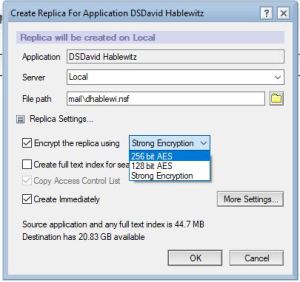
- Cross Certification with other organizations.
Notes has built-in the ability to ensure the identity of external organizations through the cross certificate process. Both organizations share a public key to each other that can then be used to verify the identity of any connection from that external user is truly that user and prevents someone from creating a bogus identity to masquerade as them. What is a trivial procedure using a Notes “smart client” in the Notes/Domino platform, is is a painfully complicated process for platforms that use “dumb clients” (web browsers). How long has Notes had this? Right. Since the 1990’s.
- Execution Control List (ECL).
You know how Windows will prompt you to ask if you trust an application to make changes to your computer? Well Notes has had that as an integral part of the software long before Windows did it.
Here is an example of what you see in Windows (UAC):
Notes has similar settings, only far more granular. Here is one alert specifying a single type of action by a single signer: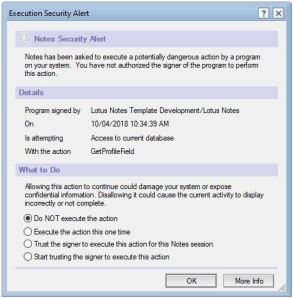
This dialog allows setting the default values for all the possible execution actions in the ECL settings:
- Ability to view file attachments without the risk of running potentially harmful code.
When you receive an attachment in email containing malicious code in it, if you were to open it in its native application, it may cause harm to your computer. To prevent this, Notes has an option to View the attachment via a simple, built-in viewer which can’t execute any code. The result is a fast, simple, safe way to see attachment contents.
On this great feature, I think they made a regression in V10. Prior to V10, if the attachment is an executable program (.exe for example), then the viewer would just display the compiler information — very handy for quickly identifying if it was created by the source you were expecting. As of V10 this feature was modified so that the “dumb” viewers were removed and it now uses a web browser instead. This process is a bit slower to open and it launches your default web browser which you may not want to open. For that matter, it requires that you have a web browser installed. I don’t know what the risks to malware are for attachments opened this way. I personally prefer the original solution. In any case, this feature is another example of the innovations that have been in Notes well ahead of the competition.
Here is what it displayed with an executable: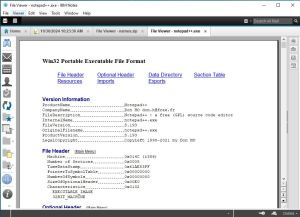
This is what it displayed if you clicked View for a .zip file: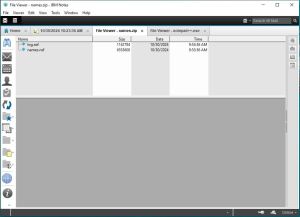
(If you would like to see this feature restored to its original implementation, please vote for the idea here:
https://domino-ideas.hcltechsw.com/ideas/NTS-I-2705
In summary, this is just a sample list to highlight of some of the innovations that Notes has had over the years in the area of Security that set it apart and ahead in the software industry.
Coming up: Innovative user features that set Lotus Notes / HCL Notes apart
How to add Pause Counter to your Toastmasters Agenda in EasySpeak
If you watched my presentation or read my article on Pause Counter, then you may be ready to add the meeting role to your club’s agenda. If you use https://easy-speak.org for your club, follow this video:
When you create the role, I suggest you add the following link for the role
instructions: https://bit.ly/pausecounterform
This links to the google drive with the pause counter form which includes a description of the role.
The 5-Minute Secret to Being an HCL Domino (Lotus Notes) Genius
Do you ever feel lost in the world of HCL (#LotusNotes) from a technical knowledge perspective?
Wonder how other professionals in this realm keep up on the latest there is to know about Notes, Domino, Sametime, Connections, BigFix, and any other HCL software? Lean in and let me share my secret: I spend 5 minutes a day scanning the latest posts in the HCL Customer Support Knowledgebase.
You would be amazed at the gems of knowledge that get published there. Sure, much of what gets published may have no impact on your work… today. But scan through the topics posted to find those that do. And for those that don’t, you will at least gain a bit more understanding of those areas of knowledge. But it is important to optimize this process so you can do it in just a few minutes and the key to that is in the filtering and sorting.
First, log into the HCL Customer Support portal. It is here:
I also have this listed in my permanent page of important links:
Next, select the languages you want to see (if you don’t do this, many articles may be repeated in multiple languages).
Select the product you want to filter on.
Lastly, in the top right corner of the search results, next to “Sort by” click on “Newest”.
Scan the results for interesting topics since you last scanned the list.

Once upon a time, the knowledgebase was stored in a Lotus Notes database and customers could replicate it. That was handy, because back then I would take advantage of unread marks in Notes and use “Display Unread Only” feature to see the new and updated documents. Then when I was done reading what I wanted to see or got to the end of my time, I just Marked All Read, making it ready for the next time I went into the Knowledgebase. That method was also handy for when they occasionally just updated an existing article. If you think that would be useful to you, please vote for this idea:
HCL Domino and HCL Notes (Lotus Notes) V14.0 FP2 Released: 65 Fixes Included
Today HCL released V14.0 FP2 of HCL Domino and HCL Notes #LotusNotes. Here is the announcement from HCL with all the details. Fix Packs just have fixes, no new features. This Fix Pack has 65 published fixes. You can find a brief description of the full list on the fixlist website.
You will find the software on the “Recently Released” list when you first log into the download site.

And a reminder that I have a page with links to my favorite websites for HCL Notes (Lotus Notes) and Domino at the top right of my page under “Me on the Web” section. You can always go there to find what you’re looking for.
Notes.net domain: Holy Grail of the Notes Community Sits Silently Waiting
Home/Notes/net: Every Notes client has a connection to this Domino server with DNS name home.notes.net.

The founding fathers of Lotus Notes demonstrated their Public Relations vision and genius when they defined a connection to this server in every HCL (Lotus) Notes client software installed. (They stopped short by not including icons to notes.net databases on installation.) The public relations and brand-building opportunities here are incredible, quietly waiting to be tapped. It begs the questions:
Why aren’t we using this today? What happened to the Home/Notes/net Domino server?
With such a resource built into the software, HCL has the potential to directly reach every single Notes user in the world. How powerful could that be? What price would a company pay for such ubiquitous reach into their customer base?
What did the original creators of Lotus Notes have in mind when they created this server that would have a direct touch to every single user of their software? I haven’t been able to find the answer yet, (if you know, please post in the comments), but I can think of many ways this could add to the value of the software and the bottom line of HCL’s stock. Here are a few examples:
– Help databases
– Tutorial videos
– Periodic news letter
– Tips & tricks for end users, admins, and developers
– A Notes application store with live examples
– A sandbox for “trying before buying”
– Demonstrate the power of Notes clients over web browsers
– Community discussion forums
– Hosting for Notes user groups
– A working Sametime environment for people to connect, chat, and build a community
Just imagine, a public Domino server (cluster) demonstrating the full power of Notes and Domino. This is but a small sample of the incredible ways notes.net could be leveraged. What would you like to see hosted on the home.notes.net server? Please share your ideas in the comments below. Also, Please support this idea and vote for it here: https://domino-ideas.hcltechsw.com/ideas/NTS-I-2669
Everyone who uses Notes should know about Home/Notes/Net.
FP1 for Domino and Lotus Notes V14 just released!

I continue to be surprised at how prolific HCL is in code generation. It’s been only 4 months and they already released FP1 for Notes/Domino V14.0. 4/15/2024. You can find it easily at the new download website:
https://my.hcltechsw.com/downloads/domino
And if you want to know what’s in FP1, look here:
https://help.hcltechsw.com/domino/14.0.0/admin/wn_140FP1.html
And the complete release notes are here:
https://support.hcltechsw.com/csm?id=kb_article&sysparm_article=KB0112431
And a reminder that you can find these and all the most important links in my page of
All Essential Lotus Links.
The Power of the Pause: The Secret Sauce of Great Public Speaking
This presentation is all about a crucial tool in public speaking that is missing from Toastmasters:
The Pause.
In this presentation, I demonstrate the importance of pauses in everything from telling a joke to playing music. You may find it helpful to first download the Pause Counter form with the explanation of pause types so you have it to follow along while listening. http://bit.ly/pausecounterform
You can use this shortened URL to share an easy-to-remember link to this article:
https://bit.ly/PowerOfThePause
Pauses are found in many places. A long distance swimmer pauses between strokes to go further faster. In music, there may be many notes played at one time, but when a rest note is played, it stands alone. Driving in traffic, a stop sign creates a pause to add safety. When you look for them, you can find pauses everywhere in our world. Pauses are the natural substitute for that infamous Toastmaster Taboo: the filler word. Elimination of filler words is a good goal, but Toastmasters has put the focus on the problem, not the solution. What if, instead of focusing on what to avoid — the filler words — we focus on what we want in their place — pauses? If you focus on adding pauses, the filler words will naturally disappear.
Not all pauses are created equal. There are many different types of pauses which I have been able to separate into 2 categories: Incidental and Intentional.
Incidental pauses are those that come naturally and are used in conversational speech. They generally give the speaker a chance to breathe or to think. They are usually dictated by punctuation, such as commas, semicolons, periods, question marks. Incidental pauses are also used as a replacement for a filler word – or rather, a filler word is often used where a pause belongs. This is “the silent filler.” These pauses are essential to being clearly understood and a basic part of speaking. The Ah-counter in Toastmasters is essentially focused on these, but instead of listening for pauses, they are listening for when pauses are replaced with filler words.
Intentional pauses make up the second category of pauses. These are the pauses that serve a greater purpose than just giving the speaker time to breathe or think. These pauses add seasoning and spice to your words. Most people go through their day never using these pauses. But if you listen carefully, you will find that the most interesting people tend to use many of these pauses as a staple part of their vocabulary.
Types of Intentional Pauses
Here is a breakdown of the different types of intentional pauses that I have identified so far. I’m sure as you study and observe, you will come up with more of your own, either nuanced differences from these or entirely new styles of pauses. If you have an idea, post it in a comment.
Pre-emptive Pause: Pause before starting to speak. This allows the speaker to gather their thoughts as
well as draw in the attention of the audience. A powerful start to any speech. Extend this pause for 5 or more seconds to build anticipation in your audience. Remember in Toastmasters, the timer doesn’t start until you start talking.
Punchline Pause: Humor has more impact when a pause is made before delivering the punchline. Watch a few standup comedians online to see how they use pauses. A wonderful example can be found in this performance by Stomp entertainment group. Their silence is palpable and the pause itself even becomes the punchline.
Audience Pause: Also known as Laugh Pause and Applause Pause. This is used to give the audience
time to react. Generally, the larger the audience, the longer the Pause. Do not step on their reaction or
cut it short. Like popping popcorn – It’s not done until it slows down enough, but don’t overcook it.
Thoughtful Pause: Allows the audience time to digest what was just said. In storytelling, it allows them
time to use their imagination; in technical talks, it allows them time to understand.
Emphatic Pause: Used to add emphasis to what precedes or follows the pause.
Indefinite Pause: When Finished speaking or when waiting for the listener to respond. Do not speak again until the listener responds. It is very important to not give in and speak first if the audience doesn’t respond as quickly as you expect. Get comfortable with this one so you can let it get uncomfortable for the listener. This is especially useful in negotiations. This specific usage is described in the book “Never Split the Difference” by Chris Voss.
Here are a few more resources that I mentioned in my video presentation above. These are 3 winners of the International Speech Contest, so they should be a great way to practice counting the various pauses. Even among winning speeches, I think you will find a direct correlation between the number and length of the pauses and the perception of the speech. You can do this with any speech. For comparisons, try to use speeches of similar lengths. That is where contest speeches are handy. They are all 5-7 minutes. Also be aware that speeches given to an online-only audience won’t have any audience pauses. Those only occur with a live audience in the room. This is why talk shows are “filmed before a live studio audience” and why sitcoms have laugh tracks. This is also why I am a strong advocate for practicing your speaking before a live audience. If all you do is speak to a camera, you are missing out on the most important part of Public Speaking: the audience.
You might also check out the second video on my 2019 blog post showcasing the Stomp acting group video demonstrating pauses.
In fact, pauses can be treated as words in your vocabulary. The more types of pauses you learn, the more fluent your vocabulary will become. Shift the focus from what to avoid — filler words — to what you want to include — pauses — and watch how quickly your public speaking improves.
Call To Action:
– Share this with your Toastmasters club and friends.
– Create a Pause Counter meeting role for your club meetings.
– This is just getting started. Add your suggestions for growing Pauses in the comments below.
You might enjoy these related blog posts:
Video: Stomp performers are masters of body language and pauses
Video: 20 Things You Forgot About Giving Speeches in Person
Video: Worst (and Best) Practices for Giving Speeches Online
The Power of the Paws, inspired by and in memory of Freddy the Bassett.

Deep Dive Video of (Lotus) HCL Domino V14
Watch this Deep Dive of Domino V14 video hosted by the Product Managers.
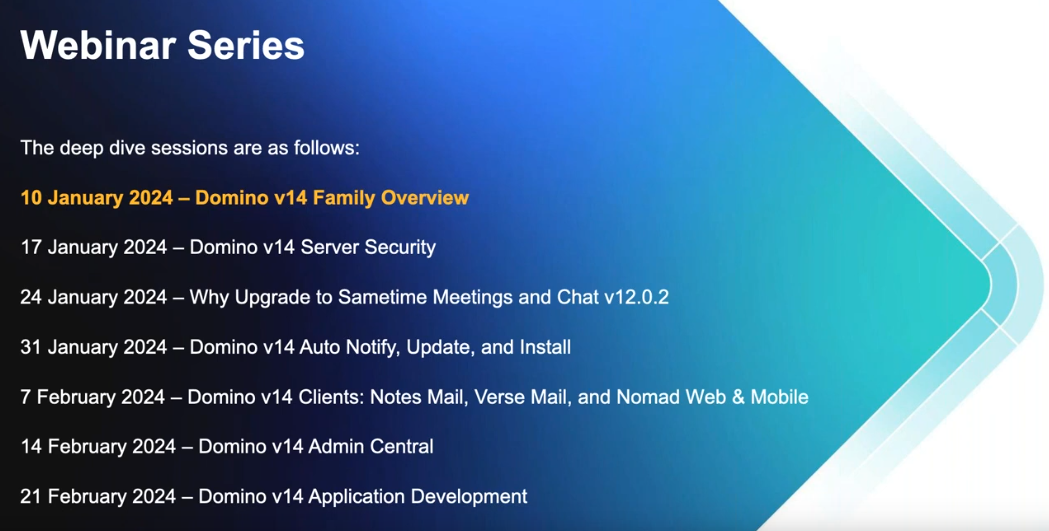
While you’re at it, you might click the link on the video to open it in YouTube and then subscribe to their channel. Also, don’t miss these upcoming sessions. Click on the image below to visit the calendar and registration page.
HCL Domino /(Lotus Notes) V14.0 is now available!
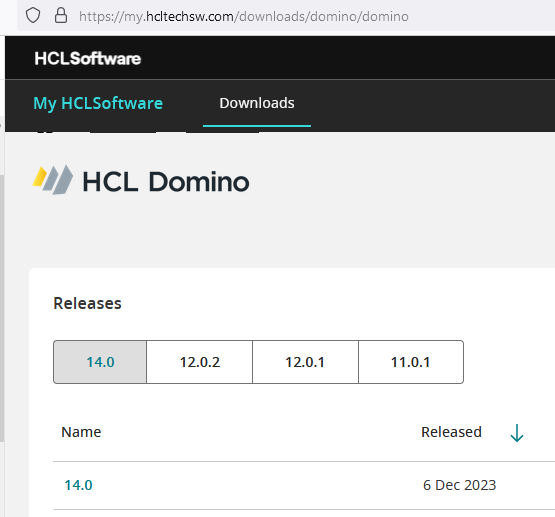
Ahead of schedule, HCL has released V14.0 of HCL Domino and HCL Notes (Lotus Notes as most of us still like to call it). Numerous major new features, like the new auto-update for the software. Find a detailed list of what’s new here: https://help.hcltechsw.com/domino/14.0.0/admin/wn_140.html
You can also watch the official release event (which covers a lot more) here: https://register.gotowebinar.com/register/3240097374153477467
If you dislike flexnet as much as most people, you can download the software at the very user-friendly site: https://my.hcltechsw.com/downloads/domino/domino
As you plan to upgrade your Notes clients to V14, keep in mind that there is no 32 bit version of V14, so unless you are already running 64 bit V12.x, you will need to uninstall the software before installing V14. If you’re using Panagenda’s MarvelClient for handling your upgrades, that will also take care of it.
Essential Notes/Domino Links
 Short URL to this page:
https://bit.ly/dominolinks
Here is a collection of links to everything you could possibly want for Domino and HCL Notes (#LotusNotes)
Bookmark this one page for all your Notes & Domino links.
Use the shortened URL above that is easy to remember:
If you know of a link that I should add to this list, please post it in the comments and I will get it added.
If you find a link is broken, also let me know what the new link is or if it should be removed.
HCL websites
HCL Software Downloads Homepage: https://my.hcltechsw.com/
HCL Customer Support – knowledgebase, documentation, forums, support tickets: https://support.hcltechsw.com/csm?id=csm_index
HCL Idea Portal: https://domino-ideas.hcltechsw.com/ideas
HCL Developer Community: https://developer.ds.hcl-software.com/
HCL Ambassador Program: https://www.hcltechsw.com/about/hcl-ambassadors
HCL Notes/Domino Release Fixlist per release: https://ds-infolib.hcltechsw.com/ldd/fixlist.nsf
HCL Notes/Domno Release Schedule: https://ds_infolib.hcltechsw.com/ldd/fixlist.nsf/Progress?OpenView
HCLSoftware U: (the new academy) https://hclsoftwareu.hcltechsw.com/
HCL Software Blog: https://blog.hcltechsw.com/
Your HCL Portal for personalized links: https://id.hcltechsw.com/app/UserHome
HCL Domino Apps Store: https://marketplace.hcl-software.com/domino
HCL Business Partners
Businesss Partner Locator: https://www.hcl-software.com/partner-connect/partner-ecosystem
Business Partner Registration: https://registration.hclpartnerconnect.com/general.nsf/welcome?open&login=1
Business Partner Portal: https://www.hcltechsw.com/resources/partner-connect
HCL 3rd party software
HCL app store catalog https://hclsofy.com/domino
Divergent Solutions LLC https://divergentnw.com
RPR Wyatt Vital Signs: https://rprwyatt.com/vitalsigns/
Crossware: https://crossware365.com/hcl-domino-email-signatures/
Panagenda: https://www.panagenda.com/
Ytria: https://www.ytria.com/ezsuite/
Maysoft SpamSentinel: http://maysoft.com/spamsentinel-for-hcl-domino.html
Libraesva https://www.libraesva.com/
Prominic: https://www.prominic.net
Belsoft: https://belsoft-collaboration.ch/en/
User groups
OpenNTF: https://www.openntf.org
CollabSphere: https://collabsphere.org
Engage: https://engage.ug/
C3UG: http://www.c3ug.ca/
DNUG: https://dnug.de/en/
Let’s Connect Nordics: https://nordics.letsconnect.world/
sutol: https://sutol.cz/
Spanish Domino User Group: https://www.slug.es/
Facebook Groups
HCL Notes Domino App Store https://www.facebook.com/groups/domino.app.store
HCL Software – Digital Solutions Business Partners – Worldwide https://www.facebook.com/groups/135983955430
HCL Notes Domino Administrators https://www.facebook.com/groups/LotusDominoAdmins
HCL Notes Domino etc Enthusiasts https://www.facebook.com/groups/hclenthusiasts
HCL Notes Domino Developers https://www.facebook.com/groups/dominodev
LinkedIn groups
Messaging & Collaboration Professionals – Lotus https://www.linkedin.com/groups/37836/ (26K members)
HCL Domino, Notes & XPages https://www.linkedin.com/groups/25044/ (10K members)
HCL Sovereign Suite Collaboration https://www.linkedin.com/groups/73034/ (9K members)
HCL (Lotus) Domino Administration https://www.linkedin.com/groups/2255889/ (16K members)
LinkedIn pages
https://www.linkedin.com/company/hclsoftware/ (400K followers)
https://www.linkedin.com/company/hcltech/ (5.5M followers)
Formerly known as Twitter
https://twitter.com/HCLAmbassadors (2K followers)
https://twitter.com/HCLSoftware (40K followers)
https://twitter.com/HCL_CollabSup (1K followers)
https://twitter.com/HCLDigital (47K followers)
Youtube Channels
https://www.youtube.com/c/HCLSoftware/videos
https://www.youtube.com/@HCLDigitalSolutions/videos
https://www.youtube.com/@OpenNTF
https://www.youtube.com/c/NotesIn9
Blog Collectors
Planet Lotus: https://planetlotus.org/
Collaboration Today: https://collaborationtoday.info/
Individual Blogs
https://davidhablewitz.com
http://notesin9.com/
http://xpages.tv/episodes.nsf/home.xsp
Other resources you asked me to include here
http://xpagescheatsheet.com/
A few more HCL sites
HCL Domino Beta Program: https://registration.hclpartnerconnect.com/D11Beta
HCL Domino Volt Beta Program: https://help.hcltechsw.com/domino_volt/beta/welcome.html
HCL Domino Leap Complete Resources: https://hclwiki.atlassian.net/wiki/spaces/HDV/overview
HCL Sandboxes for Leap, Sametime, and Nomad Web: https://start.myhclsandbox.com/
HCL Open Source Repositories: https://opensource.hcltechsw.com/domino
HCL public Sametime Community: PENDING
HCL public Connections Community: PENDING
HCL Notes.net Domino Server for Notes client connections to resources: PENDING
HCL Notes/Domino V14 Early Access Program release 3 is available today
EA3 of HCL Notes/Domino V14.0, probably last EA release before the final version is released later this year, was released today! Try out their new website for software downloads while you’re at it. Visit https://my.hcltechsw.com/downloads
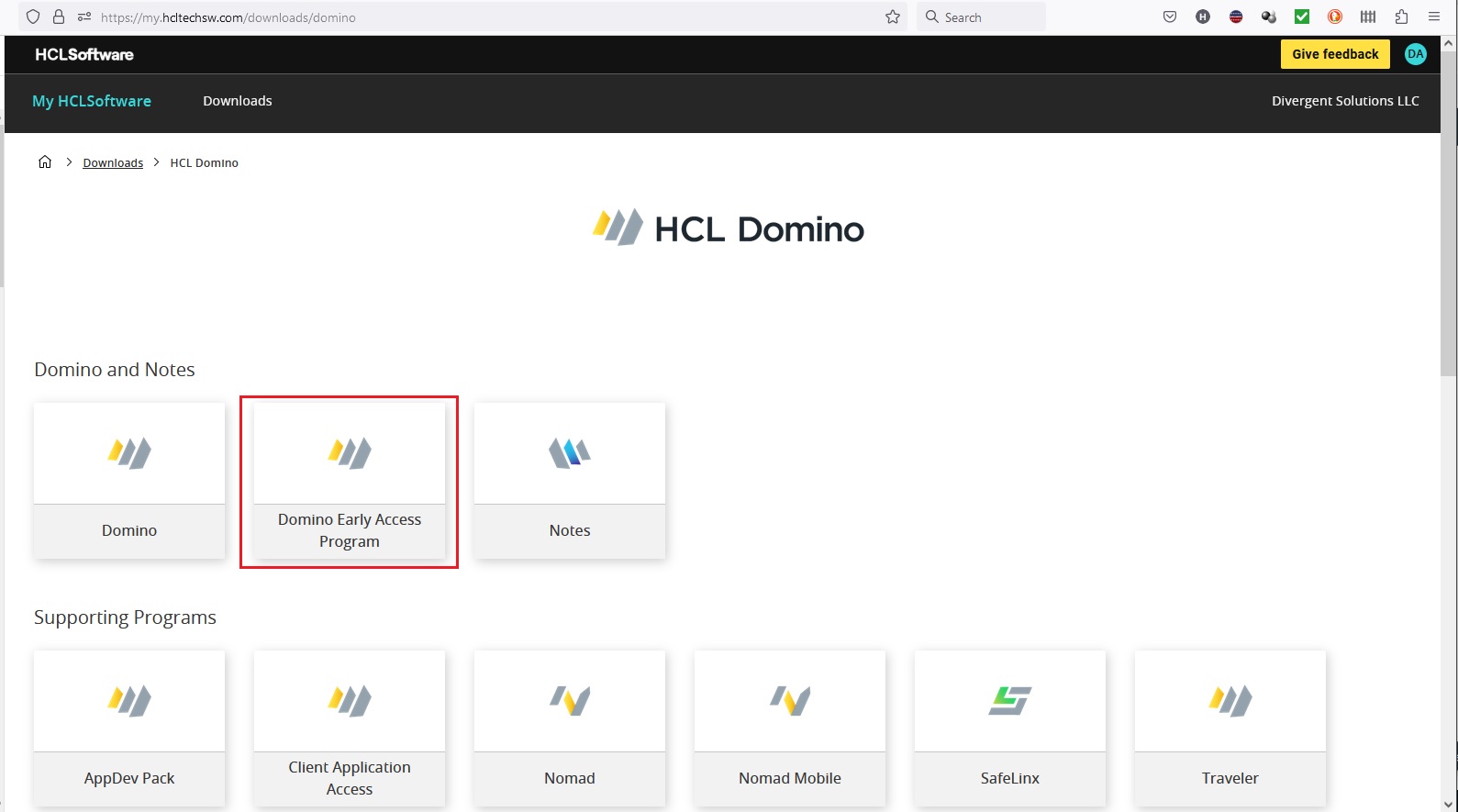
I will say this new website is a joy to work with. From here, it is easy to download the components you want to try out. Then be sure to give feedback on the product before it is released. Post your feedback here: https://registration.hclpartnerconnect.com/domino14forum.nsf/allDocuments.xsp
#LotusNotes #IBMNotes
How to disable the alternate FROM fields in Notes V12
A new feature in mail for Notes 12 is the ability to send messages using different FROM addresses. If your company has a rule prohibiting this, you will want a way to disable this new feature. Have no fear, they thought of that already. Just push out the Notes.ini setting via User Policies: $DisableShortNameFrom=1


 The Notes Guy in Seattle