Category Archives: Uncategorized
The Secret to Keeping the junk out of your Sent folder
Quick Tip: This will help keep the junk out of your sent folder and keep your mail file smaller.
Step 1: Create a folder called “Delete Later” (or just use the Junk folder).
Step 2: ALWAYS use Send and File instead of Send. If the message is important, it should be filed into the appropriate folder. If it is not, then file it in the “Delete Later” folder.
Step 3. Whenever you get a quota warning, start by deleting all the messages in the Delete Later folder.
If I had it my way, the option to send without filing a message would not even exist. I preach this method to my users and have seen some users trash 1/4 to 1/3 of all their sent mail using this method. That’s a huge savings of space and clutter.
If you liked this tip, please rate it and spread the word. If you didn’t, please keep it a secret.
Making a REAL difference in your inbox management. (HINT: Don’t use Domino inbox maintenance!)

 When I was in college, I had a professor who demanded all computer programs be written modularly, broken into logical functions and procedures that were short enough to be viewed on one screen without scrolling. We would get a one letter grade deduction for each procedure in the program that did not fit on one screen. (at that time, one screen was 25 lines) His reasoning was that troubleshooting a unit of code was vastly more difficult when the entire piece could not be viewed at one time.
This same best practice applies to most everything you view on the computer including websites and INBOXES. That’s right. The moment you have to scroll your inbox to view all the messages, you have reached the point of functional breakdown. Once you have to scroll the inbox, those messages not on the screen are less likely to be looked at ever again and it is very unlikely it will ever get back to not scrolling without radical action. Why? Because it literally becomes endless. That is, you can’t see the ends. Other than the size of the slider in relation to the bar, there is no way to tell how many messages are in the inbox. And as the saying goes, out of sight, out of mind. It is vastly easier to keep an inbox to less than one screen full than it is to reduce an inbox to one screen once the scroll bar appears.
Some people would have you believe the Inbox Maintenance feature is the greatest thing to come along for maintaining your inbox. WRONG. All it does is hides the problem and makes it even harder to fix later. Once you remove the messages from the inbox without adding them to another folder, they become lost in the morass of the All Documents view, forever inseparable from the messages that have been properly filed except through creative coding of an agent. Sure, that will temporarily improve server performance, but it does not go far enough to address the real problem: degraded human performance. The server will tolerate an inbox with several hundred messages. But humans performance degrades as soon as they don’t all fit on one screen. (This is the one advantage of using the preview pane on the side rather than the bottom.)
WHAT YOU NEED TO KNOW
Step 1: Empty your inbox.
– Create a folder called “Inbox 2010”
– Open your inbox and select all messages. All of them. On a PC type Ctrl-A to select all.
– Drag them to the new folder you just created. You now have an empty inbox. You can always go back and deal with those messages you moved when you have extra time. But we both know that won’t happen.
Step 2: Keep the inbox empty for as long as you can.
– Make it your goal to eliminate all new messages promptly. Whenever possible, process each one only once. Read it, act on it and delete or file it. Much like a video game, your goal is to “kill” the emails. You lose as soon as your inbox gets large enough to scroll.
Step 3: Game Over: Start again.
– When you get the scroll bar for the inbox, repeat step 1 again.
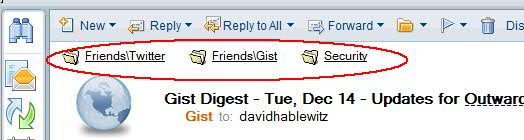
You can simplify the process of filing messages if you install Swiftfile, the free add-on from IBM that learns your message filing habits and gives quick links for the 3 folders you will most likely want to file the message. In just one click the message is filed and next one opened. (see screen shot)
For more on this topic, check out the book Getting Things Done by David Allen.
Notes Admins: It’s that time of year. Remember how to create those holidays for importing into calendars?
It’s December. By now your HR department should have published the holidays for next year for your company. But did you add them to your Domino Directory and did you let HR tell people how to add them to their calendars? Shame on you if you didn’t. But it’s not too late. Here is a quick reminder of the steps:
- Get your list of holidays from HR for each country you have users. Remember, they are different around the world.
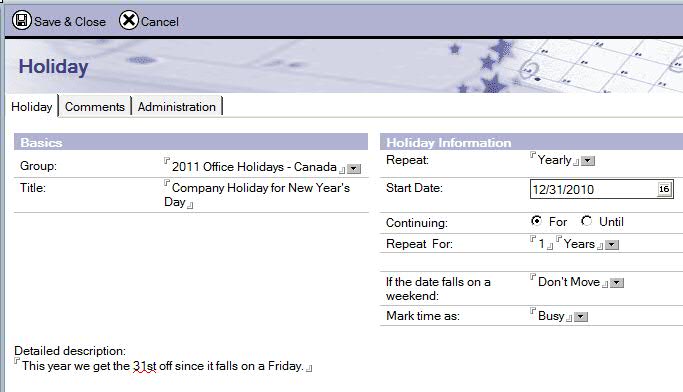
- Open the Domino Directory and go to the view: Configuration – Miscellaneous – Holidays
- There are already national holidays listed, but leave those alone. Those are the official holidays which may not correspond exactly with the days your company takes off. Instead, create a new set of holidays. When you do this, put them into a group named appropriately, for example “2011 Office Holidays – Canada”. I like to put the year first so it is easier to find in the list.

- If you already have a holiday listed, just edit it and update the dates and change the group. Be careful about repeating the entry for more than one year. Most HR departments don’t finalize the holidays more than 1 year in advance and they don’t always follow a set rule, so talk to your HR department first.
- Tell your users how to import the new holidays. Repeat this information again in January when everyone is back from their vacations. Some people who have a lot of vacation to burn are already gone for the year and won’t go back to read your message. Ideally, this message would come from HR and would be included where ever they post the holiday list.
You should also ensure new hires are given the instructions on how to import calendar entries. And just in case you forgot how to do that…
- Open your calendar.
- In the Action buttons, click on More – Import Holidays.
- Select the groups of holidays you want imported. Here is where you’ll be glad you put the year first. If you work with users in other countries, you may want to import the holidays for those countries too.
Consider this my holiday gift to you. Happy Holidays!
(You read it, now please rate it.)
How to build a predictable server replication scheme
One day your CFO calls you at 9:45 AM and says “London is waiting on the financial report I just updated in the Notes database. When will that get replicated over to the server in London so they can work on it?” You think to yourself “I don’t know, first it has to go to the hub and then to the London server and the schedule for each is every 60 minutes from 12:01 AM to 11:59 PM. That’s two replication events, so it means it could happen anytime between right now to 2 hours from now.” So you say to her “I’m not sure, but I can force that over right now.” You drop what you were doing and go to force the replication process. Has this ever happened to you?
Well with proper planning your answer could have been as simple as “Sure, the hub replicates with your server every hour on the hour and then with the London server 10 minutes past the hour. Your data will replicate to the hub at 10:00 and at 10:10 it will replicate to London.” She hangs up happy and you go back to your work.
In my years supporting a broad variety of environments ranging from 5 to 90,000 users, I have figured out a number of tips like this one that can make a big difference in the operation of your Notes environment. When I shared them with my friends at IBM services, they adopted these as best practices when working with their customers. I would like to share those tips with everyone.
When it comes to monitoring replication events, it’s easier to troubleshoot replication issues and to predict when replication will occur if the replication times are listed explicitly in the connection document instead of using a time range and interval. The reason is the replication interval starts when the previous replication event is finished. So if the replication interval is set to 60 minutes and the first replication starts at 8:00 AM and takes 5 minutes to complete, the next replication will occur at 9:05 AM, not 9:00 AM. Then the next will be at 10:10 AM, etc. causing a drift in the replication time. You can avoid this drift by explicitly listing the replication times. To define replication to occur at an explicit time, the connection times should use the format “8:00 AM; 9:00 AM; 10:00 AM” etc. and the interval should be “0”. Also set a replication time limit with a value less than the interval so replication events do not overlap. Explicitly defining the times is particularly useful when data must travel through multiple servers to get from one end user to another and a fast, predictable delivery time is needed. This is more efficient than setting the replication interval ridiculously short to compensate for the seemingly unpredictable nature of using the time range/interval method.
Now let’s say you have a hub server that is running 4 replicator tasks and you need it to replicate hourly with 24 different servers. You can schedule it to replicate with 4 servers at a time, 10 minutes apart. so a part of that schedule might look like this:
From to Schedule
Hub Mail01 7:00 AM, 8:00 AM; 9:00 AM; 10:00 AM; 11:00 AM; 12:00 PM; 1:00 PM; 2:00 PM; 3:00 PM; 4:00 PM; 5:00 PM
Hub Mail02 7:00 AM, 8:00 AM; 9:00 AM; 10:00 AM; 11:00 AM; 12:00 PM; 1:00 PM; 2:00 PM; 3:00 PM; 4:00 PM; 5:00 PM
Hub Mail03 7:00 AM, 8:00 AM; 9:00 AM; 10:00 AM; 11:00 AM; 12:00 PM; 1:00 PM; 2:00 PM; 3:00 PM; 4:00 PM; 5:00 PM
Hub Mail04 7:00 AM, 8:00 AM; 9:00 AM; 10:00 AM; 11:00 AM; 12:00 PM; 1:00 PM; 2:00 PM; 3:00 PM; 4:00 PM; 5:00 PM
Hub Mail05 7:10 AM, 8:10 AM; 9:10 AM; 10:10 AM; 11:10 AM; 12:10 PM; 1:10 PM; 2:10 PM; 3:10 PM; 4:10 PM; 5:10 PM
Hub Mail06 7:10 AM, 8:10 AM; 9:10 AM; 10:10 AM; 11:10 AM; 12:10 PM; 1:10 PM; 2:10 PM; 3:10 PM; 4:10 PM; 5:10 PM
Hub Mail07 7:10 AM, 8:10 AM; 9:10 AM; 10:10 AM; 11:10 AM; 12:10 PM; 1:10 PM; 2:10 PM; 3:10 PM; 4:10 PM; 5:10 PM
Hub Mail08 7:10 AM, 8:10 AM; 9:10 AM; 10:10 AM; 11:10 AM; 12:10 PM; 1:10 PM; 2:10 PM; 3:10 PM; 4:10 PM; 5:10 PM
Hub Mail09 7:20 AM, 8:20 AM; 9:20 AM; 10:20 AM; 11:20 AM; 12:20 PM; 1:20 PM; 2:20 PM; 3:20 PM; 4:20 PM; 5:20 PM
Hub Mail10 7:20 AM, 8:20 AM; 9:20 AM; 10:20 AM; 11:20 AM; 12:20 PM; 1:20 PM; 2:20 PM; 3:20 PM; 4:20 PM; 5:20 PM
Hub Mail11 7:20 AM, 8:20 AM; 9:20 AM; 10:20 AM; 11:20 AM; 12:20 PM; 1:20 PM; 2:20 PM; 3:20 PM; 4:20 PM; 5:20 PM
Hub Mail12 7:20 AM, 8:20 AM; 9:20 AM; 10:20 AM; 11:20 AM; 12:20 PM; 1:20 PM; 2:20 PM; 3:20 PM; 4:20 PM; 5:20 PM
While I’m talking about replication times, I should mention that it’s wise to not have any replication going on while the nightly maintenance tasks are running, like Design and Compact. This is usually between 1:00 AM and 4:00 AM. (Check your program documents and the “ServerTasksAtn=” parameters in the notes.ini.) If you have servers in different time zones, be sure replication does not occur between them during the maintenance window of either server. For example, if you have a server in London (time zone GMT) and another server in New York (time zone GMT -5) and they both have a maintenance window from 1:00 AM to 4:00 AM, then from the London server’s perspective, no replication should occur between the times of 1:00 AM – 4:00 AM or 6:00 AM – 9:00 AM GMT. From the New York server’s perspective, no replication should occur between 8:00 PM – 11:00 PM or 1:00 AM – 4:00 AM EST. If you have more than two or 3 time zones to deal with, create a table and indicate the maintenance window of each server in its local time and translate it into the time zone for each server that replicates with it.
This may seem like a lot of effort compared to using a replication interval, but this little bit of planning makes a huge impact on managing large domains. It will also help preserve your sanity. (I have constructed a replication schema that involved 200+ servers replicating through 4 hub servers spanning 20 time zones and these techniques were absolutely essential to make it manageable and predictable.)
Regarding mail routing using connection documents, even though there is an option for “Pull-Push” on the router type setting, the actual behavior of pull is to tell the other server to push. As a result, if there are any firewalls between the servers, the firewall rules must allow both servers to initiate a conversation on port 1352 for NRPC mail routing. This also applies to mail routing via Notes Named Network (NNN). This is critical because if two servers are in the same NNN, but the firewall prevents either server from initiating the conversation, then mail will fail. This is true even if there is a valid path between the two that involves a third server. If they are in the same NNN, they MUST be able to connect directly to each other.
In a hub/spoke configuration, let the hub initiate the replication so you only have to check one log to see the results.
A few other tips:
Create a view in the Domino Directory to display connections by both source and destination servers.
In a hub/spoke configuration, let the hub servers initiate the replication so you only have to check one log to see the results.
Create a connection that replicates from spoke to hub that runs once per day as a safety.
Always use DNS names rather than IP addresses unless that is not an option (like servers isolated via firewalls)
Do not use hosts file or lmhost file to define addresses.
Use Notes Named Networks for mail routing whenever possible.
Beware of putting servers in the same NNN that do not have a direct path between them.
Disable replication on Templates and change replication priority on templates to Low, then set connections to only replicate medium and high. Now they won’t replicate and they won’t report an error.
Microsoft opens consumer store #7 at Bellevue Mall, WA

Microsoft store front
Microsoft just opened their seventh consumer store. So I went to check it out. This is the first one here in Microsoft’s hometown, at Bellevue Square Mall. This wasn’t the first store to open because they wanted to get the kinks worked out before the big show here at home. It looks like they did work out whatever kinks there would be. Well most of them anyway. Apparently they “comprimised”

"Comprimising" photo
on using a spell checker when they made their signs.
They have a cool wall of flat screens that make a long, continuous image. See it in the background of the photo of me.

Microsoft store#7, Bellevue, WA
One corner of the store is setup with Xbox so you can try out the new Kinect. (see photo) This is their equivalent of the Wii. The cool thing about the Kinect is that it
doesn’t need a device in your hand to control. Instead, it has a sophisticated motion sensor that you stand in front of to interact with the game. It works fairly well, but if
you play competitive table tennis, don’t expect much realism from their version of the game. I expect future versions of the device will improve in realism.
But this really isn’t a store about Microsoft. It’s more about the hardware that you can run Microsoft software on, specifically Windows 7and Windows Phone 7. So it’s really a Dell/Visio/HP/AT&T/Toshiba/etc. store. For all its glitz and hoopla, wall of monitors and a few more (OK, a LOT more) square feet, it feels remarkably undifferentiated from the Apple store just 4 doors down.

Author with wall of monitors in the background

Kinect demo

Apple store just a few doors away
The Harmonica Man: Proof you don’t have to have something to give something.
The Harmonica Man: A Pacific Northwest icon of generosity and one more reason Washington state has more musicians per capita than any other state in the U.S. This holiday season, please consider giving a bit more to those less fortunate, even if all you have to give is your music.
Check out this news article from CBS news:
Quick Tip: Restricting who can send email to your broadcast groups
You probably have a mail group used for sending broadcast emails (mass mailings) to many people, like all of your employees. Do you ever have someone send a message using this group that shouldn’t? Do you ever have someone Reply to All when they receive a message addressed this way? Do you ever get spam addressed to that group? The fix for this is very simple. You can restrict access to any group by setting the reader names. Follow these steps:
1. Before updating your broadcast group, create a group that will be used to define who is allowed to send mail using the broadcast group. Add the appropriate members to the group. In many cases this group will be maintained by HR or some other person responsible for authorizing broadcast messages.
2. Edit the group used for broadcast messages.
3. Display the document properties of the mass mailing group. One way to do this is press Alt-Enter, then change the object to Document.
4. Click on the security tab (the one with the key)
5. Unselect the field “All readers and above”
6. Add the group created in step 1 to the list of readers. IMPORTANT: You MUST also add LocalDomainServers as well as your administrator group or you will not be able to view this group document once you save it.

7. Save and close the group.
Now only people listed in those groups can send email to the broadcast group. NO messages received via SMTP will be able to use the group because they are treated as anonymous.
In Response to: How do you argue with those wanting to go to Google Mail?
In response to: How do you argue with those wanting to go to Google Mail?
First find out WHY they want to switch. Identify their pain. (Here are the 3 categories of pain along with examples: financial: to save money; strategic: to stay competitive in our business; personal: he has to work too much overtime with the current system)
Second, make your claim. Present your alternative solution strictly as it addresses their pain. Nothing more as it will only cloud the decision.
Third, show the gain. Demonstrate proof of how your solution will address their pain better than any other. Case studies where they can talk to the one who did it are best. Demos are next and lastly are well-described visions of the solution as it will reduce their pain.
Fourth, address the message in a way that it will directly reach their “Old Brain”. There are specific ways of delivering the message that are more effective than others. Writing a report and emailing it to the decision-maker is not one of them. That is a total waste of time. You must have a meeting in person to deliver the message successfully.
But what is the old brain? Start here: http://www.salesbrain.net/users/folder.asp?FolderID=5638 Google it and you may find more. Better yet, read the book “Neuromarketing: Understanding the Buy Buttons in Your Customer’s Brain”. I have been on a quest to find the same answer you seek. This is the best book I have found on the topic. It will tell you all the steps I mentioned above as well has how to deliver the message. Technical people like us consistently fail to persuade or influence decisions because we use high order logic which does not facilitate decision-making. It does not reach the Old Brain. Watch my blog for more on this topic soon. Meanwhile, take a break from reading websites and technical manuals and get this book from your library or Amazon and read it. I promise you, it will totally change your perspective on this issue.

Software Suicide: Microsoft’s hangs itself with “Why Migrations Instead of In-Place Upgrades?”
In response to Perry’s blog at Microsoft: “Why Migrations Instead of In-Place Upgrades?” He gives 5 bad reasons:
- Surprise! It’s not about the laziness of the Exchange Devs
- In major releases we tend to make substantial changes to our architecture to take advantage of exponential changes occurring on the hardware front. Doing this in a backwards compatible way often leads to substantial compromises that leads to a more expensive and less reliable TCO.
- Certainly to fully take advantage of the changes in the release requires rethinking the hardware design. Over the past couple of releases, doing this properly will reduce costs so substantially that continuing to run the old hardware would be un-economic even through it is fully depreciated.
- Given the rapidly improving hardware and the fact that the most expensive component (storage) wears out. Regular hardware refreshes in the order of every 3-4 years are needed. Doing both a major-version in-place upgrade followed by a migration to new hardware is a model that combines the worst of both approaches
- The migration model is well suited to most organizations because it allows you to move your least sensitive mailboxes first, your most sensitive mailboxes ( execs? application mailboxes?) last and have a great coexistence story.
Here is why I say they are so bad:
1. Yes, it is a sign of laziness. Not lazy developers, but lazy product designers and product managers. Henry Ford’s engineers insisted they could not make a car for $800, but he kept sending them back to work until they did it. You could learn a lot from Henry Ford.
2. That just reflects a poorly designed product. Other brands of products are able to take advantage of the new hardware architecture without compromising cost or reliability. In fact, NO OTHER SOFTWARE on my computer or in my server room requires a hardware replacement to be upgraded. Not any software by any other manufacturer. NONE.
3. If your software design requires rethinking every 3 years and forces a redesign of the hardware and a replacement and is intolerant of backward compatibility, then not enough vision and planning is going into the product. That is also driving up the TCO unnecessarily. As a business owner, I would be willing to give up some of the minor performance gains you provide through tweaking the hardware with every new release if it means I can let *my* needs drive hardware replacement rather than *yours*.
4. Thanks for forcing me to make my hardware upgrades when you want them instead of letting me decide. Your assumption of a 3-5 year hardware life cycle is true for some companies, but not all. That is a very broad range and I expect software upgrades more often than I expect to upgrade hardware.. If you provide a major release every 3 years and I plan to upgrade hardware every 4-5 years, then you are forcing me to either replace the hardware before I am ready or to continue to use old software. Also, even if I am replacing my hardware as often as upgrades are provided, the timing of those events do not necessarily coincide. I may have to replace the hardware before you come out with that major release. What do I do then? Wait another 4 years for my hardware to get old before I upgrade the software or do I buy all new hardware again?
5. Great coexistence story? I don’t give a rat’s ass about stories. I am not running software to provide stories for your marketing. I want to be able to use the latest software with the least amount of risk, pain, expense and disruption in my business as possible. I want the flexibility to manage my computer systems as my business needs, not yours. If I have to make a migration anyway, I think this is a great opportunity to look at migrating to a different platform. I know Lotus Notes and Domino don’t strong-arm me into purchasing hardware and they come out with major releases about every year.
I don’t know anyone who looks forward to migrating their software. Why on earth would you intentionally build this requirement into the design of your product? That is software suicide.
If you have an executive looking to migrate to Microsoft, share these points to scare some sense into them.
Wikipedia definition of FUD showcases IBM and Microsoft
I stumbled upon the wikipedia definition of FUD which happens to showcase IBM and Microsoft for their examples. It is worth reading the entry in its entirety, but here are two good exerpts. While IBM is given credit with the original exploitation, they appear to have abandoned the practice while Microsoft has perfected it:
The idea, of course, was to persuade buyers to go with safe IBM gear rather than with competitors’ equipment. This implicit coercion was traditionally accomplished by promising that Good Things would happen to people who stuck with IBM, but Dark Shadows loomed over the future of competitors’ equipment or software. After 1991 the term has become generalized to refer to any kind of disinformation used as a competitive weapon.
And this:
Although originally associated with IBM, from the 1990s on the term became most often associated with software industry giant Microsoft. Roger Irwin said:[8]
“ Microsoft soon picked up the art of FUD from IBM, and throughout the 80’s used FUD as a primary marketing tool, much as IBM had in the previous decade. They ended up out FUD-ding IBM themselves during the OS2 vs Win3.1 years. ” The leaked internal Microsoft “Halloween documents” stated “OSS [Open Source Software] is long-term credible… [therefore] FUD tactics cannot be used to combat it.”[9] Open source software, and the GNU/Linux community in particular, are widely perceived as frequent targets of Microsoft FUD:
- Statements about the “viral nature”[10] of the GNU General Public License (GPL).
- Statements that “…FOSS [Free and open source software] infringes on no fewer than 235 Microsoft patents,” before software patent law precedents were even established.[11]
- Statements that Windows has lower total cost of ownership (TCO) than Linux, in Microsoft’s “Get-The-Facts” campaign. It turned out that they were comparing Linux on a very expensive IBM Mainframe to Windows on a PC.
- Statements that “If an open source software solution breaks, who’s gonna fix it?”[12]
NotesIsCool.com Website is Hot!
Send your end users to this site: http://www.notesiscool.com/
Better yet, have them add the RSS feed to their Notes client http://www.notesiscool.com/feed/
and remind them to glance at the updates. Publish it and re-publish it to your users often as they will forget.
This will expose them to the coolest features of the software at their fingertips, remind them daily in concrete terms why we all say Notes is cool, and put a feather in your cap as their favorite Notes professional for showing it to them. There are 4 groups of people you MUST give this to:
1. Secretaries and administrative assistants – Your best advocates or worst adversaries depending on what you teach them.
2. Senior executives and vocal Notes nay-sayers – Their position and their loudness makes all the difference.
3. Remote users and road warriors – They have no one to learn the tricks from and yet need them the most.
4. Other Lotus professionals – Make it viral and as common as OpenNTF.org for maximum leverage (Darren, not used as a verb).
This is certainly a cool website. Darren is proving that grass roots campaigns can make all the difference. But it has no value if you don’t give it to the users of the software.
Re: My note to Lotus Support
(As commented on Brian M Moore’s post)
I have been calling Lotus technical support for many years. In fact, back in the R3 and R4 days, I think everyone there knew me. At that time the support was structured differently with tiers and so often I would here “Hi David, What’s the issue so I can write it down. I already know if it’s coming from you, I’m going to be escalating it.” Through all of these years I have been very pleased with the support I have received. And trust me, I’ve generated more than my fair share of SPR’s to be solved in future releases.
One reason I have made so many calls is because of the stellar service that I have always gotten from IBM support. If you call expecting them to magically feed you the answer to your problem, you’re in the wrong business. If you call expecting to have someone work through the problem with you as an instant extension to your team, you will be successful. How well they can help you is actually very dependent on how well you communicate the problem. Use the opportunity to develop and refine your own troubleshooting skills. Pay special attention to what they ask and how they go about isolating and identifying the problem. The type of thinking required for troubleshooting is not the same as for say, following installation procedures from a manual. (Referred to as Navigational Thinking vs. Procedural Thinking.)
If I’m calling support, it probably isn’t going to be a quick fix, though with their access to internal resources, this does happen. At the end of those calls you’ll say “Wow, that was easy. Glad I called. You just saved me a lot of time.”
Another great thing about Lotus technical support is that they are here. They are in Austin, Atlanta, Cambridge. If I call today I am very likely to talk with someone who I have worked with in years past. They may even remember details about my system, making troubleshooting even faster. I’ve even had someone say “David, btw, I read your latest blog article. You were dead on.” There is a value to this longevity and continuity that cannot be measured objectively, but has immense value.
I echo Brian’s blog post. Joyce, please pass this on to Robert A, Adrienne D, Andrew L, Brian G, Brad H, Brian Y, Christopher M, Chesley S, Deronza S, Ed N, Erik S, Emily Z, Greg H, Harold M, Isaac B, Jacqueline C, James S, and many others on the support teams. You all do great work!


 The Notes Guy in Seattle