IBM and ESPN 3: Using social media to tell the world what they mean by “Let’s build a smarter planet.”
You’ve heard me ask “What does IBM sell?” Sure, *I* know what they sell. But my point is: what do they do to make sure the average consumer knows?
Well, on this idle Saturday afternoon, while watching my Gators on ESPN 3 crush UAB, *BAM*, there it was – A smarter planet ad on ESPN 3 with a twist: it ended with a URL: http://www.youtube.com/ibm
What’s the big deal? First, IBM is talking to consumers. That’s right, beer-drinking, college football-watching average America. Second, this is ESPN 3. In other words, the webcast version of ESPN. So anyone watching that ad is already sitting at their computer. I don’t know about smarter planet, but certainly smarter advertising. So I went to check it out. On my other monitor, of course.
What did I find there? The first video was their 30-minute story: “IBM Centennial Film: They Were There – People who changed the way the world works”. On the new youtube, you can have longer videos than the old 10-minute limit. Of course, that doesn’t change the fact the the average attention span is somewhere between 10 and 20 minutes and the average time spent on a web page is 1 minute. That was one of the driving reasons for the 10 minute limit in the first place. The cool thing about youtube is that everyone can see the results. It shows how many viewings each video gets. So we will get to see just how successful the videos are.
The good news: This video includes IBM founder Tom Watson’s answer to my question. Retired IBMer Fred Brooks tells the story of how Thomas Watson Sr. used to go into the lab and ask some young engineer: “What do we sell?”
And the young man would say “punch cards sir.”
“NO, NO!” Watson replied. “We sell a service that satisfies.”
Now the bad news: This answer comes at 28:52 minutes into a 30:41 minute video.
But this video isn’t about what IBM sells anyway. It’s about their past. A good production, but wouldn’t it be more effective to lead with a short ad that builds on the *BAM* that the original ad made on ESPN 3? Something that teases with a bit more details on what IBM has to offer today and how they will take MY company into the future and give ME an advantage over my competition? To make ME a leader in a smarter planet? End it with the viewer wanting to know more. Make it a two minute video to fill those dead zone commercial breaks that don’t show anything for web viewers. Just say:
Visit http://www.youtube.com/ibm the next time you see this:

My compliments to IBM digital marketing. (Maria, is this your doing?) Now take it to the next level.
The video ends with the words of another IBMer: “You’ve got to stay alert and you’ve got to be nimble on your feet. You’ve got to recognize that what was true yesterday will not be true tomorrow in terms of technology.”
Binary Tree no longer does migrations to Lotus Notes (almost)
I just happened to notice a job ad for Binary Tree posted on LinkedIn.com. Here is an excerpt:
“Company Description
Binary Tree is a leading provider of software for migrating enterprise messaging users and applications to on-premises and cloud-based versions of the Microsoft platform. Since 1993, Binary Tree and its business partners have helped over 5,000 customers around the world to migrate more than 20,000,000 email users. Binary Tree’s suite of software provides solutions for migrating from Exchange 2003/2007 and Lotus Notes to on-premises and online versions of Exchange and SharePoint. Binary Tree is the preferred vendor for migrating to the Microsoft cloud. Binary Tree is represented by business partners worldwide who provide specialized services and a proven methodology for guiding customers through complex transitions. Binary Tree is a Microsoft Gold ISV Partner, an IBM Premier Business Partner, and was a finalist for Microsoft’s 2010 Notes Migration Partner of the Year award. Binary Tree is headquartered in the New York metropolitan area with international offices in London, Paris, Stockholm, Singapore, and Sydney. For more information, please visit us online at http://www.binarytree.com.”
In this ad as well as their website, you will notice there is no longer any mention of using their products and services to migrate toward Lotus Notes or LotusLive. A few years back at Lotusphere I suggested that IBM acquire Binary Tree and make it a part of the IBM offering to de-emphasize migrations away from Notes while promoting migrations toward it. Even if IBM had little to gain in the acquisition, it would have stymied their aiding migrations toward Exchange. Companies often do this just to keep patents out of the hands of their competition. This technique was also heavily used by the great college football coach Paul “Bear” Bryant in his achievement as the winningest head coach ever. He would give a scholarships to every good player he could find because he would rather have them sitting on his bench doing nothing than being on the field playing for the other team.
Based on this info I expect there is no shortage of work for Binary Tree.
Ironically, much of Binary Tree’s early success came from Lotus Notes tools and from migrating companies TO Lotus Notes. Mind you I’m not complaining. In a strange twist of fate, it is those very migrations that are now keeping me quite busy.
The following image shows their solutions offerings. Notice that for Lotus customers it lists migrating to Microsoft solutions. But under Microsoft customers it also only lists migrating to various Microsoft solutions.

Of Earthquakes and Hurricanes: Stay safe
I grew up in Florida, so I know what you’re all going through with this hurricane.
I live on the west coast, so I know what you went through with the earthquake last week.
At least 15% of my Linkedin connections live in the path of this hurricane. I hope all of you stay safe and sound.
Website Design Case Study: IBM Passport Advantage Website
Every year at Lotusphere in the Ask the Developers session someone will ask IBM “When are you going to make the Passport Advantage website user-friendly?!” And every year the response from IBM is “What are you talking about? It’s fine!” Apparently usability studies are unnecessary. After all, this is IBM. How could the world’s second or third largest software company NOT know how to build a website? Who are we to give them advice, right? We’re just customers, not experts on web development, right? We are mere ersatz of IBM’s erudite web developers.
Well recently I have been refreshing my web development skills in a degree program at Bellevue College and I would like to think I have become more than just a dilettante of web design. As part of my studies, I am using the Passport Advantage website as a case study in best (and worst) practices in web design. I would like to bring you along for the lesson. Please join me in this discussion of what does and doesn’t work in web design, particularly as it relates to the success of the IBM Passport Advantage website in achieving its goal. Hopefully by this vetting, all of us can learn something from this world class international website representing the third most valuable brand in the world.
My classmates don’t have access to log into this website. So I will include some screen shots. Hopefully this does not infringe on any copyrights. This is intended for review by my classmates in the web design class and web authoring program for educational purposes only.
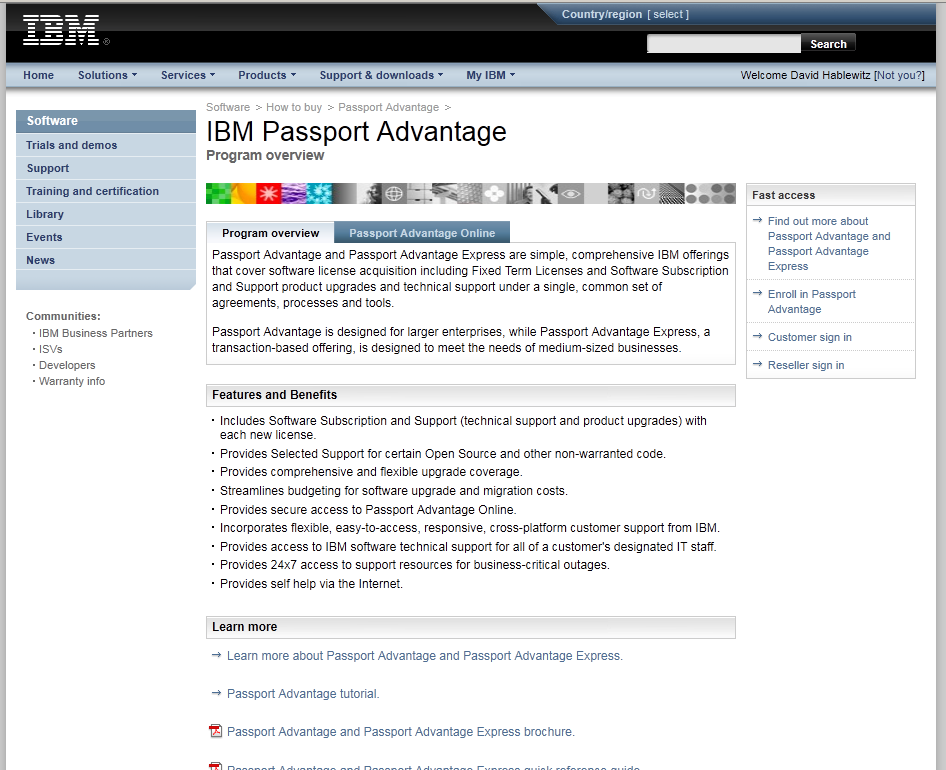
First, let’s find the URL. If I were to guess at it so I could go directly to it, I would expect something like http://www.ibm.com/passportadvantage . But that doesn’t work. So let’s go to the IBM home page, http://www.ibm.com and look for a link. You can find it on IBM’s home page, though with some effort. You won’t find it in any of the menus at the top of the page, but if you scroll down, you can find it “below the fold” under the Popular Links list. For that reason, I expect most people just use a search engine to find the site. I searched for “Passport Advantage” on Google.com and it came up as the first link. It was the second link listed on both yahoo.com and bing.com. It was also the first link in the results list when searched directly on the IBM website. Here is the landing page for all of these. The URL is http://www-01.ibm.com/software/howtobuy/passportadvantage/
<01_landingpage>
(click image to enlarge)
Not exactly an intuitive URL. Note in the screen shot that it already knows who I am. Am I logged in? Well, no. I need to click on the Customer sign in link in the box on the right labeled “Fast Access”.
Note that it instructs to use my email address for the user name. Not exactly. Some accounts (like mine) require the username that was created, NOT the email address.
<02_loginpage>

(click image to enlarge)
By the way, if I click on the link that says “Not you?” beside my name in the top right, I get this error page with no way back but to close the browser and start over:
<03_switchusererror>

(click image to enlarge)
After logging in, you get to what I will call the “homepage” of Passport Advantage. Actually there is no home page for Passport Advantage and there is never an obvious path back to this page. I could find no links that lead back to this page except by logging in. The Home link on this page goes to the home page of ibm.com and once you go there, good luck trying to get back to Passport Advantage. Assuming you know about the link at the bottom of the page, you’ll get back fairly easily. But most people just google it again. (even if you call customer support, they will direct you to find it this way!)
<04_homepage>

(click image to enlarge)
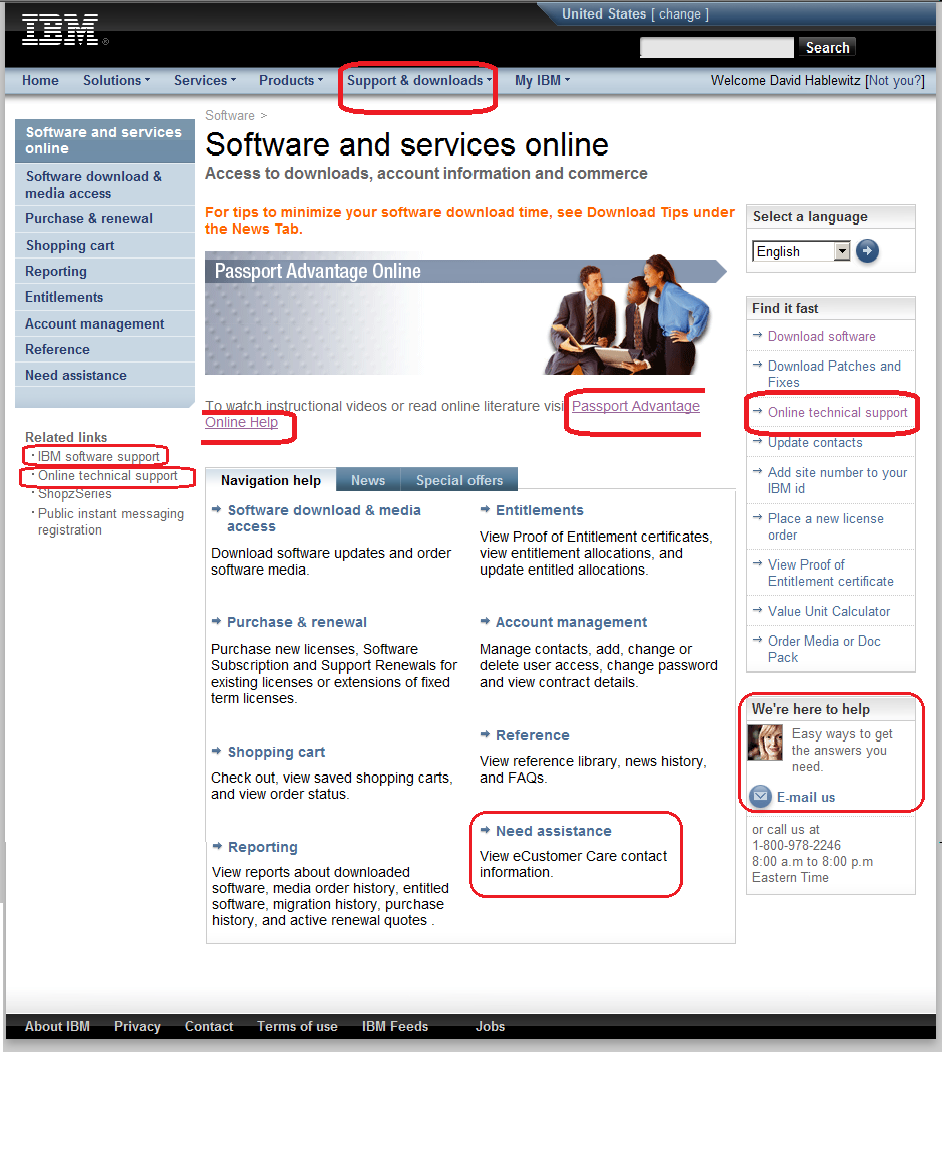
Great now you’re on the “homepage”. There are primarily 2 reasons most Lotus professionals visit this site: 1. To open a PMR with technical support or 2. To download software. Let’s start with getting technical support. Look closely. There are no less than 7 links to get some kind of help, not counting the phone number listed in the bottom right corner, which by the way, is NOT the number to call to reach technical support. Each of these 7 links go to different pages. The one to open a ticket with technical support (called a PMR) happens to be the last one in the left pane, labeled “Online technical support”. This would seem obvious but for the 6 other links to support on the page. By the way, if you visit a page and then hit the Back button, you will occasionally get an error instead and it will prompt you to log in again.
<05_supportLinks>
(click image to enlarge)
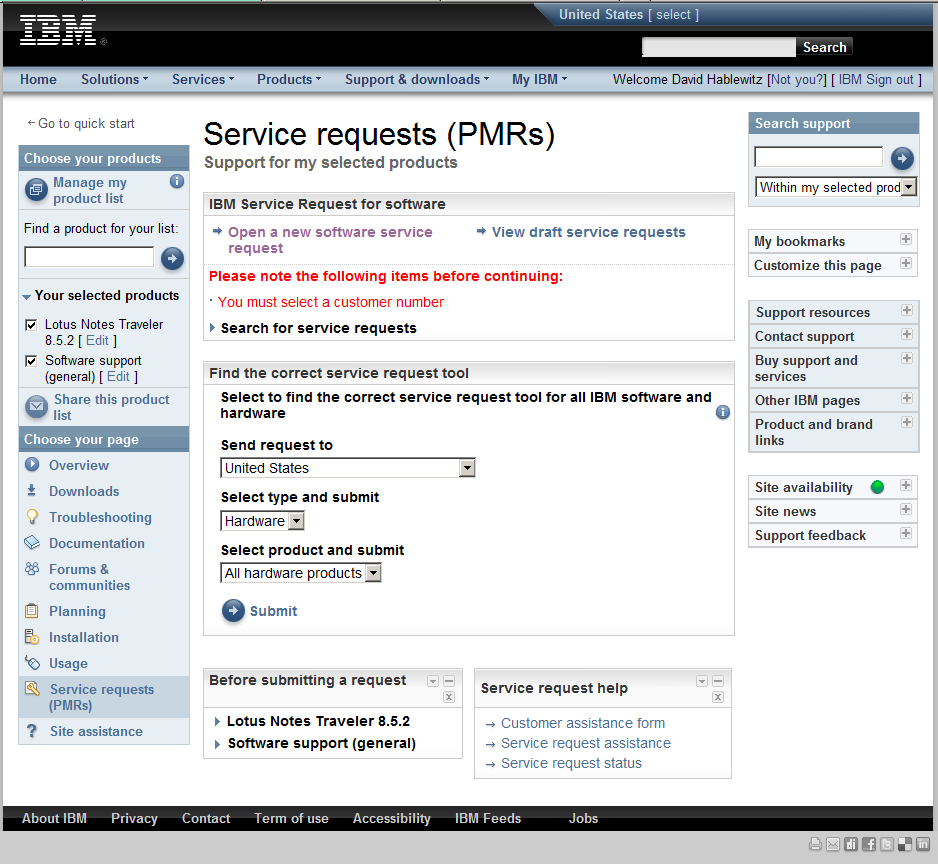
Once you get to the place to enter a PMR with technical support, you may want to get back to the “homepage”. Which link on this page do you think you should select?
<06_whereishome>

(click image to enlarge)
If you chose Home you would be wrong and once there you would not be able to use the back button to return here.
If you chose Return to the IBM Support Portal you would also be wrong. (See the next screen shot.)
The correct link is actually under related links. Go figure.
(click image to enlarge)
Now let’s look at the second common reason to visit this site: downloading software. For this function you “only” have 5 choices. Again, they all go to different places. Choose carefully. You may navigate through several lengthy steps before realizing you’re in the wrong place to find what you’re looking for.
<07_downloadLinks>

(click image to enlarge)
The downloads process continues through several confusing steps including prompting TWICE that you accept the software agreement, before actually getting to download the software. And you had better know exactly what you are looking for. There are no useful descriptions of the purpose of each software and many have very similar names.
In our classroom discussion the class agreed when it comes to usability, this site fails miserably, It is laden with many confusing links that are not organized in any obvious, meaningful grouping. There are way too many links without any form of structure or organization to the navigation. One of the class exercises is to create a site map identifying the navigation, but this website proved too complex to create a site map at all. The arrangement of the navigation did not help to identify the relevance of the links either. And why does it have 2 places to select a language? (one at the extreme top of the page, the other in the right column beside the banner image)
Well, there you have it. So far we have examined the pages leading up to the main page of the Passport Advantage site and the main page itself. What do you think? Is this analysis off the mark? If you regularly navigate this site, what has your experience been with it?
Up next if I have the time and patience: Stepping through the website to download software – no trivial task.
Before you pass final judgement on this website, check out what truly BAD websites look like at WebPagesThatSuck
Footnote: After writing this article, I noticed there is now a tutorial for Passport advantage on the landing page (you do not need to log in to view it.)
http://download.boulder.ibm.com/ibmdl/pub/software/passportadvantage/demos/English_Tutorial/english_pa.html
After a few minutes of frustration I had to quit viewing it. The wizard was tiny. The navigators to advance the slides are so small I had trouble getting my mouse in just the right spot to click it. There are pages and pages of blah, blah, blah. It isn’t a tutorial about USING the website. It’s about 45 minutes of reading all about WHY you should BUY it.
Brand as Mythology: Could the Lotus brand elevate to Mythology?
Here is an interesting perspective on branding, marketing, and the idea of a brand elevating to mythology.
http://sethgodin.typepad.com/seths_blog/2011/07/just-a-myth.html
How true is his statement: “People use a Dell. They are an Apple.”
I think Seth is touching on something that could be applied to the marketing of Lotus IBM software: “Isn’t that the dream of any marketer? To create a myth?”
As Lotus completes the long and painful process of being absorbed into IBM, could they, as Seth describes, invent a mythic brand with a story that promises to deliver an heroic outcome rather than just a product and a pile of facts. I believe it is possible. Ironically, by dropping the brand, it may elevate it to mythology. What do you think?
An amazing thing is about to happen at IdeaJam.net! (Where Lotus software ideas are promoted by you)
IdeaJam.net is a great forum for the Lotus community to share their ideas on improving the Lotus software and voting on your favorites. It gives IBM great feedback for what we really want. And as smart as the few dozen developers at IBM are, most of the best ideas are bound to come from the thousands of us who use the software in ways they never considered.
So what’s about to happen there that is so amazing? First, it just surpassed 4,000 ideas submitted! Over 10,000 comments have been made on those ideas. With a mindshare like that, IBM has an incredible resource that no other software or software company has — FREE. It’s combining the innovation of open source with the financial strength of private industry. Wow!
Next amazing point: IdeaJam is approaching 100,000 votes by all of us! It is currently at 98,907 votes. Check out the stats here: http://ideajam.net/IdeaJam/P/ij.nsf/welcome?readform
Now here’s the bad part: It looks like people aren’t contributing as much lately as they have in the past. Why aren’t you voting? Are you disillusioned because you don’t think ideas posted there are making it into the product or having any influence? Well, yeah. Me too. And I think it’s because IBM is not participating in those discussions. IBM, we need to know you’re listening. Just being lurkers that read but don’t respond leaves us guessing if you care or if you are paying attention at all. IBM, if you value this rare input from your customers, then show it.
If you have been to the last two Lotuspheres and attended the “Ask the Developers” or the new session titled “Ask the Product Managers”, then you’ve heard me present ideas that got good applause from the audience. Those ideas came from IdeaJam. They were already proven to be very popular. Several of those ideas have been added to the product. One in particular is the feature to block replication if a replica has not replicated within the purge interval. This is coming in 8.5.3.
Check out the ideas of the top innovators and take the time to vote. IBM, you need to step up to the plate too and start being more responsive to your community or people will abandon it and you can kiss this great asset goodbye.
A split perspective on Quality. Does Quality really matter?
I came across this great article “Defining Quality” by Seth Godin discussing just what quality is and how it influences the success of a product. Seth describes the two types of quality: Quality in Design and Quality in Manufacturing. These two are as different as a brand new Bentley and a one-year-old Honda Civic. He also applies these concepts to the software industry.
What I find particularly interesting is his comment regarding these measures of quality:
“The balance, then, is to understand that marketers want both.
A short-sighted CFO might want neither. “
The issue that you may have experienced with corporate decisions about messaging software obviously carries over to just about everything else too. For those of us in the software industry who deal with CFOs who make seemly illogical decisions to switch software, (and make no mistake about it, it is the CFO more often than anyone else, who makes that decision) you are not alone. So if you find yourself trying to fend off the arguments for switching your messaging software, don’t think that they care whatsoever about which platform has more features or is easier to maintain or is more reliable. Before you try to make a case based on those points, you need to ask those most senior decision-makers just what really is important to them. Be careful of the mid-level managers filtering their responses too. They may be telling you what they think is important to senior management rather than what is truly important. If they really knew the pain points of the CFO, they would have already addressed them long ago. You can also read more about this factor in influencing decisions in the book “Neuromarketing: Understanding the Buy Buttons in Your Customer’s Brain” by Renvoise and Morin.
Regardless of your profession or position, you should arm yourself with an understanding of how those decision-makers make decisions and how they are influenced.
Working with Microsoft: You don’t know what you’re missing.
Yes, you don’t know what you’re missing. I’m not talking about what it’s like working at Microsoft. I am enjoying it. I’m just talking about using the software. Whether you’re a Lotus groupie or a Microsoft fanatic, you’re missing something either way. I always knew this, but now I’m getting the deep dive with a perspective like no one else in the Lotus community has. Here is a taste of some of the differences I have identified after using Microsoft tools the way the experts use them.
First, for the Lotus professionals who may not know Microsoft software. Here are some of the technology features you are missing that stand out to me. Check out these cool features I have now that I didn’t have using Lotus software:
- I can use the mouse wheel to scroll a region on mouse-over – I don’t have to click on a message or in a view to put focus there for scrolling via the mouse scroll wheel. (a feature requested on ideajam long ago.)
- I can manually run mail rules at any time. (another feature I have long requested in Notes)
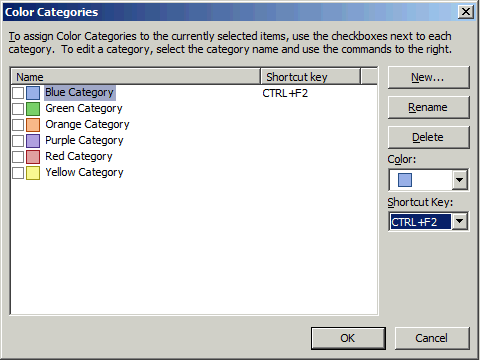
- I can categorize messages in Outlook. This is effectively their way of tagging.. Yes, the categories can be renamed to something meaningful.

- Cleanup – Conversation: OK, now we’re talking. This is a cool feature! It gets rid of all the previous messages in a conversation so you just have the latest one that contains all the history in it. You can run it on a specific message, a folder, or a folder and all its subfolders. This feature was created by someone who got tired of dealing with all the ‘Reply to All’ messages that quickly filled their inbox. Yes, the philosophy is send your message to everyone you know and then always use ‘Reply to All’. The idea is to be sure everyone knows what’s going on. Personally, I would use discussion forums.
- I can click an option to Ignore a conversation which sends all future responses to the selected message to the Deleted Items folder. Handy for those conversations I mentioned that you somehow find your name was added to the thread that don’t really interest you. But dangerous because you never know when that conversation will have been directed at you and you will miss it.
- OneNote: Like the Journal in Notes. I haven’t explored this much yet. I like my Lotus Notes Journal since it is synchronized with my BlackBerry.
- I can have it read my email to me (like NotesBuddy did many years ago, but for some typical, senseless reason, IBM dropped it)
- OCS (instant meeting and unified communications) has a great feature that shows the entire chain of command for a person so you can see where they are in relation to you in the company.

- Search: To clarify my response to Mat’s comments, I have added these screen shots. Search in Outlook now can search all of your mail including attachments. I don’t know when this was added, but it is now matching the basic full text search function of Notes, though without any of the advanced settings. (click to view)



Next, for Microsoft professionals who may not know Lotus software, here are some of the technology features you are missing, or at least I’m missing them:
- Classic pulldown menus – I hate this ribbon thing in Office. I would even live with that stupid animated paper clip if I could just get the classic pulldown menus back.
- Swiftfile – That great, free add-on that determines the 3 folders you will most likely want to file a message, then puts a link for each of them at the top of the message so filing the message is one click away. Outlook has a Move feature in the ribbon that let’s me pick from a list of 10 recently-used folders, but there is no other intelligence built into the folders offered and it’s not one click.
- Send and file – In Outlook, you can’t organize your sent messages into folders when you send them. For that matter, if you move them to a folder, they are removed from the sent folder (unless you copy of it to another folder, which means you then have 2 copies of the message.)
- Reply and include the attachment for editing – There is no way to include an attachment in a reply and edit the attachment before sending. Attachments must be saved from the original message, edited, and then re-attached to the reply.
- There is no way to put attachments in a specific location within the body of the email for contextual relevance.
- How can I customize the mail file design?
- Widgets. I want to build my widgets and use the Google widgets again. I expect there is a way to do this if I wanted to write some C# code.
- Doclinks – Oh, how I miss doclinks! The Microsoft way is to use URLs. But URLs don’t work for everything. It can’t create and send a link to something in Visual Studio or Product Studio or other software. Only things that are reachable with a browser can be hyperlinked. I find myself doing a lot of copy/pasting. Not to mention Notes doclinks will go to a replica of a database if you don’t have access to the specific location referenced when it was created. Oh, how I miss doclinks!
- Spell checking in Lync (instant messaging).
- I can’t view messages in the Deleted Items folder sorted by date/time deleted. So if you just deleted a message by mistake, you have to go hunt for it. Good luck.
- The selection tray like in Notes views and folders. The column on the left of every view where you can click to select a document or click and drag to select many. In Outlook you have to hold Ctrl or Shift when adding to a selection and if you slip on holding the Ctrl or Shift, you have to start over because the selection is lost.
- Message encryption. I can’t encrypt messages. That’s’ bad considering I have to email passwords on occasion. I know there are tools to do this, but encryption should be an intrinsic part of messaging.
- Tabbed windows. If you open a message in Outlook, it creates a separate window. I like the tabs in Notes better.
- Being able to add recipients by clicking Reply to All after first clicking Reply without having to go back and start over from the original message.
- Consistent applications all stored on one server using one client to access them. (Don’t say web browsers could replace it. Every app has different browser brand and version requirements.) Instead, I have a collection of applications installed on my computer. In some cases I have to remote control into the server to do my work. Visual Studio, Product Studio, Sharepoint websites, Exchange Management Console, Active Directory, SQL Server, …
- Being able to scroll through the directory to browse a list of groups or people (without having to bring up an address dialog).
- Ctrl-Break to interrupt processing. Outlook hangs as much as Notes does. At least in Notes I could usually type Ctrl-Break to get focus back. Not so in any Microsoft software.
- All Documents view. There is no one place to go and see all of your messages. This means you have to search or scan through each folder separately. Suddenly filing messages into folders becomes a liability for remembering where you filed it!
- Ability to add a message to multiple folders (without making multiple copies of the message)
- Save as Draft button. In Outlook, you close the message. Then it prompts if you want to keep the message in drafts. NOT intuitive.
- Ability to reorder folders to put them in the order you want, not only limited to alphabetical order. I find myself naming folders to affect their sort order rather than to make sense.
- Right double-clicking to close windows. Notes does this and I wish all software would pick up this standard. Another reason why browser apps are inferior to Notes apps. Brilliant! (unless you have a Mac)
- Left double-click to edit a document (or message or other file in Microsoft world).
- Discussion and teamroom databases. Yeah. How basic is that? Get all this email out of my Inbox! Don’t reply to all. Just post a response to a msg in the discussion where I can see the entire thread.
- Doclinks in the message header linking to the previous message within an email thread.
- Quickr Connectors to get the attachments out of my mail file and into a common place to share them. We do have Sharepoint, but it doesn’t work that way at all. Also, if you are looking at one of your files in Sharepoint and copy the URL to share with someone else, it probably won’t work for them.
- The ability to make an app quickly. OK, eventually I will learn the other software tools, but I need an app that was very simple to create and deploy in Notes. I have asked around and no one really knows how to do that using Microsoft software. One suggestion was to use InfoPath and Sharepoint.
- Did I mention doclinks? Wow, I never realized just how much I used them before. It really is all about the apps, isn’t it?
I have much to learn about the Microsoft software suite and I am sure I will find more things I like about it. But my personal preference is still Lotus Notes, Domino, Traveler, Sametime and Connections both from the system administration and development perspectives as well as the end user perspective. The cool thing is I’m getting to experience Microsoft software as implemented by the experts. Time will tell how that will influence me. And the reality is as long as I want to live and work in the beautiful Pacific Northwest, I have to accept the fact that Microsoft is my only choice at work these days. IBM doesn’t sell those products around here any more.
What’s in a name? – Response to Ed Brill’s post: “Whatever we call it”
Open response to Ed Brill’s blog post: “Whatever we call it”
I step away for a weekend and look what happens! I think it’s time to figure out how to get those RSS feeds into my Outlook client. 😦
Ed, I hope you are more efficient at writing your blog entries than I am. Such a carefully worded article for me would have taken me forever to write.
To nit-pick: IBM is the “3rd most valuable brand”, not 2nd. Though I’m still not sure what that means. If you look at the list (Apple, Google, IBM, MacDonald’s, Microsoft, Coca-Cola, AT&T, Marlboro, China Mobile, GE – See the source: Brandz article on Most Valuable Brands ) All but one of these brands brings to mind a specific product: IBM. What good is a brand if it’s product(s) are unknown?
At this point I think IBM has, through its own neglect, done enough damage to the Lotus brand name that I think you are making the right decision to sell it as IBM rather than Lotus. (as if you needed my approval, right?) But certainly I can provide a unique perspective to this from my vantage point. I know this region of the world has many IBM customers and they would not be shy to buy IBM solutions, even here in Microsoft land, where they would be a hard sell on Lotus branded products. Of course this assumes someone follows through and actually markets and sells those products. (ahem. nudge, nudge, wink, wink.)
I completely agree with you that “product management does not drive branding.” It shouldn’t. Product management should be focused on what it knows best: software engineering, not marketing. Though by default, Ed, you are the mouth and face of the Lotus brand since all of this marketing news is coming from you, not from Sandy Carter, the VP of marketing. I admit that I am more guilty than most of targeting you with points on marketing awareness when I really should be directing that energy toward Sandy. But hey, you’re a more visible and accessible person and we all appreciate that.
I can think of no other company that has such a transparent approach to their product development and direction as IBM has with its Lotus brand. Even other IBM product communities don’t have such transparency or stir such passion. But honestly, we don’t so much care about the transparency as we do about results. It’s much like the way a boss or parent will micro-manage when they aren’t getting the results they expect and will be more hands-off when they do. Right now the Lotus community is trying to micro-manage IBM because it doesn’t have confidence in your current strategy. This community wouldn’t be so involved or vocal if their careers weren’t so closely tied to IBM’s success. It’s no fun to be a stakeholder yet have little voice in the process beyond commenting on your blog or writing on our own blogs. I believe the American Revolution started for the same reason exactly 235 years ago. That is the independence theme in “screw IBM, let’s buy the product back from them” . I didn’t see the post, but I’ll bet the author was an American.
At PACLUG I had a chance to talk with several people who seem to think “Hey, IBM has adapted to survive for the last 100 years, that is longer than anyone else in this business. We know what we’re doing and we will continue to succeed.” I say to that, if IBM has a 64 year jump on Microsoft, 65 years on Apple, 85 years on Google, and an incredible 93 year jump on Facebook, then why isn’t IBM way ahead of all of them? As the stock purchasing disclaimer goes “past success does not indicate future performance.” Or as the customer’s mantra goes “It’s not ‘what have you done for me?’ It is ‘what have you done for me *lately*?'”
Ed, in all of my studies and research on marketing, there are 3 books that I have found that stand out to address this issue best. You already know the first one: “Influence: The Psychology of Persuasion”. The second is “Neuromarketing: Understanding the Buy Buttons in Your Customer’s Brain” by Renvoise and Morin (terrible title, great content). Don’t read it unless you’re interested in expanding your knowledge on selling, but do at least share it with Sandy.
I’m just glad I branded myself as “The Notes Guy in Seattle” instead of “The Lotus Guy in Seattle”.
Cheers,
-David
The nice thing about being on the dark side is “When it’s dark enough you can see the stars.” — Ralph Waldo Emerson
Recap of PACLUG 2011
The first edition of the PACLUG user group conference was held this week at the Planet Hollywood Hotel & Casino in Las Vegas. The two-day event was scheduled to piggy-back the View’s AdminDev2011 conference. They actually overlapped schedules a bit on Wednesday and PACLUG was invited to the keynote presentation of AdminDev2011. The Tuesday sessions of PACLUG were focused mostly on Domino-related topics while the second day was mostly related to Websphere Portal. Had I known this I might have been tempted to skip the Wednesday sessions, but after attending them I can say that to do so would have been a big mistake. I got some very valuable information in those sessions.
After all, as technology professionals, it is important to keep up with the changes in technology. Simply put, if you’re in IT, you had better be prepared for a lifetime of learning to follow the technology and stay employed. And for many of us, that’s great. If we aren’t learning something new, we’re quickly bored. If this isn’t you, you’re probably a really good COBOL programmer working or a bank or insurance company. If not, then you should be planning your next career.
The knowledge I gained in the sessions was useful, but as I find with all of these conferences, the meat of the value of the conference is in connecting with new friends and reconnecting with old ones. I don’t care how well connected you are via the Internet, nothing could ever match the rapport developed and connections made by face-to-face meetings, not to mention the “accidental meetings” with people you weren’t looking for. That said, it was disappointing to arrive early on Monday only to watch the tweet stream talk about how people were not coming in until late that night. It would have been good to put an informal pre-conference social gathering on the agenda for early arrivals. This is the REAL Social Business.
For comparison, take the phrase “computer dating.” It’s a terrible misnomer. All the computer does is get people connected. The dating part always takes place meeting face-to-face. This is equally true for developing business relationships, though you probably put less emphasis on what a business contact looks like.
Sponsorship for this conference was amazing! There was no fee to attend the user group portion of the conference. It was FREE. Thanks to GBS, Panagenda, Team Studio, IBM, Elguji, BCC, ExtraComm, The View, and all the other sponsors. ( http://www.paclug.org/sponsors ) Also thanks to the organizers, especially David Stephens.
The conference was lightly attended, but this was only the first time this event was held. From the positive feedback, I expect it will be more popular next year. (speaking of feedback, there was no opportunity to submit feedback formally. That would have been very useful to improve future events.) Perhaps joining it with AdminDev2011 detracted from the attendance of each? I don’t know about that, but I do know I had a chance to meet with people at PACLUG that probably would not have been there if it were not connected to The View’s AdminDev2011. I’m not so sure about Las Vegas in June either. The high temperature was 104F – 108F degrees for the 3 days I was there. Not being a gambler, the extra-curricular activities were limited. Personally, I went to this even in spite of it being in Vegas, not because of it.
Overall, it was a good first event for the west coast. I expect it will grow in the upcoming years. Maybe I could convince the organizers to hold it in Seattle in July next year? That time of year we have endless sunny skies with temperatures in the 70’s and 80’s. Lots of extracurricular activities to do. We even have Vegas-style casinos if you really want that, though there are so many things to see and do here that are unique to Seattle, I don’t think anyone would think of going to a casino. For more information about the conference, visit http://www.paclug.org/ http://lanyrd.com/2011/paclug/ and http://www.admin2011.com/
A sneak peek into the upcoming announcement about the Lotus brand and IBM’s 100-year philosophy
Is Lotus Notes the next Selectric Typewriter? This USAToday article about IBM turning 100 reveals some clues into the motivations that drive IBM which might tell us about their plans for the future.
“Don’t make the mistake of thinking IBM is a corporate old-timer that just watched technology evolve. It has remained at the forefront through the decades and tops several of its whippersnapper rivals in some regards. “
Of course we’re talking about the same company that totally missed some opportunities like the operating system for their personal computers that has gone on to become their nemesis. We’re talking about a company that has taken the once-famous brand of Lotus and made it disappear from the public eye better than a Harry Houdini magic act.
“This isn’t like the auto industry, where the combustible engine still exists, or oil, where many parts of the business are the same,” Iwata says. “We have to let go of what we have invented. We stopped making typewriters, punch-card machines, PCs. We had to move on.”
Hmm. Is this foreshadowing? When I was 8 years old I saw the movie “Old Yeller”. In spite of all the clues, I did not did not see that coming. I thought that dog would live forever. Have I gotten any better at reading the clues? Probably not. But here’s another one:
“•Ability to move into new businesses without abandoning core tenets. IBM is a classic example of a company that had to get into entirely new businesses, without turning its back on what got it to where it is, Collins says. If you consider what IBM’s mission is, it’s not about computers or technology. It’s about allowing its individual employees to create ways for its customers to solve operational problems, Collins says. Whether that’s a task best done with scales, typewriters or computers doesn’t matter; what matters is that customers’ needs are answered, Collins says. “
I don’t know how this movie will end. Maybe we’ll learn more on the Greenhouse webcast about the future of the Lotus brand June 28 at 10:00AM ET.
Meeanwhile, let’s get some popcorn and watch a few movie trailers.


 The Notes Guy in Seattle