Blog Archives
New Notes/Domino Community hosted by HCL

HCL just launched a new online community around their software. It supports blogs, events, presentations, job postings and a number of other resources to make it a central place for users, administrators, and developers to communicate with each other and with HCL.
Here is a link: https://developer.ds.hcl-software.com/
I have also added it to my Essential Notes/Domino links Page so you just need one link to get to everything: https://bit.ly/dominolinks
(Updated Dec 14) Critical Alert: Do Not Restart Domino Servers After 2024-12-13 Without the Hot Fix
14 Dec 2024 UPDATE: Less than 24 hours from first posting and the technote below has already been updated to include links to the hot fixes for the latest versions of 11, 12, and 14 with additional fixes coming. Note: You must be current on your software support license to obtain the patches. Also updated that patches will be provided for V9 and V10 for customers paying for extended support. HCL is doing a great job handling this.
HCL released this alert regarding all versions of Domino on all platforms.
In short, there is a date/time bug in the code that will cause mail routing to fail if the server is restarted as of 13 December 2024. Read the technote for details:
“CRITICAL ALERT: Mail not routing after Domino restarts beginning 13 December 24”
https://support.hcl-software.com/csm?id=kb_article&sysparm_article=KB0118192
This is the first time I have ever seen such a notice regarding Lotus Notes / Domino ever. To this I will say,
First, impressive that this is the first time in 30 years (including leading up to Y2K) that they have had such a notice and
Second, that by mid day, they had identified the issue and are working on the hot fix.
Third, this is only an issue if you restart Domino, (though I would avoid restarting the router task as well) and Domino is renowned for its reliability, so hopefully you we can all just leave well enough alone and wait for the HF.
NOTICE: if you are one of those companies who quit paying your software and support licensing, you’re about to get a reminder that software isn’t free. You will need to re-instate your licenses to get access to the hot fix. Even if you are running *OLD versions* (9.0 and earlier even), your server will not route mail once it is restarted. An impactful time bomb for sure. (UPDATE: The technote has been updated that a hot fix will also be created for V9.0.1 and V10, provided you are on extended support)
With that in mind, If you need to re-instate your licenses so you can access the hot fix, send an email to me at Info@divergentnw.com . Don’t wait until your server restarts.
My heart goes out to the developers working to generate a hot fix for this. Not the kind of pressure anyone wants going into a weekend. My turn will come in this event. I will be the one installing the hot fix on servers everywhere as soon as it is available.
History of Innovations in HCL Notes & Domino (Lotus Notes) – PART 1: Security
Some people have forgotten just how much Lotus Notes changed the software industry and established innovations that were decades ahead of the rest of the world. Innovations that are being “reinvented” today in other software as if they were creating something new. Software developers think they’ve come up with some novel idea that was actually first developed by Ray Ozzie’s team years or decades ago. The new re-creations of these innovations often lack the refinement in one seamless environment like is found in the mature and 30+ years time-hardened software that is HCL Notes & Domino. This article is the first of a series that will explore a few of those landmark innovations that set Lotus Notes so far ahead of the competition and in many ways continues even today.
- Port 1352.
It’s a very special number among the Lotus Professionals. This is the port number reserved by the Internet Assigned Numbers Authority (IANA) that is dedicated to HCL Notes protocol, also referred to as the well-known ports. https://en.wikipedia.org/wiki/List_of_TCP_and_UDP_port_numbers
While many software applications may unofficially stake a claim on some particular port, Notes/Domino has had official, exclusive assignment of this port since the 1990’s. This makes it exceptionally easy to manage networks and firewalls while retaining security. - Multi-Factor Authentication.
Since R1.0 of Lotus Notes, it has had multi-factor authentication (MFA). What is all the rage today as an essential component of protecting your authentication and preventing unauthorized access, Notes has had from Day One. MFA requires two things: Something you have and Something you know. With Notes, these are the Notes user ID file and the password for it. Notes has provided this method of advanced security — natively and seamlessly — for over 30 years. Many of today’s web-based apps must go through all sorts of convoluted integration with systems to send text messages (vulnerable) or additional dedicated apps, like Authy or RSA Authenticator on your mobile device. Meanwhile, MFA in Notes is so seamless and has existed for so long that many people even forgot this is MFA. - Anti-spoofing protection during password input.
While we’re on the subject of passwords, Notes has another anti-spoofing feature that many people don’t think about. Have you ever noticed when you type your password into Notes, the dialog displays randomly from 1 to 4 ‘XXX’ characters in the password field? This is to obfuscate how long your password is, making it harder for an ‘over the shoulder’ attack. Also, there is a graphic that changes with every character typed. The graphic is displayed algorithmically, so at the end of typing your password correctly, it will always be the same graphic. If it isn’t, then either you typed it wrong or the screen may be a man-in-the-middle, posing as a Notes client. I have yet to see any other software provide these security features that have always been part of the Notes client.

- End-to-end encryption and compression during data transportation.
All communications server-to-server and server-to-client have the ability to be encrypted as well as compressed. This port level encryption prevents eavesdropping on the data being transmitted.
- NATIVE User-level encryption via public-private RSA key technology.
From the beginning, Notes has had a public and private key structure as an intrinsic part of the software that allows encrypting documents in Notes that can only be read by the intended user. This includes email messages sent within the mail system. The security was so strong, IBM was required to publish a separate, International version of the software that the U.S. government could decrypt.
Unlike other platforms out there which have finally come around to recognizing the value of this functionality, require third-party add-ons and complex administration, this feature has long been an integral innovation used in Notes out of the box. Read more of that history here.
- Encryption of data at rest.
Notes and Domino are also able to use the encryption key infrastructure in Notes to encrypt database files stored on the disk drive. This secures data from someone attempting to access the file directly from the operating system outside of Notes. This is especially effective in securing data on laptops, for example. Just another innovation that has been an intrinsic part of the software for decades.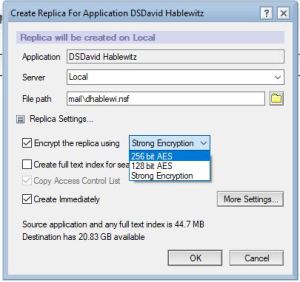
- Cross Certification with other organizations.
Notes has built-in the ability to ensure the identity of external organizations through the cross certificate process. Both organizations share a public key to each other that can then be used to verify the identity of any connection from that external user is truly that user and prevents someone from creating a bogus identity to masquerade as them. What is a trivial procedure using a Notes “smart client” in the Notes/Domino platform, is is a painfully complicated process for platforms that use “dumb clients” (web browsers). How long has Notes had this? Right. Since the 1990’s.
- Execution Control List (ECL).
You know how Windows will prompt you to ask if you trust an application to make changes to your computer? Well Notes has had that as an integral part of the software long before Windows did it.
Here is an example of what you see in Windows (UAC):
Notes has similar settings, only far more granular. Here is one alert specifying a single type of action by a single signer: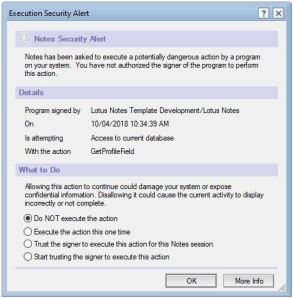
This dialog allows setting the default values for all the possible execution actions in the ECL settings:
- Ability to view file attachments without the risk of running potentially harmful code.
When you receive an attachment in email containing malicious code in it, if you were to open it in its native application, it may cause harm to your computer. To prevent this, Notes has an option to View the attachment via a simple, built-in viewer which can’t execute any code. The result is a fast, simple, safe way to see attachment contents.
On this great feature, I think they made a regression in V10. Prior to V10, if the attachment is an executable program (.exe for example), then the viewer would just display the compiler information — very handy for quickly identifying if it was created by the source you were expecting. As of V10 this feature was modified so that the “dumb” viewers were removed and it now uses a web browser instead. This process is a bit slower to open and it launches your default web browser which you may not want to open. For that matter, it requires that you have a web browser installed. I don’t know what the risks to malware are for attachments opened this way. I personally prefer the original solution. In any case, this feature is another example of the innovations that have been in Notes well ahead of the competition.
Here is what it displayed with an executable: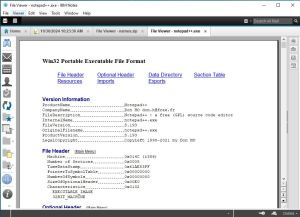
This is what it displayed if you clicked View for a .zip file: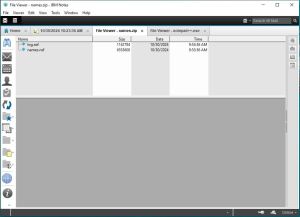
(If you would like to see this feature restored to its original implementation, please vote for the idea here:
https://domino-ideas.hcltechsw.com/ideas/NTS-I-2705
In summary, this is just a sample list to highlight of some of the innovations that Notes has had over the years in the area of Security that set it apart and ahead in the software industry.
Coming up: Innovative user features that set Lotus Notes / HCL Notes apart
HCL Notes/Domino V14 Early Access Program release 3 is available today
EA3 of HCL Notes/Domino V14.0, probably last EA release before the final version is released later this year, was released today! Try out their new website for software downloads while you’re at it. Visit https://my.hcltechsw.com/downloads
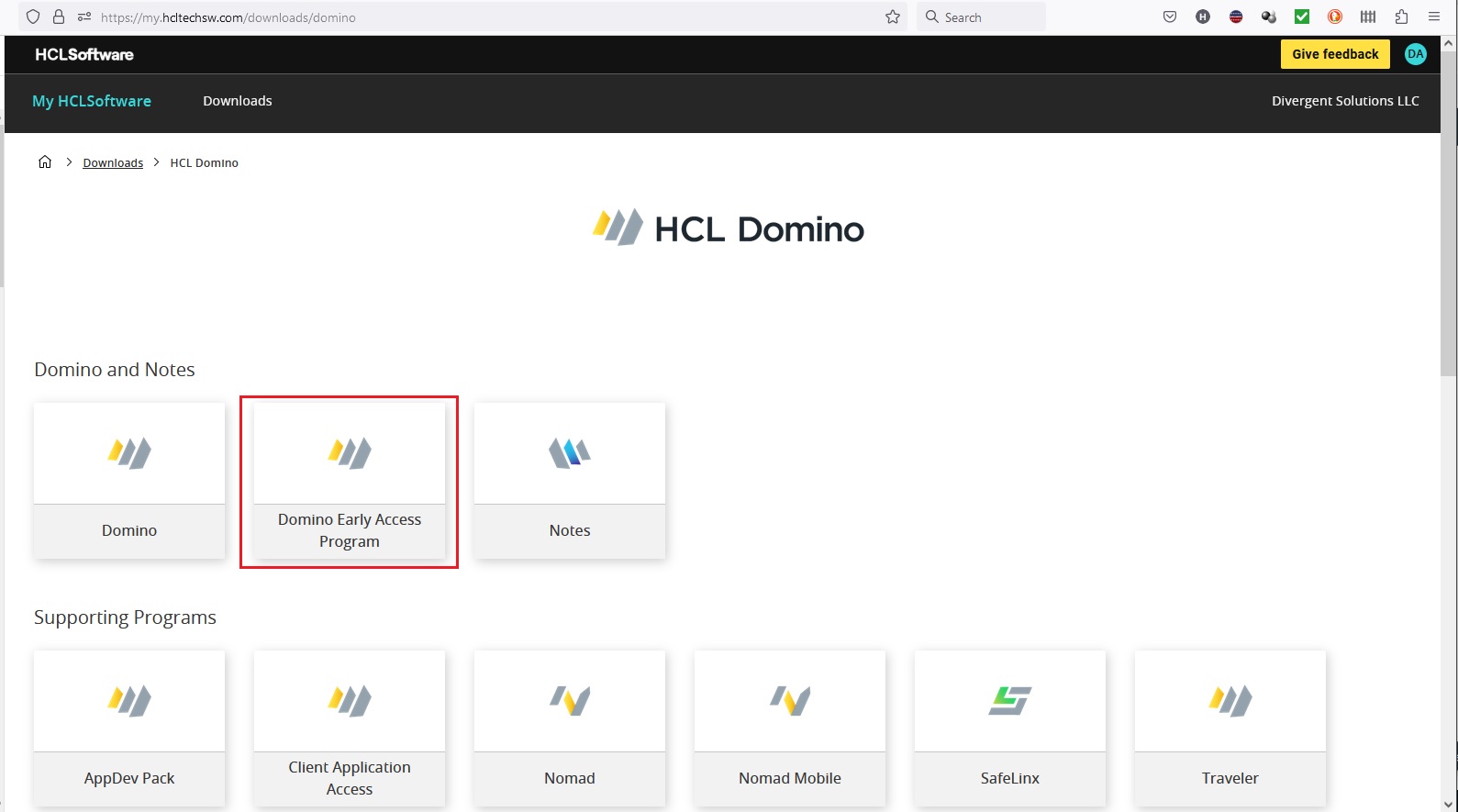
I will say this new website is a joy to work with. From here, it is easy to download the components you want to try out. Then be sure to give feedback on the product before it is released. Post your feedback here: https://registration.hclpartnerconnect.com/domino14forum.nsf/allDocuments.xsp
#LotusNotes #IBMNotes
Updated Zoom Plugin for HCL Notes V11

[blog post update: The new software and documentation from Zoom can be found here.]
HCL Notes users: If you are using Zoom instead of HCL Sametime for your video meetings, you may have discovered that the Notes integration plugin provided by Zoom that made it easy to schedule Zoom meetings in your Notes calendar broke with Notes V11. Well I have good news. Zoom is finally releasing an update that works with Notes V11. See their response in the Zoom support forum. You can find the earlier release of the Zoom plugin for Notes V10 here. The update is scheduled for release on Monday. If that is at a different URL, I will add it here when it is available.

If you want to eliminate this problem altogether, your company should be using HCL Sametime for video conferencing. It is more secure; you have total control of the software; it allows you to keep all of your data inside your company with no harvesting of user data or chats; it is — and always will be — tightly integrated with your HCL Notes and Domino environment; and it’s less expensive.
Congratulations to the 2021 HCL Ambassadors!
This has been a challenging year for all of us. In the beginning of March, I was in Holland attending the Engage user group conference when the pandemic started and I returned home just 2 days before the border restrictions would have left me stranded in Europe. It turned out that was the last time that any HCL Ambassadors would gather this year.

What is an HCL Ambassador? As described at the HCL website:
“HCL Ambassador is a distinction that HCL awards select members of the community that are both experts in their field and are passionate about sharing their HCL knowledge with others.
HCL Ambassadors are exactly that, ambassadors. Importantly they are not employees, but their commitment to sharing their expertise has a huge impact on the HCL community. Whether they are blogging, writing books, speaking, running workshops, creating tutorials and classes, offering support in forums, or organizing and contributing to local events – they help make HCL’s mission of making technology play nice, possible.
HCL Ambassadors are eager to bring their technical expertise to new audiences both in person and online around the world.”
This year it has been exceptionally difficult to contribute in the typical ways, but this group of individuals managed to make the transition, holding several more user group conferences online, which actually made it possible for more people to attend than ever before. Certainly these heroes are the glue that keeps our software community together to make it possible for all of us and the companies we work for, to maximize our success. There is no stronger brand loyalty in the industry. See the entire list of HCL Ambassadors here. I am honored and humbled to be surrounded by such a team of positive, generous, innovative people dedicated to our profession and the HCL Digital Solutions community, I am! If you know or work with any of them, please take a moment to thank them.
HCL Software Community is Open for Business!
HCL has just launched their community that will serve as our new place to interact with HCL and other professionals that use their software. It’s already fast becoming a useful forum of information. Join the community and post your burning questions and be sure to contribute answers too. Here is the link.
I’m hoping HCL will integrate the aha Ideajam site into this forum (click here to vote for it) so we can have a similar scoreboard feature for contributing product ideas and add a Sametime chat community like we once had with IBM Greenhouse (click here to vote for ST chat) and integrate OpenNTF into this new HCL community. (click here to vote for OpenNTF integration) In an ideal world, this would become the homepage where everything else related to HCL collaboration software is linked. Here are the forums it has so far:
- AppScan
- Digital Experience
- Connections
- Notes/Domino
- Sametime
Follow Up to What’s New in Sametime V10 and Beyond?
Good news with persistent chat and with eliminating WAS and DB2. Persistent chat is coming in V10. WAS and DB2 will be eliminated in V11 or V12. System Console is also eliminated in V10. V10 also supports login on multiple devices concurrently. It is worth listening to the replay (at 1.5x speed). Be sure to listen through the Q&A and the conclusion. There were many useful questions answered. The slide deck should be available in the replay too. But I think the two slides of most importance are these tables showing what features are coming in which release. (these folks are going to be busy!)


You should be able to watch the replay using the same
link to register: https://lnkd.in/dR4cHik
And here is the complete slide deck: letschataboutsametimemay2019rev71558616324635
IBM-Panagenda Partnership yields powerful FREE IBM Notes upgrade tool
Panagenda also has a free version of The software can be downloaded here:
Domino Mobile Apps for the iPad is Here!
A Notes client (sort of) for the iPad has just been released! This is the announcement. I’m looking forward to the next steps when they port this to the iPhone and Android phone. All the security, replication, workflow and offline functionality of Notes with the portability of a mobile device and no redundant develop to web-enable any apps. Nice job IBM and HCL.


|
#Domino10 will be turning heads 10/10/2018 Launch Event Schedule. #IAM

Click here to see details on the blog post by Bob Schultz, General Manager IBM Watson Talent and Collaboration Solutions or
Click the image below to get to the PDF with live links.

Thank you HCL for taking the Kryptonite out of IBM’s pocket!
Domino is truly Superhuman Software.


 The Notes Guy in Seattle