Blog Archives
HCL Notes and Domino V14.5 is Released!
Version 14.5 of HCL Notes (Lotus Notes) and HCL Domino have been released today. Some details you might like to know…
You can watch the replay of the release announcement on youtube right here:
The download website is here and rather than remember that, just bookmark my page with all the Domino links you’ll want in one place!
History of Innovations in HCL Notes & Domino (Lotus Notes) – PART 1: Security
Some people have forgotten just how much Lotus Notes changed the software industry and established innovations that were decades ahead of the rest of the world. Innovations that are being “reinvented” today in other software as if they were creating something new. Software developers think they’ve come up with some novel idea that was actually first developed by Ray Ozzie’s team years or decades ago. The new re-creations of these innovations often lack the refinement in one seamless environment like is found in the mature and 30+ years time-hardened software that is HCL Notes & Domino. This article is the first of a series that will explore a few of those landmark innovations that set Lotus Notes so far ahead of the competition and in many ways continues even today.
- Port 1352.
It’s a very special number among the Lotus Professionals. This is the port number reserved by the Internet Assigned Numbers Authority (IANA) that is dedicated to HCL Notes protocol, also referred to as the well-known ports. https://en.wikipedia.org/wiki/List_of_TCP_and_UDP_port_numbers
While many software applications may unofficially stake a claim on some particular port, Notes/Domino has had official, exclusive assignment of this port since the 1990’s. This makes it exceptionally easy to manage networks and firewalls while retaining security. - Multi-Factor Authentication.
Since R1.0 of Lotus Notes, it has had multi-factor authentication (MFA). What is all the rage today as an essential component of protecting your authentication and preventing unauthorized access, Notes has had from Day One. MFA requires two things: Something you have and Something you know. With Notes, these are the Notes user ID file and the password for it. Notes has provided this method of advanced security — natively and seamlessly — for over 30 years. Many of today’s web-based apps must go through all sorts of convoluted integration with systems to send text messages (vulnerable) or additional dedicated apps, like Authy or RSA Authenticator on your mobile device. Meanwhile, MFA in Notes is so seamless and has existed for so long that many people even forgot this is MFA. - Anti-spoofing protection during password input.
While we’re on the subject of passwords, Notes has another anti-spoofing feature that many people don’t think about. Have you ever noticed when you type your password into Notes, the dialog displays randomly from 1 to 4 ‘XXX’ characters in the password field? This is to obfuscate how long your password is, making it harder for an ‘over the shoulder’ attack. Also, there is a graphic that changes with every character typed. The graphic is displayed algorithmically, so at the end of typing your password correctly, it will always be the same graphic. If it isn’t, then either you typed it wrong or the screen may be a man-in-the-middle, posing as a Notes client. I have yet to see any other software provide these security features that have always been part of the Notes client.

- End-to-end encryption and compression during data transportation.
All communications server-to-server and server-to-client have the ability to be encrypted as well as compressed. This port level encryption prevents eavesdropping on the data being transmitted.
- NATIVE User-level encryption via public-private RSA key technology.
From the beginning, Notes has had a public and private key structure as an intrinsic part of the software that allows encrypting documents in Notes that can only be read by the intended user. This includes email messages sent within the mail system. The security was so strong, IBM was required to publish a separate, International version of the software that the U.S. government could decrypt.
Unlike other platforms out there which have finally come around to recognizing the value of this functionality, require third-party add-ons and complex administration, this feature has long been an integral innovation used in Notes out of the box. Read more of that history here.
- Encryption of data at rest.
Notes and Domino are also able to use the encryption key infrastructure in Notes to encrypt database files stored on the disk drive. This secures data from someone attempting to access the file directly from the operating system outside of Notes. This is especially effective in securing data on laptops, for example. Just another innovation that has been an intrinsic part of the software for decades.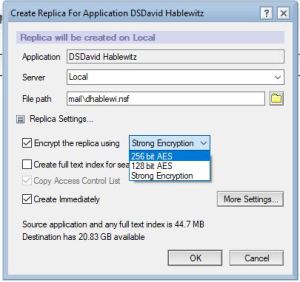
- Cross Certification with other organizations.
Notes has built-in the ability to ensure the identity of external organizations through the cross certificate process. Both organizations share a public key to each other that can then be used to verify the identity of any connection from that external user is truly that user and prevents someone from creating a bogus identity to masquerade as them. What is a trivial procedure using a Notes “smart client” in the Notes/Domino platform, is is a painfully complicated process for platforms that use “dumb clients” (web browsers). How long has Notes had this? Right. Since the 1990’s.
- Execution Control List (ECL).
You know how Windows will prompt you to ask if you trust an application to make changes to your computer? Well Notes has had that as an integral part of the software long before Windows did it.
Here is an example of what you see in Windows (UAC):
Notes has similar settings, only far more granular. Here is one alert specifying a single type of action by a single signer: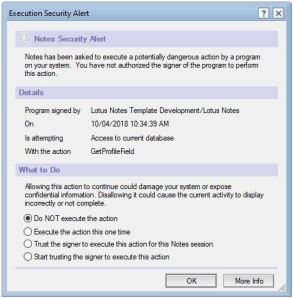
This dialog allows setting the default values for all the possible execution actions in the ECL settings:
- Ability to view file attachments without the risk of running potentially harmful code.
When you receive an attachment in email containing malicious code in it, if you were to open it in its native application, it may cause harm to your computer. To prevent this, Notes has an option to View the attachment via a simple, built-in viewer which can’t execute any code. The result is a fast, simple, safe way to see attachment contents.
On this great feature, I think they made a regression in V10. Prior to V10, if the attachment is an executable program (.exe for example), then the viewer would just display the compiler information — very handy for quickly identifying if it was created by the source you were expecting. As of V10 this feature was modified so that the “dumb” viewers were removed and it now uses a web browser instead. This process is a bit slower to open and it launches your default web browser which you may not want to open. For that matter, it requires that you have a web browser installed. I don’t know what the risks to malware are for attachments opened this way. I personally prefer the original solution. In any case, this feature is another example of the innovations that have been in Notes well ahead of the competition.
Here is what it displayed with an executable: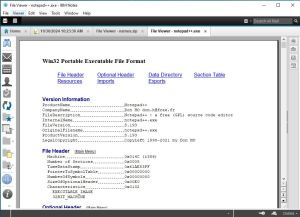
This is what it displayed if you clicked View for a .zip file: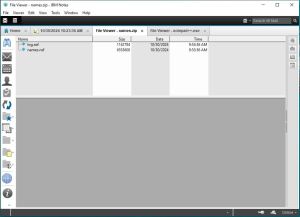
(If you would like to see this feature restored to its original implementation, please vote for the idea here:
https://domino-ideas.hcltechsw.com/ideas/NTS-I-2705
In summary, this is just a sample list to highlight of some of the innovations that Notes has had over the years in the area of Security that set it apart and ahead in the software industry.
Coming up: Innovative user features that set Lotus Notes / HCL Notes apart
HCL Domino and HCL Notes (Lotus Notes) V14.0 FP2 Released: 65 Fixes Included
Today HCL released V14.0 FP2 of HCL Domino and HCL Notes #LotusNotes. Here is the announcement from HCL with all the details. Fix Packs just have fixes, no new features. This Fix Pack has 65 published fixes. You can find a brief description of the full list on the fixlist website.
You will find the software on the “Recently Released” list when you first log into the download site.

And a reminder that I have a page with links to my favorite websites for HCL Notes (Lotus Notes) and Domino at the top right of my page under “Me on the Web” section. You can always go there to find what you’re looking for.
HCL Domino /(Lotus Notes) V14.0 is now available!
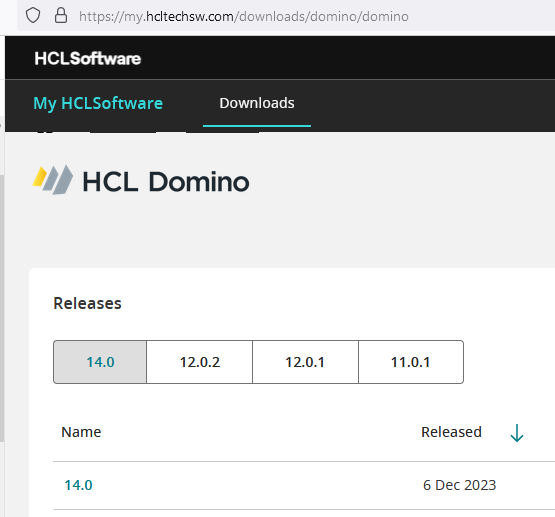
Ahead of schedule, HCL has released V14.0 of HCL Domino and HCL Notes (Lotus Notes as most of us still like to call it). Numerous major new features, like the new auto-update for the software. Find a detailed list of what’s new here: https://help.hcltechsw.com/domino/14.0.0/admin/wn_140.html
You can also watch the official release event (which covers a lot more) here: https://register.gotowebinar.com/register/3240097374153477467
If you dislike flexnet as much as most people, you can download the software at the very user-friendly site: https://my.hcltechsw.com/downloads/domino/domino
As you plan to upgrade your Notes clients to V14, keep in mind that there is no 32 bit version of V14, so unless you are already running 64 bit V12.x, you will need to uninstall the software before installing V14. If you’re using Panagenda’s MarvelClient for handling your upgrades, that will also take care of it.
Essential Notes/Domino Links
 Short URL to this page:
https://bit.ly/dominolinks
Here is a collection of links to everything you could possibly want for Domino and HCL Notes (#LotusNotes)
Bookmark this one page for all your Notes & Domino links.
Use the shortened URL above that is easy to remember:
If you know of a link that I should add to this list, please post it in the comments and I will get it added.
If you find a link is broken, also let me know what the new link is or if it should be removed.
HCL websites
HCL Software Downloads Homepage: https://my.hcltechsw.com/
HCL Customer Support – knowledgebase, documentation, forums, support tickets: https://support.hcltechsw.com/csm?id=csm_index
HCL Idea Portal: https://domino-ideas.hcltechsw.com/ideas
HCL Developer Community: https://developer.ds.hcl-software.com/
HCL Ambassador Program: https://www.hcltechsw.com/about/hcl-ambassadors
HCL Notes/Domino Release Fixlist per release: https://ds-infolib.hcltechsw.com/ldd/fixlist.nsf
HCL Notes/Domno Release Schedule: https://ds_infolib.hcltechsw.com/ldd/fixlist.nsf/Progress?OpenView
HCLSoftware U: (the new academy) https://hclsoftwareu.hcltechsw.com/
HCL Software Blog: https://blog.hcltechsw.com/
Your HCL Portal for personalized links: https://id.hcltechsw.com/app/UserHome
HCL Domino Apps Store: https://marketplace.hcl-software.com/domino
HCL Business Partners
Businesss Partner Locator: https://www.hcl-software.com/partner-connect/partner-ecosystem
Business Partner Registration: https://registration.hclpartnerconnect.com/general.nsf/welcome?open&login=1
Business Partner Portal: https://www.hcltechsw.com/resources/partner-connect
HCL 3rd party software
HCL app store catalog https://hclsofy.com/domino
Divergent Solutions LLC https://divergentnw.com
RPR Wyatt Vital Signs: https://rprwyatt.com/vitalsigns/
Crossware: https://crossware365.com/hcl-domino-email-signatures/
Panagenda: https://www.panagenda.com/
Ytria: https://www.ytria.com/ezsuite/
Maysoft SpamSentinel: http://maysoft.com/spamsentinel-for-hcl-domino.html
Libraesva https://www.libraesva.com/
Prominic: https://www.prominic.net
Belsoft: https://belsoft-collaboration.ch/en/
User groups
OpenNTF: https://www.openntf.org
CollabSphere: https://collabsphere.org
Engage: https://engage.ug/
C3UG: http://www.c3ug.ca/
DNUG: https://dnug.de/en/
Let’s Connect Nordics: https://nordics.letsconnect.world/
sutol: https://sutol.cz/
Spanish Domino User Group: https://www.slug.es/
Facebook Groups
HCL Notes Domino App Store https://www.facebook.com/groups/domino.app.store
HCL Software – Digital Solutions Business Partners – Worldwide https://www.facebook.com/groups/135983955430
HCL Notes Domino Administrators https://www.facebook.com/groups/LotusDominoAdmins
HCL Notes Domino etc Enthusiasts https://www.facebook.com/groups/hclenthusiasts
HCL Notes Domino Developers https://www.facebook.com/groups/dominodev
LinkedIn groups
Messaging & Collaboration Professionals – Lotus https://www.linkedin.com/groups/37836/ (26K members)
HCL Domino, Notes & XPages https://www.linkedin.com/groups/25044/ (10K members)
HCL Sovereign Suite Collaboration https://www.linkedin.com/groups/73034/ (9K members)
HCL (Lotus) Domino Administration https://www.linkedin.com/groups/2255889/ (16K members)
LinkedIn pages
https://www.linkedin.com/company/hclsoftware/ (400K followers)
https://www.linkedin.com/company/hcltech/ (5.5M followers)
Formerly known as Twitter
https://twitter.com/HCLAmbassadors (2K followers)
https://twitter.com/HCLSoftware (40K followers)
https://twitter.com/HCL_CollabSup (1K followers)
https://twitter.com/HCLDigital (47K followers)
Youtube Channels
https://www.youtube.com/c/HCLSoftware/videos
https://www.youtube.com/@HCLDigitalSolutions/videos
https://www.youtube.com/@OpenNTF
https://www.youtube.com/c/NotesIn9
Blog Collectors
Planet Lotus: https://planetlotus.org/
Collaboration Today: https://collaborationtoday.info/
Individual Blogs
https://davidhablewitz.com
http://notesin9.com/
http://xpages.tv/episodes.nsf/home.xsp
Other resources you asked me to include here
http://xpagescheatsheet.com/
A few more HCL sites
HCL Domino Beta Program: https://registration.hclpartnerconnect.com/D11Beta
HCL Domino Volt Beta Program: https://help.hcltechsw.com/domino_volt/beta/welcome.html
HCL Domino Leap Complete Resources: https://hclwiki.atlassian.net/wiki/spaces/HDV/overview
HCL Sandboxes for Leap, Sametime, and Nomad Web: https://start.myhclsandbox.com/
HCL Open Source Repositories: https://opensource.hcltechsw.com/domino
HCL public Sametime Community: PENDING
HCL public Connections Community: PENDING
HCL Notes.net Domino Server for Notes client connections to resources: PENDING
HCL Notes & Domino V12.0.1 Beta 1: How to Download, How to Join the Forum, What’s New
The Beta 1 version of Notes and Domino V12.0.1 is now available on Flexnet. If you are licensed for Notes & Domino, this video shows how to download the beta. It also shows how to get to the HCL blog post with lots of details including what is new and how to participate in the beta forum with the developers.
Updated Zoom Plugin for HCL Notes V11

[blog post update: The new software and documentation from Zoom can be found here.]
HCL Notes users: If you are using Zoom instead of HCL Sametime for your video meetings, you may have discovered that the Notes integration plugin provided by Zoom that made it easy to schedule Zoom meetings in your Notes calendar broke with Notes V11. Well I have good news. Zoom is finally releasing an update that works with Notes V11. See their response in the Zoom support forum. You can find the earlier release of the Zoom plugin for Notes V10 here. The update is scheduled for release on Monday. If that is at a different URL, I will add it here when it is available.

If you want to eliminate this problem altogether, your company should be using HCL Sametime for video conferencing. It is more secure; you have total control of the software; it allows you to keep all of your data inside your company with no harvesting of user data or chats; it is — and always will be — tightly integrated with your HCL Notes and Domino environment; and it’s less expensive.
Notes client doesn’t launch after upgrade: SOLVED
I like to share when I find a solution that hasn’t been previously documented in a technote. The short story is this: If you encounter the following error when trying to launch Notes: CWPA4003W: Failed to load application from url: nrpc:/….nsfname=…
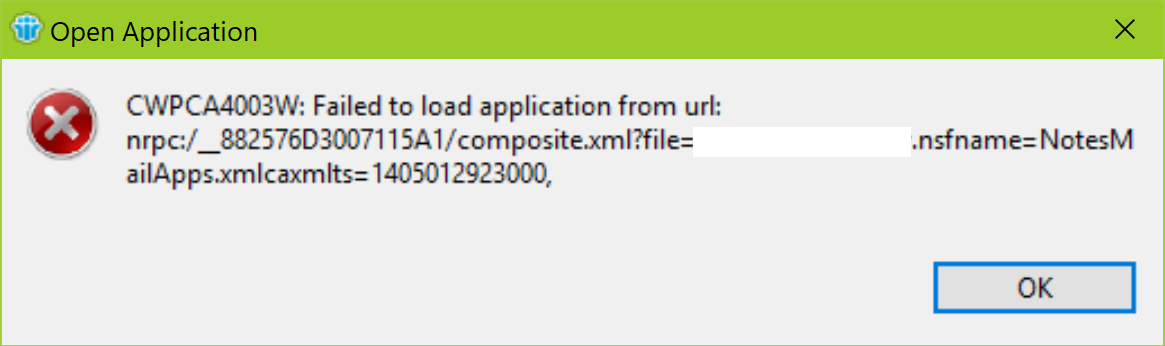
CWPA4003W: Failed to load application from url: nrpc:/….nsfname=…
Then start by doing traditional maintenance on the local databases, especially names.nsf
The details:
You may encounter this error after a variety of events. In this particular case Notes gave this error and would not launch after running the installer to upgrade from 9.0.1 FP10 to 9.0.1 FP10 SHF315. The error persisted even after uninstalling and re-installing Notes — the first indication it might not be a problem with the software. Also, Notes would launch in basic mode or if you right click and select Run As Administrator. That misguided my troubleshooting into thinking it was an issue with Eclipse or Java. There is a similar issue reported in this technote:
https://www-01.ibm.com/support/docview.wss?uid=swg1LO67058
Detailed steps to fix:
1. Edit the notes.ini and make sure it has the following line based on the version of Notes installed:
CREATE_R9_DATABASES=1
CREATE_R10_DATABASES=1
(If you have an earlier version, you have bigger problems and should be upgrading to the latest version, currently that is 10.0.1 FP3)
2. Launch a cmd prompt and change the path to the Notes program directory
3. enter these commands one at a time in this order:
nfixup names.nsf
nupdall names.nsf -R
ncompact names.nsf
(Note: it will prompt for the Notes password. When you type it in, nothing will appear to happen until you press enter.)
I highly recommend executing these commands on ALL of the local databases. To do so, just leave “names.nsf” out of the commands you enter.


 The Notes Guy in Seattle