SmartCloud Demonstration at Seattle Technical Forum Meetup, Redmond, WA
If you are a CTO, IT director, computer professional or enthusiast of cloud computing technology, you won’t want to miss out on this meeting of the Seattle Technical Forum meetup group.
There will be 3 presenters at this meeting speaking on the following topics:
– Google Cloud Platform: Top 10 Edition
– Properly securing your cloud infrastructure
– SmartCloud – IBM’s Biggest Little Secret
I will be presenting a demonstration of SmartCloud for Social Business with IBMer David Bell. This will show off what is sure to be tagged as “The next Facebook”, business style.
You can find the details here.
Even if you can’t attend, you can create a free 60-day trial account at http://collabserv.com
SmartCloud Tip #04: Special considerations for Soft Deletions with MMR
The SmartCloud administration panel has a setting for how long deleted messages are in the trash. From the administration screen, in the left navigation click on IBM SmartCloud Notes, Click Account Settings…
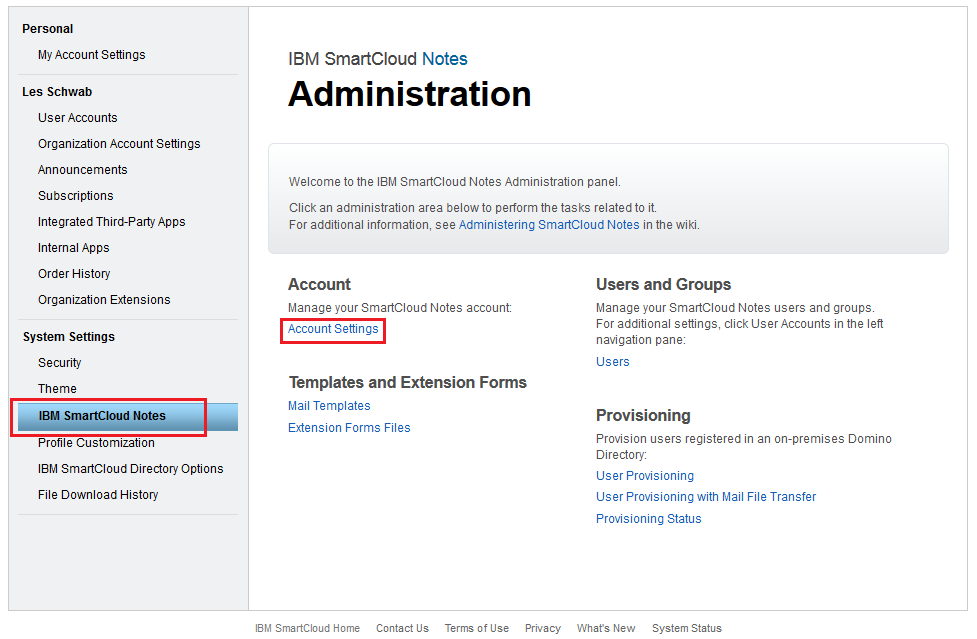
Click Email Management.

This setting overrides the setting in the database properties – advanced tab – soft deletions.

However…
If your users are using Managed Mail Replicas (MMR), then they have a local replica and the Notes client will still process soft deletions on that local replica according to the database setting. So if the database setting is set shorter than what you have in the SmartCloud admin settings, the trash will be emptied locally and then replicated to the server and it will appear as though the server setting isn’t working.
Normally the administrator could change this database setting, but not for mail files in SmartCloud because no one has manager access to the database, not even to the local replica.
To avoid this problem, simply make sure to set the value of the soft deletions database property to something longer than the time you have set in SmartCloud up to 2160 hours (90 days) before you migrate the mail file to SmartCloud. Don’t exceed that as excessively high values create other problems. Also do this to the mail template you are using for new users.
The beauty of cloud-based software is the speed that updates are deployed and I expect this will change soon. IBM is working on refinements to managing the soft deletions with MMRs, but it is still best to deal with this pro-actively before migrating.
Read these articles for more tips on preparing mail files for migration to SmartCloud Notes:
SmartCloud Tip #02: Best Practices to get mail files ready to move to SmartCloud
SmartCloud Tip #03: Important Details to Setting the ACL on your Mail Files
Wealth is not measured by how much you have, but by how much you give
Please visit my official Donor Page to help the YMCA kids
This time of year I am normally helping out at my YMCA with their Partners With Youth campaign, sitting in a phone bank with other volunteers, calling people in the community asking for donations to help their cause.
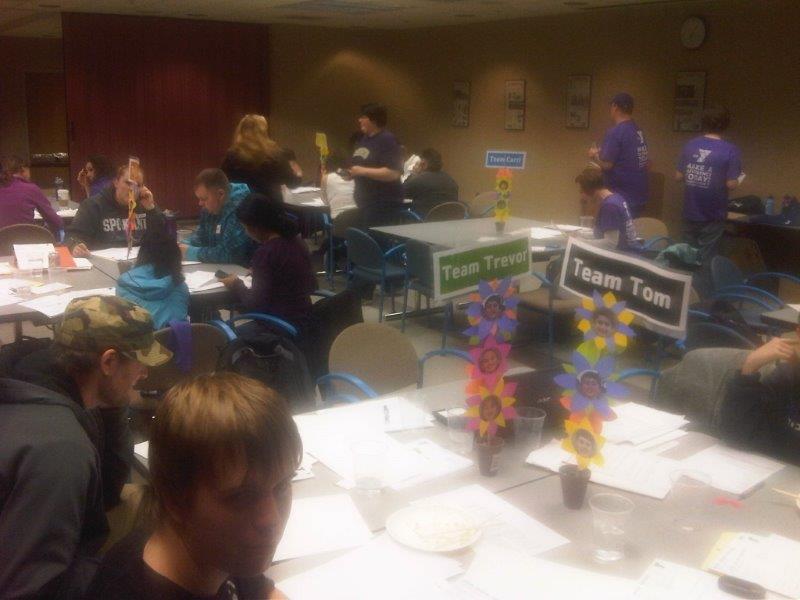
Phone bank volunteers working hard
This is a charity that helps provide funding for kids whose family can’t afford to put them into programs like before and after school care, swim lessons, or summer camp. In some cases this care is vital in making it possible for their parents (or parent) to be able to go to work. In other cases it makes it possible for kids to get to continue in those programs while their families get past a brief challenging time, like unemployment. One thing I like about this program is that it helps people right here in my neighborhood and community. Also that they are so efficient with the money. Over 95% goes directly to the need. I have been giving to this charity for many years. Then a few years ago, I found myself on the receiving end. My daughter has been going to the Y summer camps since about age 6. She just loves it and it would have been hard to tell her one summer that she couldn’t go. Fortunately Partners With Youth was there for us.
That time has past, and since then I have been able to resume contributing my time and money to the program. This year my business has been very successful. But my work has taken me on the road a lot and with all the travel I have not been able to help out working the phones to call for donations. So instead I will leverage what small influence I have in social media to try to help these kids. Please visit my official Donor Page and make a contribution. Even if it is just $5, it makes a huge difference. “How do you eat an elephant? One bite at a time.” How to I make my donor goal? One dollar at a time. On behalf of the kids you will help, I thank you!
SmartCloud Tip #03: Important Details to Setting the ACL on your Mail Files
When you move to SmartCloud Notes, you get many great benefits, but of course there are a few tradeoffs. One of those is giving up Manager access to the mail files. Whether you’re the mail file owner or the system administrator, the best access you’ll ever have is Editor. And unless you explicitly configure it otherwise, by default only the mail file owner will have any access at all. This is actually great for enforcing best practices. Users should never have more than editor access anyway, and in countries like France, the law prohibits administrators from accessing a user’s mail without their permission. Yes, the owner can always use delegation to grant others access to their mail file, but that only works if they are available to give that access. That doesn’t help for employees that are out sick or no longer employed at your company.
If you want anything other than the default, you need to plan ahead because once the mail file has been migrated, you can’t change the ACL. This means adding certain groups and roles to the ACL of the existing mail files as well as to the template for any future mail files.
There are typically 3 groups you will want to add to the ACL. The first is your administrator group. Without this, administrators can’t perform some basic administrator tasks, like opening the mail file to do troubleshooting.
The second group that may need access are support personnel who may need access to the mail files, but should not be included in your administrator group. For example, this may be regional administrators, or designated people on the help desk, or HR, or the legal department. How you organize these groups will vary depending on the organization and size of your company. Note that you need a different mail template in SmartCloud for each different ACL. For example, you will need a different template for each region if each region will have a different group of regional administrators.
The third consideration is providing access for your application servers in the event you have applications that run agents that directly touch the mail files. Keep in mind that no agents can run on directly on the SmartCloud mail servers so any agents will need to be run on a server you maintain on site. Typically databases use mail routing to get things into your mail file, but I have encountered a few applications that add entries directly to the calendar. The process of assigning access to these groups is simple, but must be done in advance of migrating the mail files into SmartCloud and also requires modifying the ACL of your mail template that will be posted in SmartCloud so future accounts created in the cloud will have them.
First, create a role called ExcludeDelegate in the ACL of the mail files, then create the three groups mentioned above as you need and apply that role to them. (More on exactly how to do this later.) The following screen shot was taken from the database catalog and shows these ACL entries framed in red boxes. Note that regardless of what level of access you give these groups in the mail file on site, it will not have more than Editor when it is moved to the cloud. But if those entries do not have the ExcludeDelegate role applied, they will be removed entirely from the ACL upon migration.

Entries needed in SmartCloud ACL
So how do you get these settings applied to all of your mail files in advance? You could add the entries using the administrator client. On the files tab, select a set databases then right click and choose Access Control – Manage. A dialog box displays that allows adding, modifying, or deleting ACL entries. It also allows creating roles. But the ability to actually applying those roles to ACL entries is missed. (I say BUG, IBM says “functioning as designed”) So the only way to assign a role to an ACL entry via the Administrator UI is to manually open each database one at a time and add the role to the entry. Not exactly convenient when trying to assign the [ExcludeDelegate] role to entries in hundreds or thousands of mail files before migrating them to SmartCloud.
Footnote: An SPR# GPKS6TNBN4 is a request to fix the admin client to mass-update roles in ACLs. Read this article for more details:
http://www-01.ibm.com/support/docview.wss?uid=swg21264880
Please take a moment to open a ticket with IBM technical support and request that your company be added to this SPR. The more companies that request an enhancement, the more urgent they consider it.
Meanwhile, you can accomplish this using third party tools, such as Ytria EZ ACL tool, a module in the suite of useful admin tools. (Contact me for a discount code) or you can write an agent to accomplish this task.
Prepare your environment with these steps well in advance of migrating and things will be much less complicated at the time of migration.
If you found this tip helpful, you might also be interested in my other tips:
SmartCloud Tip #01 Using the Notes admin client to compliment the SmartCloud web admin screens
SmartCloud Tip #02: Best Practices to get mail files ready to move to SmartCloud
iSecurity hole is not so good. This wouldn’t happen with a BlackBerry.
Be wary of using your iWhatever on public networks until the patches are made. The scary part is not knowing how long the “bad guys” have been exploiting this.
http://www.huffingtonpost.com/2014/02/24/apple-security_n_4847109.html
For all the bad rap BlackBerry got for their product, one thing that they never compromised on was security. From device, through the phone carrier, through the BB data center, over the Internet, and to your company’s mail server.
2014 Winter Olympics Numbers Games
When looking at the medal count from the 2014 winter Olympics, at a glance it appears the United States did really well finishing with the second-highest medal count of any country.

Medal Counts
But then I saw Norway was in third place, and it made me wonder…
So I drafted a quick spreadsheet (using IBM SmartCloud Docs) and came up with this graphic, of medals per million people in each country. Suddenly the U.S. didn’t do so hot while Norway totally owns the winter games, all 5 million people:

Medals per capita
Norway even earned 8 times more medals than Canada!
Update: In the first 10 minutes of posting this article, Norway had by far the highest number of visits per capita!

Computer gaming companies are choosing IBM over Amazon
A few weeks ago I mentioned on the first day of IBM Connect conference that it is clear now beyond any doubt that computing power is becoming the next utility like electricity, phone, water, and cable TV. I predict that there will come a day in the very near future when few companies will still have their own physical data center.
This article at thestreet.com is more proof of that as the gaming industry is the first to make this move. But even more interesting is that IBM, not Amazon, Google or Microsoft, is leading this trend. This adds even more credibility to IBM SmartCloud for Social Business and why I see it eclipsing Microsoft Office 365 and Google Apps in the coming years as businesses of all sizes seek more business-directed solutions than what those consumer-focused, consumer-driven businesses (Amazon, Google, and Microsoft) can provide.
SmartCloud Tip #02: Best Practices to get mail files ready to move to SmartCloud
Here are several essential tips to avoid users having problems after migrating users’ mail to SmartCloud and to avoid having problems during the migration.
1. First, make an initial pass with the Onboarding Planning Tool (OPT) as early in the migration planning process as possible. You will want to get a jumpstart on fixing all the errors it is going to find that you never knew you had. This will also help to identify all those orphaned accounts no longer in use so you can get a more accurate count of how many licenses you need.
2. Look at the mail files on your server with the admin client. Sort them by size. If you have any over 5 GB, then open each and see how many documents are in the inbox. If you have a lot of these, make an agent to scan them all and create a report. For any that have more than about 1000 messages in the inbox you should have the owner clean it up before they are migrated. This is a performance issue.
3. Identify all mail files that have more than 400 folders. These will need to be reduced to under 400. Again, it is a performance issue and can also cause errors. Finding these isn’t as easy. If you are a glutton for punishment, you can do it manually. Open the server log, go to the view Usage – By Size. Open the document for one of the mail databases and you will find a list of all the folders. An easy way to count them is to copy the list and paste it into a spreadsheet or into an editor that will display line numbers, like Notepad++, a great, free editor. I recommend creating an agent or using a 3rd party tool like Ytria tools instead. (Contact me and I can get you a discount.)
In case you’re wondering, I’ve already asked IBM to add processing counting the inbox documents and the number of folders to the OPT. It is more likely to happen sooner if others request it too.
4. If you aren’t already using local mail replicas and managing them with MMR, then you are best off getting this setup on all users before you start migrating. You can do it after the migration as well, but creating the replicas will take longer because it is pulling it down from the Internet instead of from servers in your data center. Do NOT try to do it at the same time you migrate users. You will inevitably have problems and it will give the impression the migration was the cause. For users with excessively large mail files or with a high document count in their inbox, create the local replica first and have them do their clean up work locally. If you use the MMR settings on the Mail tab of the Desktop Policy settings, you can also tell it to create the full text index automatically too. Your users will be thankful. Be sure to teach them how to use it too!
These tips aren’t documented in the IBM SmartCloud Wiki.
But there are many good lessons to learn there if you are considering making the move. Check out the Learning Center pages on the SmartCloud wiki
Quick Tip: Fix for unexplainable common crashes of Lotus Notes 8.x with Eclipse
Lotus Notes Version 8.x introduced the Eclipse-based extension with many new features and functions possible. But along with that came a world of new opportunities for software failures. The introduction of the Fault Reports database made it easier to gather crash information, but still doesn’t provide any tools for fixing the issues or identifying the cause of many errors in the Eclipse configuration information that is stored in the \Workspace directory located in the Notes data directory. It could present a variety of errors from the client closing as soon as it is launched to crashing whenever the user tries to send an email with an attachment. The first step is to identify if the problem is related to Eclipse. An easy test for this is to launch the Notes client in basic mode. This can be done two ways:
1. Add this line to the notes.ini: UseBasicNotes=1
I prefer not to use this method since this is only being used temporarily.
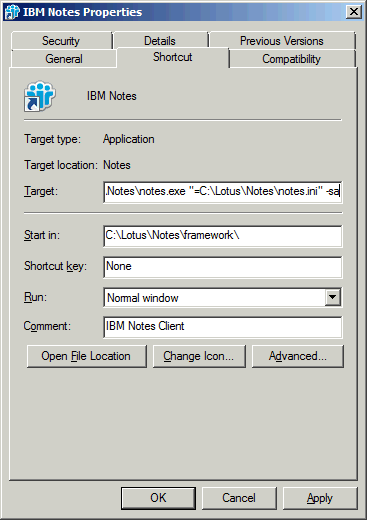
2. The preferred method for this use is to edit the properties of the icon used to launch Notes and append ” -sa” (without the quotes) to the end of the command line that has notes.exe so it looks like this:
If you cannot reproduce the error while running in basic mode, the problem is probably due to an Eclipse configuration issue.
In such cases, the brute-force method of solving the problem would be to delete the \Workspace folder and cache.ndk and maybe even the bookmarks.nsf. This may work, but it also deletes many settings that have been customized for that client. A less drastic, but not publicly documented method is to launch the Notes client with parameters that will clear the Eclipse cache or reset the configuration.
1. Click the Windows Start button, type cmd and press enter. This will launch a command prompt.
2. Change the current path to the Notes Program directory.
3. Launch Notes using the following command:
> Notes -RPARAMS -clean
or to reset the configuration, Launch Notes using the following command:
> Notes -RPARAMS -resetconfig
Each of these commands has a specific impact on the Eclipse files. The full impact is not publicly documented, so you may want to make a backup of the \Workspace folder first and if you have access to IBM technical support, it is best to open a ticket with them before using these commands. But this is another tool to add to your Notes client repair kit.
For a related article describing an example of using the Fault Reports data to troubleshoot client crashes, check out my post titled: The Single biggest cause of Lotus Notes client crashes and how to avoid them
Connectosphere 2014 Final Day: GURUpalooza!, Ask the Product Managers, Ask the Developers sessions
(Long article. Jump to the meat at the end if you don’t want the full story) If you left before the end of the conference, you missed the best part. Thursday always holds the crown jewels: GURUpalooza, Ask the Product Managers, and Ask the Developers. Each of these sessions have a panel on stage and give attendees a chance to ask any question they wish or give their suggestions. If you were there, you already know this is my favorite day of the conference. No surprise given my love for product design and chronic divergent thinking (I don’t think outside the box. It’s more like there is no box.) This can be a curse at times, but on Thursday I revel in it.
At GURUpalooza, the panel consists of all the conference speakers who are not IBMers (not counting Susan Bulloch who hosts the session and Mat Newman who recently transcended the independents to become an IBMer). The big selling point of this session is you won’t get marketing fluff and they won’t skirt the question; just direct, truthful answers. And if they don’t know, they will candidly say “I don’t know.”
Then comes Ask the Product Managers. Originally started at Connect 2013 by Ed Brill, probably in response to the many questions that were more befitting of the product managers than the developers, as they were more about product direction than specific bugs or features. This is where all the hard questions are asked that the audience tries to put the panel on the hot seat. Since Ed started his new role in Mobile at the end of the conference last year, this session was hosted by Kramer Reeves, Director, Product Management, Messaging and Collaboration.
Third comes Ask the Developers. This session has a long tradition of being the final session before the closing session. It has taken on a more light-hearted atmosphere as most of the toughest questions have already been fielded in the Ask the Product Managers session, hosted by John Woods, Director of Development, Domino and SmartCloud Notes.
To paint the picture, these Q&A sessions are all held in the Swan. they open up the 5 large conference rooms to make one large, wide room. There are 4 wide isles between the chairs and at the front of each isle they set a microphone for anyone in the audience to line up in front of and take a turn to ask their question. The rules for these sessions are all the same: Each person gets to ask one and only one question and must then go back to the end of the line at one of the mics again to ask another question. Questions are taken from each mic in a round robin format. I took my usual spot at the mic in the isle directly in front of the stage.
I believe these sessions were recorded this year and are available for replay on the web. I am working on getting a complete list of all questions asked in each of the sessions. Meanwhile, here are the questions I asked this year. I am hoping that by publishing it, next year we can reflect back on what happened over the year and see if our input made a difference.
GURUpalooza!
1. Roaming is not officially supported by SmartCloud, even with the data stored on a local server. Do any of the Gurus have personal experience using Roaming with SmartCloud that can speak to any issues using it in a SmartCloud environment?
A: No one on the panel has experience with it yet.
2: What is your opinion of the impact adding Kenexa to Lotusphere has had on the conference?
A: As expected, the responses spanned the board. Great that it draws people from line of business (HR users and decision-makers) so they can see what solutions are available and not rely on IT staff to spread the word. Bad that the Opening General Session had all the technical details of substance removed to appeal to the non-technical audience. Interesting to see them focus on the solution and not the technology behind it, but unfortunate that they made no references whatsoever to what software was used in the case studies they showcased. Also disappointed that the party at a park was moved to Tuesday night because the kenexa sessions only ran through Tuesday. I expect there will be much controversy on this conference merger for a long time to come.
Ask the Product Managers
1. While the “Hollywood Squares” style multi-camera web conferencing is a great stride forward, most of us still operate our web conferences from a meeting room with a group of people. When will Sametime support a roundt able camera like the competitors have?
2. We need SAML to work with Sametime and Traveler.
3. The Notes admin client hasn’t been updated since R6.5. Can the UI be updated and possibly include integrated tools to administer SmartCloud?
4. When will we see migration tools to move from Microsoft Outlook and Office 365 to SmartCloud?
Ask the Developers:
1. In the user preferences on the Basic Notes Client Configuration tab, Additional Options list, Can you add numbers to the list so it is easier to find and to refer to the items?
2. SmartCloud web mail has a button to mark messages as SPAM. Can this function be added to the Notes client experience?
3. SmartCloud does not update the person documents with the users’ client version. Can this functionality be added?
4. The Notes Workspace originally designed by Ray Ozzie has proven to be a great design by being copied by iOS and Android. Can the workspace be revitalized and clean up the functionality? Dragging and dropping icons between tabs and 5. adding applications to the workspace are examples. (This one actually got HUGE applause and was noted by the team.)
6. Add official support in SmartCloud to use Roaming with the data stored on local servers.
7. Add support for middle initials in SmartCloud.
8. Allow the customer full control over all SmartCloud system-generated emails sent to users.
9. Improve the SmartCloud administration website and consider integrating it into the Notes Admin client.
Here are more suggestions I made in the Meet the Developers lab during the week:
1. Provide functionality to remove the icons of the old mail files when a user is migrated to SmartCloud.
2. In the SmartCloud OPT tool, add the test to count the number of messages in the inbox and the number of folders in the mail file before migrating to alert to possible performance problems.
I’m sure I offered many more ideas, but this it what I remember. What are your thoughts about these? Do you have ideas of your own? Please share them here. Or better yet, Call IBM technical support and open a PMR for it. From that they will create an SPR and if enough people request it, you will almost certainly see it in the product. You should also post them on IdeaJam to get more visibility. Just know that IBM doesn’t monitor that website. They only listen to PMRs and Lotusphere attendees. Don’t think they are listening? Think again. The Purge Interval Replication Control is just one example of a feature I pushed for that made it into the product (after presenting it in the Meet the Developers lab and at Ask the Developers session).

The tone is set for #IBMConnect 2014 and How Computing Power is the next Utility
If you arrive for IBM Connect on Sunday, you’re late. There has already been a flurry of activity from great 2-hour Jumpstart sessions that dive deeper into topics that other sessions during the week won’t have time to do; to the chance to visit the product showcase Sunday evening where it isn’t competing with your time networking and attending sessions. As a business partner, the Sunday BP-focused sessions have been a wealth of info on how to better inform customers.
The diversity of the conference is actually quite refreshing. It’s not all just about Lotus Notes. Sessions covering Connections, Sametime, SmartCloud, Mobile, Kenexa, real world examples of using it all, and even some amazing Smarter Planet stuff, like a display in the center of the product showcase demonstrating how it can gather and distribute traffic data between cars in an area. With such a diversity in sessions, you can’t complain if you feel pigeon-holed with no opportunity to learn new things.
For all the talk about communicating and collaborating via computing (mobile, tablet, PC) in more natural ways, the underlying tone is cloud computing. It permeates everything. With so much focus on IaaS, PaaS, SaaS, at this point there is no longer any doubt in my mind that computing power has become the next utility.
What do I mean? For comparison, go back in time to the end of the 1800’s and the beginning of the Industrial Revolution. When a business built a factory, they also built a power plant to supply it with energy. Then along came the notion of creating large power plants and a network of power lines that would supply electricity to every household. Then, these businesses realized they could also tap into that grid for supplemental power and eventually get all of their power from it without ever building their own power source. Electricity as a Utility was born.
Jump ahead 100 years. Businesses are building large data centers to house and manage their computing power needs. This is the beginning of the Information Revolution. Then along comes this network called The Internet. It connects households to computer resources and “information suppliers”. Then businesses realized they could also tap into that grid and now there is a movement to get their computing power from Cloud Computing providers like IBM, Amazon, RackSpace, and Google. If history repeats itself, as I fully predict, the day will come in the very near future when data centers at corporations will all but vanish.
The one small, but significant difference is that information, unlike electricity, is not just consumed. It is also created and stored, almost like houses that have solar panels which are wired to “sell” their surplus back to the power company. This distinction is the wild card that adds complexity to this otherwise close parallel. What do you think?


 The Notes Guy in Seattle