Blog Archives
Essential Notes/Domino Links
 Short URL to this page:
https://bit.ly/dominolinks
Here is a collection of links to everything you could possibly want for Domino and HCL Notes (#LotusNotes)
Bookmark this one page for all your Notes & Domino links.
Use the shortened URL above that is easy to remember:
If you know of a link that I should add to this list, please post it in the comments and I will get it added.
If you find a link is broken, also let me know what the new link is or if it should be removed.
HCL websites
HCL Software Downloads Homepage: https://my.hcltechsw.com/
HCL Customer Support – knowledgebase, documentation, forums, support tickets: https://support.hcltechsw.com/csm?id=csm_index
HCL Idea Portal: https://domino-ideas.hcltechsw.com/ideas
HCL Developer Community: https://developer.ds.hcl-software.com/
HCL Ambassador Program: https://www.hcltechsw.com/about/hcl-ambassadors
HCL Notes/Domino Release Fixlist per release: https://ds-infolib.hcltechsw.com/ldd/fixlist.nsf
HCL Notes/Domno Release Schedule: https://ds_infolib.hcltechsw.com/ldd/fixlist.nsf/Progress?OpenView
HCLSoftware U: (the new academy) https://hclsoftwareu.hcltechsw.com/
HCL Software Blog: https://blog.hcltechsw.com/
Your HCL Portal for personalized links: https://id.hcltechsw.com/app/UserHome
HCL Domino Apps Store: https://marketplace.hcl-software.com/domino
HCL Business Partners
Businesss Partner Locator: https://www.hcl-software.com/partner-connect/partner-ecosystem
Business Partner Registration: https://registration.hclpartnerconnect.com/general.nsf/welcome?open&login=1
Business Partner Portal: https://www.hcltechsw.com/resources/partner-connect
HCL 3rd party software
HCL app store catalog https://hclsofy.com/domino
Divergent Solutions LLC https://divergentnw.com
RPR Wyatt Vital Signs: https://rprwyatt.com/vitalsigns/
Crossware: https://crossware365.com/hcl-domino-email-signatures/
Panagenda: https://www.panagenda.com/
Ytria: https://www.ytria.com/ezsuite/
Maysoft SpamSentinel: http://maysoft.com/spamsentinel-for-hcl-domino.html
Libraesva https://www.libraesva.com/
Prominic: https://www.prominic.net
Belsoft: https://belsoft-collaboration.ch/en/
User groups
OpenNTF: https://www.openntf.org
CollabSphere: https://collabsphere.org
Engage: https://engage.ug/
C3UG: http://www.c3ug.ca/
DNUG: https://dnug.de/en/
Let’s Connect Nordics: https://nordics.letsconnect.world/
sutol: https://sutol.cz/
Spanish Domino User Group: https://www.slug.es/
Facebook Groups
HCL Notes Domino App Store https://www.facebook.com/groups/domino.app.store
HCL Software – Digital Solutions Business Partners – Worldwide https://www.facebook.com/groups/135983955430
HCL Notes Domino Administrators https://www.facebook.com/groups/LotusDominoAdmins
HCL Notes Domino etc Enthusiasts https://www.facebook.com/groups/hclenthusiasts
HCL Notes Domino Developers https://www.facebook.com/groups/dominodev
LinkedIn groups
Messaging & Collaboration Professionals – Lotus https://www.linkedin.com/groups/37836/ (26K members)
HCL Domino, Notes & XPages https://www.linkedin.com/groups/25044/ (10K members)
HCL Sovereign Suite Collaboration https://www.linkedin.com/groups/73034/ (9K members)
HCL (Lotus) Domino Administration https://www.linkedin.com/groups/2255889/ (16K members)
LinkedIn pages
https://www.linkedin.com/company/hclsoftware/ (400K followers)
https://www.linkedin.com/company/hcltech/ (5.5M followers)
Formerly known as Twitter
https://twitter.com/HCLAmbassadors (2K followers)
https://twitter.com/HCLSoftware (40K followers)
https://twitter.com/HCL_CollabSup (1K followers)
https://twitter.com/HCLDigital (47K followers)
Youtube Channels
https://www.youtube.com/c/HCLSoftware/videos
https://www.youtube.com/@HCLDigitalSolutions/videos
https://www.youtube.com/@OpenNTF
https://www.youtube.com/c/NotesIn9
Blog Collectors
Planet Lotus: https://planetlotus.org/
Collaboration Today: https://collaborationtoday.info/
Individual Blogs
https://davidhablewitz.com
http://notesin9.com/
http://xpages.tv/episodes.nsf/home.xsp
Other resources you asked me to include here
http://xpagescheatsheet.com/
A few more HCL sites
HCL Domino Beta Program: https://registration.hclpartnerconnect.com/D11Beta
HCL Domino Volt Beta Program: https://help.hcltechsw.com/domino_volt/beta/welcome.html
HCL Domino Leap Complete Resources: https://hclwiki.atlassian.net/wiki/spaces/HDV/overview
HCL Sandboxes for Leap, Sametime, and Nomad Web: https://start.myhclsandbox.com/
HCL Open Source Repositories: https://opensource.hcltechsw.com/domino
HCL public Sametime Community: PENDING
HCL public Connections Community: PENDING
HCL Notes.net Domino Server for Notes client connections to resources: PENDING
Hot Press: HCL Announces Dates for End of Support for older versions of Notes/Domino. v12.0.2 coming soon.
HCL just announced the dates that v9.0.x and v10.0.x of HCL Notes and Domino (Lotus Notes) will no longer be available for download and the date when HCL will no longer offer technical support for them.
Dec 1, 2022 – End of Marketing (EOM) – HCL will remove the software downloads from Flexnet. If you want a copy of this software, you have just 5 months to download it.
Jun 1, 2024 – End of Support – HCL will not provide customer support after this date and there will be no option for extended support on it. But seriously, why are you running a 12-year-old version of software for mission critical apps anyway?
While we’re talking about software versions, HCL continues the hot pace of prolific software development. You can see the progress of version 12.0.2 right here. It also shows progress on the maintenance release 11.0.1 FP6.
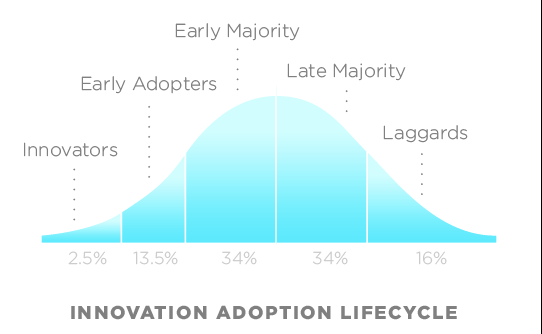
This is great news as it will push the laggards along on the Innovation Adoption curve. When organizations cling to an older version of software (imagine if you were still using Windows 8?), their employees develop an inaccurate, bad opinion of the software. That inaccurate publicity hurts the success of the software which feeds upon itself, causing the company leadership to think the problem is the software rather than their failed maintenance of it. So Kudos to HCL for driving customers to do the right thing and upgrade.
You can read more about their announcement at HCL’s blog.
You can read more about how versions are named, numbered, and supported here.

“It doesn’t matter, it’s in the past!”
HCL Notes and Domino V12.0.1 is Now Available for Download and Approved by Freddy the Bassett

I have been very happy with the beta 1 and beta 2 releases I’ve been running for the past several months. The final release is now available and from what I understand, there is more that wasn’t even in the beta releases. Go download it now and get started. Don’t know what Notes and Domino is? Only the most advanced business application development environment ever crafted. Loved by early-adopters and feared by software giants. Feared so much so that it was the target of the second largest counter-marketing attack ever run by Microsoft (Only their attack on Apple Corporation was larger.)
Wondering what makes HCL Notes & Domino worthy of such devotion and fear? Ask anyone who has created a Notes application or managed a Domino server. Security, versatility, ease of rapid application development and deployment from prototype to production. If you want to see what HCL Domino and Notes can do for your tiny to medium to enterprise-sized business, just ask me. And if you’re already using it, go download V12.0.1 and get started on deploying those new features. What’s new? Visit
https://help.hcltechsw.com/domino/12.0.0/admin/wn_12.0.1.html
HCL Notes and Domino V12.0.1 is approved by @FreddytheBassett.

Updated Zoom Plugin for HCL Notes V11

[blog post update: The new software and documentation from Zoom can be found here.]
HCL Notes users: If you are using Zoom instead of HCL Sametime for your video meetings, you may have discovered that the Notes integration plugin provided by Zoom that made it easy to schedule Zoom meetings in your Notes calendar broke with Notes V11. Well I have good news. Zoom is finally releasing an update that works with Notes V11. See their response in the Zoom support forum. You can find the earlier release of the Zoom plugin for Notes V10 here. The update is scheduled for release on Monday. If that is at a different URL, I will add it here when it is available.

If you want to eliminate this problem altogether, your company should be using HCL Sametime for video conferencing. It is more secure; you have total control of the software; it allows you to keep all of your data inside your company with no harvesting of user data or chats; it is — and always will be — tightly integrated with your HCL Notes and Domino environment; and it’s less expensive.
Domino Jeopardy! at CollabSphere 2020
I recently had the honor of playing the role of game show host of a Notes/Domino edition of Jeopardy! at CollabSphere User Group Conference. This was the Day 2 Lunchtime entertainment.
The contestants were Helen Mendoza, an HCL customer from Chicago, IL, USA; Roberto Boccadoro, an HCL business partner from Milan, Italy; and Luis Guirigay, an HCL employee from Boca Raton, FL, USA.
Hosted by me, HCL Ambassador David Hablewitz.
Many requested it, so here is the replay of that fun game.
It opens with the pre-game chat to relax the contestants and wait for the audience arrive. The actual game starts at timestamp 5:00 and ends around 38:00 followed by more conversation. Actual attendance was about 60 people. Event organizer Richard Moy (Donna) did have a gift certificate for the winner.
Sadly, on November 8, less than 2 weeks after this event, Alex Trebek, the host of the actual TV game show for 36 years, passed away from pancreatic cancer. It was a great honor and tribute to have the privilege to serve as moderator and will make this event so much more meaningful to me. While you’re watching, please take a moment to view the video in youtube and subscribe to my youtube channel or click the subscribe button at the end of the video.
A few logistical details for those interested:
The meeting was run as a webinar in Zoom, though it could have been done in any online conferencing software. Helen and Luis chose to use the virtual background feature in Zoom. Roberto used the IRL background feature (in real life). For my background, the introduction bumper, and some game controls and audio effects (which were muffled) were managed using Open Broadcaster Studio (OBS Studio) software. The website used to host the online game was https://www.playfactile.com/
The game website does provide for a method of using a buzzer, but I opted to keep this as simple as possible to avoid potential technical difficulties and it really was entertaining to hear the contestants’ voices when they buzz. This also switched the speaker view in Zoom to the person when they buzzed. The recording of the event only shows one camera at a time, but during the live event, the cameras of all 3 contestants and the host were visible at all times. This was really fun to do and it was a great success, especially considering I had only a week to pull it all together. Freddy The Bassett also made a cameo appearance at the very beginning.
Follow Up to What’s New in Sametime V10 and Beyond?
Good news with persistent chat and with eliminating WAS and DB2. Persistent chat is coming in V10. WAS and DB2 will be eliminated in V11 or V12. System Console is also eliminated in V10. V10 also supports login on multiple devices concurrently. It is worth listening to the replay (at 1.5x speed). Be sure to listen through the Q&A and the conclusion. There were many useful questions answered. The slide deck should be available in the replay too. But I think the two slides of most importance are these tables showing what features are coming in which release. (these folks are going to be busy!)


You should be able to watch the replay using the same
link to register: https://lnkd.in/dR4cHik
And here is the complete slide deck: letschataboutsametimemay2019rev71558616324635
What’s New in Sametime V10 and Beyond?

Did you know that if you have Notes licenses, then you also have Sametime Chat and online awareness…
FREE
If you don’t have Sametime Chat deployed in your environment, you may want to re-evaluate that. Start by watching the webcast tomorrow (May 23, 2019) to see what’s new and what is coming that YOU ARE ALREADY LICENSED TO USE.
Sametime Limited Use V10 and Beyond webcast:
Overview
Title: Let’s Chat about Sametime (again)!
Date: Thursday, May 23, 2019
Time: 10:00 AM Eastern Daylight Time
Duration: 1 hour
Summary
Join Kathleen Brady Jackson and Pat Galvin to learn what new value Sametime Limited Use V10 offers to Domino customers.
You’ll also hear HCL’s vision for the future product roadmap of Sametime, which includes integration with third-party conferencing vendors, Docker support, and improved co-existence with Domino.
This is a webcast you do not want to miss! Sign up today here -> https://lnkd.in/dR4cHik
If you want some assistance deploying it, I can connect you with experts.
IBM-Panagenda Partnership yields powerful FREE IBM Notes upgrade tool
Panagenda also has a free version of The software can be downloaded here:
Domino Mobile Apps for the iPad is Here!
A Notes client (sort of) for the iPad has just been released! This is the announcement. I’m looking forward to the next steps when they port this to the iPhone and Android phone. All the security, replication, workflow and offline functionality of Notes with the portability of a mobile device and no redundant develop to web-enable any apps. Nice job IBM and HCL.


|
ALERT: End of Google Cloud Messaging Support impact for IBM Verse Android clients

(Updated 3/21/2019) If you ever wondered why you should keep up to date with your server installations, this IBM Technote published today describes one really good reason. Less than a year ago Google announced they are deprecating Google Cloud Messaging (GCM) and have replaced it with Firebase Cloud Messaging (FCM). Google will remove GCM support at any time on or after April 11, 2019 (3 weeks from today).
Why do you care? This service is used by IBM Traveler (server) to communicate with Android devices (Verse for Android). When Google made this announcement, IBM quickly incorporated the new service into the latest Android Verse app (V10.0.4) and the latest release of the Traveler server code stream (V10.0.1). NOTE: This is the Traveler version, NOT the version of Domino that Traveler is running on. Traveler V10.0.1 works on Domino 9.0.1. Yes, if you are running Traveler on Websphere, you still need to upgrade Traveler.
If you get automatic updates from the app store, you will already have this version of the app on your device. If you have automatic updates disabled, be sure to update this app before April 11, 2019. But Traveler on your server still needs to be upgraded.
If you are using IBM SmartCloud Notes (IBM Connections Cloud) for your email service, you have nothing to worry about. IBM already took care of it for you.
Read this IBM Technote for details.
You asked. IBM responds: Interim Fix for Domino to support SHA-2 and TLS fix for POODLE attack.
All the information you need is in these two technotes:
http://www-01.ibm.com/support/docview.wss?uid=swg21418982
http://www-01.ibm.com/support/docview.wss?uid=swg21687167
Watch for the fix to be posted on Fix Central soon. Then this can be marked Completed in Greenhouse and IdeaJam.net
Note that one of these will only be supported on Domino 9.0.1. The 8.5 code can’t support SHA-2 encryption.
What does this mean? This addresses the issue that web browsers will soon no longer support connecting to websites that use the older encryption due to its weaker algorithms that can be broken with today’s faster computers. So Domino servers using https will need this update to allow web browsers to be able to connect after they drop support for the old security.
SmartCloud Tip #01 Using the Notes admin client to compliment the SmartCloud web admin screens
This is my first in a series of tips regarding SmartCloud Hybrid Notes migrations and administering SmartCloud Hybrid Notes environments that aren’t always obvious.
First, as a user, I will say that the more I use SmartCloud Notes, the more I like it. Yes, when doing administration tasks I keep bumping into walls that, as an experienced administrator, I wish weren’t there. But I have seen the problems that a bad or malicious administrator can reek on a system given the opportunity and I am thankful for the excessively tight security. After all, one of the biggest reasons to go to SmartCloud is so you don’t have to administer mail servers, right?
Tip #01 – How to use the Notes Administrator client to compliment the SmartCloud Web administration screens:
As usual, the system administrators are the last ones to get a UI that makes sense. No surprise since there is only 1 administrator for every few thousand end users. The SmartCloud Web Administration screens aren’t very efficient and can be downright frustrating to use at times, especially when you are accustomed to using the Notes Administrator client.
For example, let’s say you have a mixture of mail templates in use and you need to move everyone using one template to a different one. There is no way to see what template is applied to each mail file via the web admin interface. At this time it simply can’t be done. But you can use your Notes Admin client to find them. While the SmartCloud servers won’t show up in the list of servers in your domain and you can’t view the directory in SmartCloud to add those servers in bulk, from the pulldown menu select File – Open Server and enter the server name to gain limited access to the server. The SmartCloud servers will even appear in the Open Server dialog list if you have opened mail files on them already. Be sure to bookmark your SmartCloud servers in your favorites too, so you don’t have to go through this process every time.
Now that you have the server open, you can go to the Files tab and see more details on your users’ mail files including the templates applied. The directory structure they use in SmartCloud is designed to accommodate a multi-tenant environment. So you will want to know where to find your mail files. It’s not too hard because you can’t see any databases you shouldn’t have access to. The directory structure works like this: In the root there will be the directories Data0, Data1, Data2, Data3. You can ignore the Data0 directory as no mail files are in there. Each of these directories contain the following subdirectories:
12345678 (your customer ID) – location of the mail files for users that have this server designated as their mail server
lost+found – used for maintenance
s\12345678 – location of mail files where this server is the user’s secondary server in the cluster
While there aren’t many actions you can take here, it does make it easier to do tasks like open mail files for troubleshooting, view the database properties, see who is approaching their quota, etc.


