Blog Archives
What do Apple, Twitter and Facebook all have in common?




IBM is doing some interesting things to blur the line between consumer and business computing and the pace they are moving at has accelerated like a Mad Max roadster on nitro. In the past year they have joined forces with Twitter, Facebook, and most notably, Apple. The partnerships all bring together complimentary products and services. The venture with Apple, in particular, is worth paying attention to. Apple has virtually no formal enterprise solutions, yet they still dominate the business world with mobile devices. IBM on the other hand, has MobileFirst, their set of mobile solutions for business. Meanwhile, IBM has no mobile or desktop hardware and OS, so it must rely on other vendors to provide that foundation. Combining the solutions from Apple and IBM makes for a compelling case against against Microsoft and Google. The one partnership that seems to be missing is LinkedIn.
Add to these partnerships with consumer-focused companies, IBM is doing some consumer focus of its own. They have just released IBM Verse, a new online email application intended to compete with the likes of Hotmail and Gmail, at least to get consumer adoption, with the intentions that it will become the first choice for business too. While Verse is in the early stages, a steady stream of features are being added on a weekly or monthly basis.
All of these signs lead me to believe that after all these years of analysts and business partners urging and pleading, IBM finally recognizes that it needs to win the consumer first in order to win the business.
They have stepped up their marketing efforts at the same time, which is a treat for business partners. Who knew that for several years now IBM has posted the largest revenue of cloud services? (even over Amazon Web Services)
Yes, they still have work to do in marketing their web services. Often I give demonstrations of IBM Connections Cloud, an ecosystem of software services comparable to Microsoft Office 365 and Google Apps for Work, and I always get several people in the group asking “Why are they keeping this a secret?”
One final step IBM is taking is in making their solutions more attractive to small business, not just enterprise-scale organizations. Their solutions make a powerful case for businesses of all sizes now. I think the next year is going to be game-changing for IBM. The surveys from 3 years ago are actually proving out. IBM is proving why it was named one of the Four Horsemen of technology companies.
IBM partners with Twitter
IBM partners with Facebook
IBM expands partnership with Apple
Get Out the Vote…For your pick of the 2016 edition of Lotusphere
Lotusphere, IBM Connect, IBM ConnectED. Whatever you call it, There is a 4 question Anonymous survey asking for your feedback on what you would like to see in 2016.
It is done by Survey Monkey. Go Here and speak your opinion. My opinion is not so anonymous. I find Las Vegas to be the most useless city in the country.
Computer gaming companies are choosing IBM over Amazon
A few weeks ago I mentioned on the first day of IBM Connect conference that it is clear now beyond any doubt that computing power is becoming the next utility like electricity, phone, water, and cable TV. I predict that there will come a day in the very near future when few companies will still have their own physical data center.
This article at thestreet.com is more proof of that as the gaming industry is the first to make this move. But even more interesting is that IBM, not Amazon, Google or Microsoft, is leading this trend. This adds even more credibility to IBM SmartCloud for Social Business and why I see it eclipsing Microsoft Office 365 and Google Apps in the coming years as businesses of all sizes seek more business-directed solutions than what those consumer-focused, consumer-driven businesses (Amazon, Google, and Microsoft) can provide.
SmartCloud leads IBM to dethrone Microsoft on CNN’s “Four Horsemen of Tech” list
The times, they are a’changin’! In the shifting sands of technology, IBM is proving to be the Rock of Gibraltar.
CNN Money just conducted their annual survey of technology and investment experts to determine which 4 technology companies are the best investments in the industry. Apple, Amazon, Google, and IBM are what they describe as “The Four Horsemen of Tech”.
Microsoft and Dell are no longer on that list. And as recently as 2 years ago Research in Motion might have been expected on that list. The CNN article describes the changing of the guard is due to the shift from PCs to mobile and cloud solutions. I think it goes deeper than that.
Apple, Amazon, and Google are all following the same track that led Microsoft to its fame and glory days by riding the fast-but-fickle success opportunities provided by the consumer market. They are simply the latest fashion trends. In this list of top performers, IBM is the dark horse, being the only one not involved in consumer products whatsoever. They also just celebrated their 101st birthday this year. Coincidence? I don’t think so.
Rides on the consumer wave are relatively short. Google is 16 years old, Amazon is 18 and Apple is 36, though Apple’s great surge came in the last 6 years starting with the introduction of iOS. For reference, RIM and Dell are 28 years old and Microsoft is 37 and they are already declining. They too, based their success heavily on consumer products and are now feeling the consequences. Yes, RIM’s BlackBerry is intended to be a business tool, but it is a consumer device first and foremost. It is considered even more personal than a personal computer (PC). One might argue that Microsoft also makes software for business, but their primary focus has always been on consumers and their foray into the business product market has depended on consumer-driven brand recognition. Also, because many of their products service both business and consumer needs, they are driven by consumer markets. (See RIM.)
Similarly, the focus that led 3 of the current Four Horsemen to their place in the lineup has a consumer emphasis: mobile devices and advertising. Apple’s iPhone and iPad redefined mobile. Google has Android devices and search (advertising). Amazon is into selling (and advertising) along with the Kindle for a mobile presence. All of them are also dabbling in cloud services for businesses. Then there is IBM, the seasoned veteran of business solutions. What makes them part of this leadership crowd? I isn’t just for their SmartCloud solution, I think it is the fact that they have stayed true to their earliest beginnings. Unlike all of the other players, IBM has focused their attention, with laser beam precision, on the proven stable base of the business market.: They provide business solutions for businesses. IBM has resisted the temptation to cross the line into the consumer market, even at the urging of experts and loyal customers who pushed to have Lotus Notes repackaged for consumers. Doing so in the short term would certainly win consumer approval and thus fend off the consumer-led push for the Microsoft Outlook mail client to be used at both work and home. But that would have forced IBM to chase the whim and fads of consumers rather than staying focused on long-term needs of businesses.
When it comes to technology, IBM is all business.
I predict we will see a rise and fall of all 3 of the consumer-driven horsemen in CNN’s list, replaced with 3 new ones as the what’s-hot list changes. I also predict that IBM, with it’s exclusive commitment to serving up business solutions, will continue to stand at or near the top as it has for decades. For consumer products, you shouldn’t care. But for your business, it matters.
Microsoft Office annual certification test competition draws 300,000 students?
Impressive marketing: Not only can Microsoft get 750 million people around the world to pay for Microsoft Office, but they can get 300,000 students to proudly compete to show off their word processing skills at a worldwide certification test competition.
Meanwhile, it’s considered a big deal that 1 million people have downloaded Symphony, a free alternative. That is only 0.1% of the Windows PC market (I can’t speak for the other operating systems). P.T. Barnum clearly underestimated the birth rate of suckers. (or whoever said it)
If you are a Lotus professional, you could do a better job advising your management of their options. Save your company a few hundred thousand dollars and you’ll be a hero. Some companies have a cost reduction incentive program where you can get 10% of the first year’s savings. Unless you work at Microsoft, that’s a big chunk of change to leave on the table.
Some news is worth revisiting…
Microsoft Office Alternatives: Productivity Software Showdown
I am very curious to know how many of you have tried Symphony or Apache Open Office? If your company uses MS Office, do you know how much your company is spending on it? Have you presented the alternatives to your management? What was their response?
Microsoft hires Lotus Professionals for Cloud Computing at Office 365
That’s right. You read the headline correctly. I’m not the only Lotus professional working on the Office 365 project. My friend, a fellow Lotus professional just joined the team. Surprisingly, I didn’t know anything about it until a week before he started. Now you might be asking yourself: “What would Microsoft need Lotus professionals for?” No, it has nothing to do with things like mail migrations. It’s all about BlackBerry Enterprise Servers and messaging. I think this illustrates more than ever that if you have universal skills, like understanding the concepts of messaging or troubleshooting, you are highly marketable, regardless of the details of what product those skills are used on. It’s not about being a professional of a particular brand. It’s about being an expert of a process. Conceptual understanding transcends the syntactic details. Demonstrate that and you will display higher value (DHV).
Now for some quotes you might hear among us Lotus experts at the Microsoft:
“What do you mean, I can’t paste a screen shot in a Lync IM chat?”
“Where is the ‘Send and File’ feature?”
“You mean if I want to file a message into multiple folders, I have to make copies of it?”
“Why does everybody CC everyone on the team for every email? Don’t they have discussion Dbs for that?”
“What do you mean, we don’t have a knowledge base? How do we collaborate? Oh, CC everybody.”
“I’ll just Google that, uh, I mean Bing it.”
“I could do this so easy in a Notes app!”
“How do I create a reminder on my calendar?”
“Notepad++ ? Don’t let anyone see you using that.”
“Where is the workflow in this app?”
Yes, my friend, welcome to the team.
IBM and ESPN 3: Using social media to tell the world what they mean by “Let’s build a smarter planet.”
You’ve heard me ask “What does IBM sell?” Sure, *I* know what they sell. But my point is: what do they do to make sure the average consumer knows?
Well, on this idle Saturday afternoon, while watching my Gators on ESPN 3 crush UAB, *BAM*, there it was – A smarter planet ad on ESPN 3 with a twist: it ended with a URL: http://www.youtube.com/ibm
What’s the big deal? First, IBM is talking to consumers. That’s right, beer-drinking, college football-watching average America. Second, this is ESPN 3. In other words, the webcast version of ESPN. So anyone watching that ad is already sitting at their computer. I don’t know about smarter planet, but certainly smarter advertising. So I went to check it out. On my other monitor, of course.
What did I find there? The first video was their 30-minute story: “IBM Centennial Film: They Were There – People who changed the way the world works”. On the new youtube, you can have longer videos than the old 10-minute limit. Of course, that doesn’t change the fact the the average attention span is somewhere between 10 and 20 minutes and the average time spent on a web page is 1 minute. That was one of the driving reasons for the 10 minute limit in the first place. The cool thing about youtube is that everyone can see the results. It shows how many viewings each video gets. So we will get to see just how successful the videos are.
The good news: This video includes IBM founder Tom Watson’s answer to my question. Retired IBMer Fred Brooks tells the story of how Thomas Watson Sr. used to go into the lab and ask some young engineer: “What do we sell?”
And the young man would say “punch cards sir.”
“NO, NO!” Watson replied. “We sell a service that satisfies.”
Now the bad news: This answer comes at 28:52 minutes into a 30:41 minute video.
But this video isn’t about what IBM sells anyway. It’s about their past. A good production, but wouldn’t it be more effective to lead with a short ad that builds on the *BAM* that the original ad made on ESPN 3? Something that teases with a bit more details on what IBM has to offer today and how they will take MY company into the future and give ME an advantage over my competition? To make ME a leader in a smarter planet? End it with the viewer wanting to know more. Make it a two minute video to fill those dead zone commercial breaks that don’t show anything for web viewers. Just say:
Visit http://www.youtube.com/ibm the next time you see this:

My compliments to IBM digital marketing. (Maria, is this your doing?) Now take it to the next level.
The video ends with the words of another IBMer: “You’ve got to stay alert and you’ve got to be nimble on your feet. You’ve got to recognize that what was true yesterday will not be true tomorrow in terms of technology.”
Website Design Case Study: IBM Passport Advantage Website
Every year at Lotusphere in the Ask the Developers session someone will ask IBM “When are you going to make the Passport Advantage website user-friendly?!” And every year the response from IBM is “What are you talking about? It’s fine!” Apparently usability studies are unnecessary. After all, this is IBM. How could the world’s second or third largest software company NOT know how to build a website? Who are we to give them advice, right? We’re just customers, not experts on web development, right? We are mere ersatz of IBM’s erudite web developers.
Well recently I have been refreshing my web development skills in a degree program at Bellevue College and I would like to think I have become more than just a dilettante of web design. As part of my studies, I am using the Passport Advantage website as a case study in best (and worst) practices in web design. I would like to bring you along for the lesson. Please join me in this discussion of what does and doesn’t work in web design, particularly as it relates to the success of the IBM Passport Advantage website in achieving its goal. Hopefully by this vetting, all of us can learn something from this world class international website representing the third most valuable brand in the world.
My classmates don’t have access to log into this website. So I will include some screen shots. Hopefully this does not infringe on any copyrights. This is intended for review by my classmates in the web design class and web authoring program for educational purposes only.
First, let’s find the URL. If I were to guess at it so I could go directly to it, I would expect something like http://www.ibm.com/passportadvantage . But that doesn’t work. So let’s go to the IBM home page, http://www.ibm.com and look for a link. You can find it on IBM’s home page, though with some effort. You won’t find it in any of the menus at the top of the page, but if you scroll down, you can find it “below the fold” under the Popular Links list. For that reason, I expect most people just use a search engine to find the site. I searched for “Passport Advantage” on Google.com and it came up as the first link. It was the second link listed on both yahoo.com and bing.com. It was also the first link in the results list when searched directly on the IBM website. Here is the landing page for all of these. The URL is http://www-01.ibm.com/software/howtobuy/passportadvantage/
<01_landingpage>
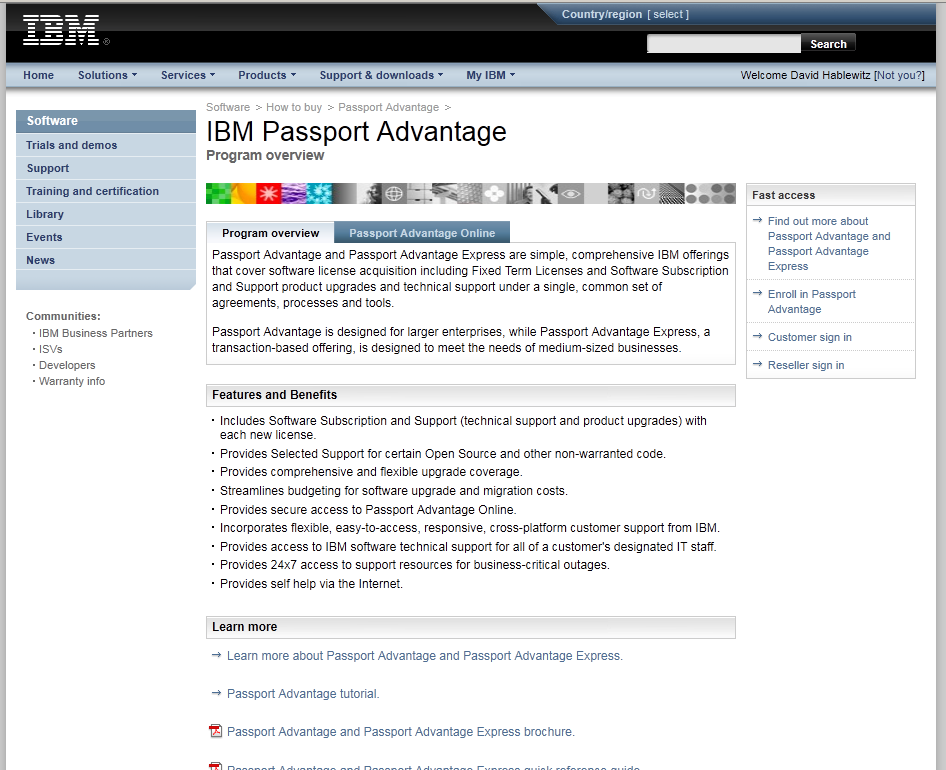
(click image to enlarge)
Not exactly an intuitive URL. Note in the screen shot that it already knows who I am. Am I logged in? Well, no. I need to click on the Customer sign in link in the box on the right labeled “Fast Access”.
Note that it instructs to use my email address for the user name. Not exactly. Some accounts (like mine) require the username that was created, NOT the email address.
<02_loginpage>

(click image to enlarge)
By the way, if I click on the link that says “Not you?” beside my name in the top right, I get this error page with no way back but to close the browser and start over:
<03_switchusererror>

(click image to enlarge)
After logging in, you get to what I will call the “homepage” of Passport Advantage. Actually there is no home page for Passport Advantage and there is never an obvious path back to this page. I could find no links that lead back to this page except by logging in. The Home link on this page goes to the home page of ibm.com and once you go there, good luck trying to get back to Passport Advantage. Assuming you know about the link at the bottom of the page, you’ll get back fairly easily. But most people just google it again. (even if you call customer support, they will direct you to find it this way!)
<04_homepage>

(click image to enlarge)
Great now you’re on the “homepage”. There are primarily 2 reasons most Lotus professionals visit this site: 1. To open a PMR with technical support or 2. To download software. Let’s start with getting technical support. Look closely. There are no less than 7 links to get some kind of help, not counting the phone number listed in the bottom right corner, which by the way, is NOT the number to call to reach technical support. Each of these 7 links go to different pages. The one to open a ticket with technical support (called a PMR) happens to be the last one in the left pane, labeled “Online technical support”. This would seem obvious but for the 6 other links to support on the page. By the way, if you visit a page and then hit the Back button, you will occasionally get an error instead and it will prompt you to log in again.
<05_supportLinks>
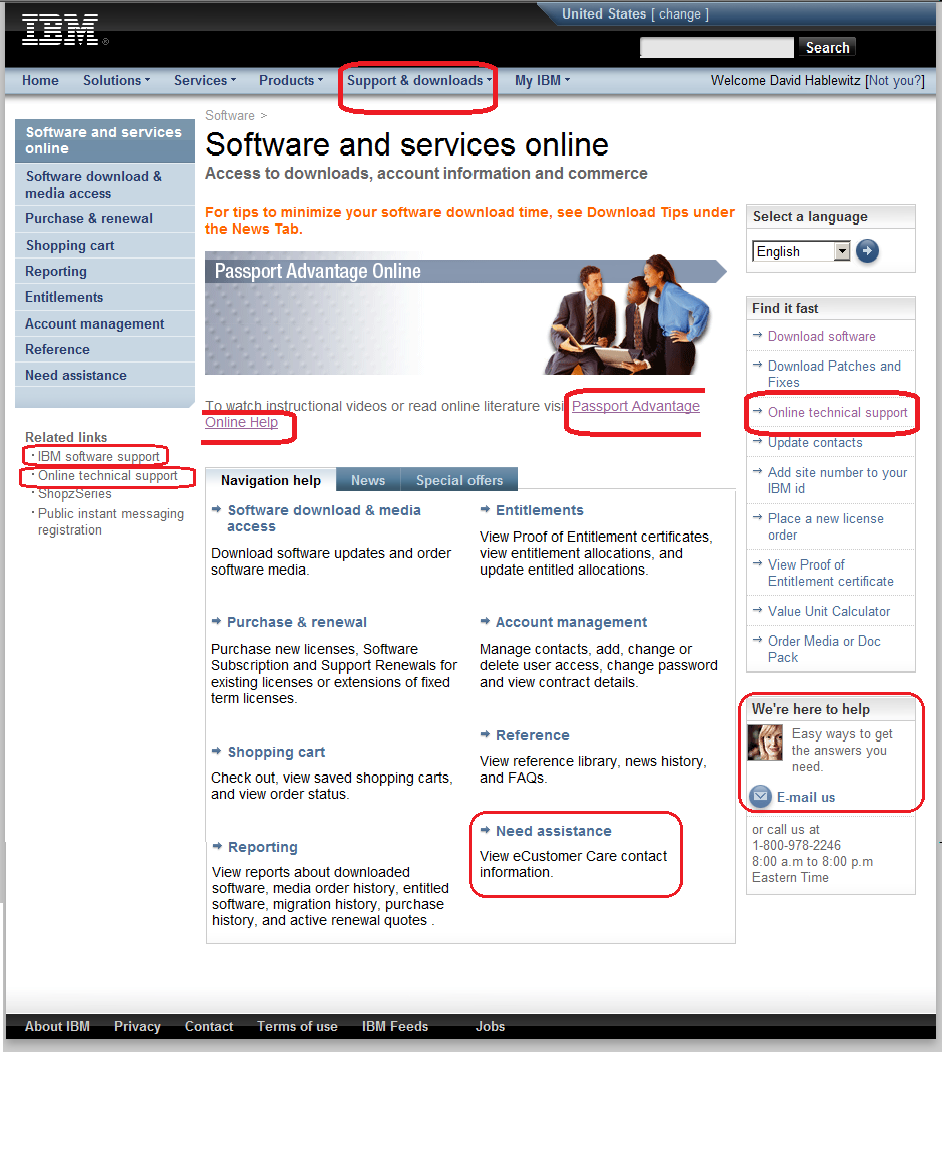
(click image to enlarge)
Once you get to the place to enter a PMR with technical support, you may want to get back to the “homepage”. Which link on this page do you think you should select?
<06_whereishome>

(click image to enlarge)
If you chose Home you would be wrong and once there you would not be able to use the back button to return here.
If you chose Return to the IBM Support Portal you would also be wrong. (See the next screen shot.)
The correct link is actually under related links. Go figure.
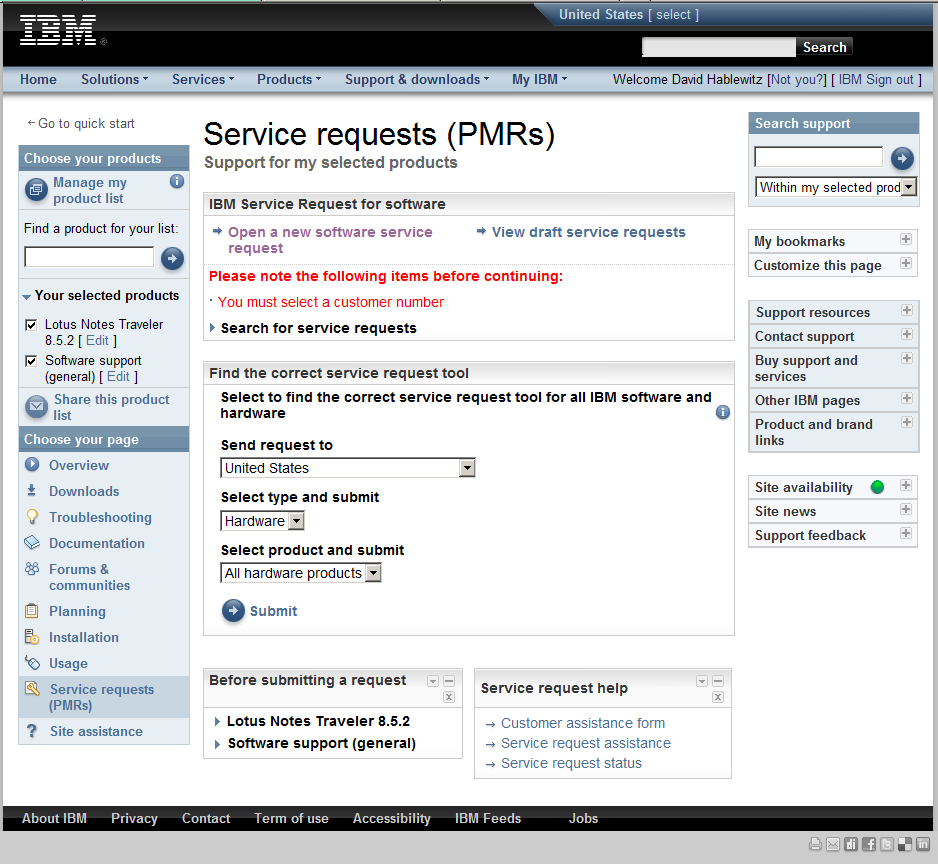
(click image to enlarge)
Now let’s look at the second common reason to visit this site: downloading software. For this function you “only” have 5 choices. Again, they all go to different places. Choose carefully. You may navigate through several lengthy steps before realizing you’re in the wrong place to find what you’re looking for.
<07_downloadLinks>

(click image to enlarge)
The downloads process continues through several confusing steps including prompting TWICE that you accept the software agreement, before actually getting to download the software. And you had better know exactly what you are looking for. There are no useful descriptions of the purpose of each software and many have very similar names.
In our classroom discussion the class agreed when it comes to usability, this site fails miserably, It is laden with many confusing links that are not organized in any obvious, meaningful grouping. There are way too many links without any form of structure or organization to the navigation. One of the class exercises is to create a site map identifying the navigation, but this website proved too complex to create a site map at all. The arrangement of the navigation did not help to identify the relevance of the links either. And why does it have 2 places to select a language? (one at the extreme top of the page, the other in the right column beside the banner image)
Well, there you have it. So far we have examined the pages leading up to the main page of the Passport Advantage site and the main page itself. What do you think? Is this analysis off the mark? If you regularly navigate this site, what has your experience been with it?
Up next if I have the time and patience: Stepping through the website to download software – no trivial task.
Before you pass final judgement on this website, check out what truly BAD websites look like at WebPagesThatSuck
Footnote: After writing this article, I noticed there is now a tutorial for Passport advantage on the landing page (you do not need to log in to view it.)
http://download.boulder.ibm.com/ibmdl/pub/software/passportadvantage/demos/English_Tutorial/english_pa.html
After a few minutes of frustration I had to quit viewing it. The wizard was tiny. The navigators to advance the slides are so small I had trouble getting my mouse in just the right spot to click it. There are pages and pages of blah, blah, blah. It isn’t a tutorial about USING the website. It’s about 45 minutes of reading all about WHY you should BUY it.


 The Notes Guy in Seattle