Blog Archives
HCL Domino /(Lotus Notes) V14.0 is now available!
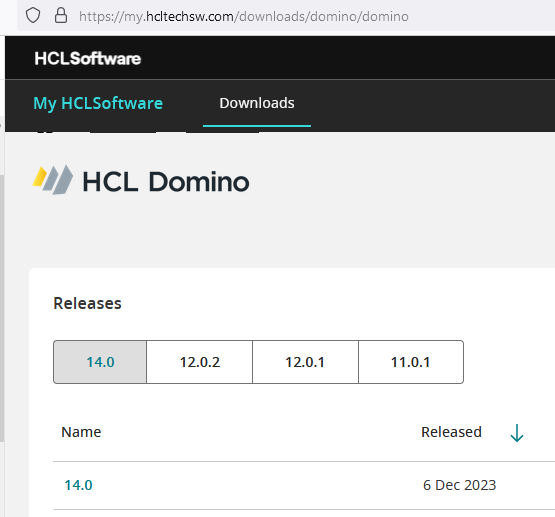
Ahead of schedule, HCL has released V14.0 of HCL Domino and HCL Notes (Lotus Notes as most of us still like to call it). Numerous major new features, like the new auto-update for the software. Find a detailed list of what’s new here: https://help.hcltechsw.com/domino/14.0.0/admin/wn_140.html
You can also watch the official release event (which covers a lot more) here: https://register.gotowebinar.com/register/3240097374153477467
If you dislike flexnet as much as most people, you can download the software at the very user-friendly site: https://my.hcltechsw.com/downloads/domino/domino
As you plan to upgrade your Notes clients to V14, keep in mind that there is no 32 bit version of V14, so unless you are already running 64 bit V12.x, you will need to uninstall the software before installing V14. If you’re using Panagenda’s MarvelClient for handling your upgrades, that will also take care of it.
Essential Notes/Domino Links
 Short URL to this page:
https://bit.ly/dominolinks
Here is a collection of links to everything you could possibly want for Domino and HCL Notes (#LotusNotes)
Bookmark this one page for all your Notes & Domino links.
Use the shortened URL above that is easy to remember:
If you know of a link that I should add to this list, please post it in the comments and I will get it added.
If you find a link is broken, also let me know what the new link is or if it should be removed.
HCL websites
HCL Software Downloads Homepage: https://my.hcltechsw.com/
HCL Customer Support – knowledgebase, documentation, forums, support tickets: https://support.hcltechsw.com/csm?id=csm_index
HCL Idea Portal: https://domino-ideas.hcltechsw.com/ideas
HCL Developer Community: https://developer.ds.hcl-software.com/
HCL Ambassador Program: https://www.hcltechsw.com/about/hcl-ambassadors
HCL Notes/Domino Release Fixlist per release: https://ds-infolib.hcltechsw.com/ldd/fixlist.nsf
HCL Notes/Domno Release Schedule: https://ds_infolib.hcltechsw.com/ldd/fixlist.nsf/Progress?OpenView
HCLSoftware U: (the new academy) https://hclsoftwareu.hcltechsw.com/
HCL Software Blog: https://blog.hcltechsw.com/
Your HCL Portal for personalized links: https://id.hcltechsw.com/app/UserHome
HCL Domino Apps Store: https://marketplace.hcl-software.com/domino
HCL Business Partners
Businesss Partner Locator: https://www.hcl-software.com/partner-connect/partner-ecosystem
Business Partner Registration: https://registration.hclpartnerconnect.com/general.nsf/welcome?open&login=1
Business Partner Portal: https://www.hcltechsw.com/resources/partner-connect
HCL 3rd party software
HCL app store catalog https://hclsofy.com/domino
Divergent Solutions LLC https://divergentnw.com
RPR Wyatt Vital Signs: https://rprwyatt.com/vitalsigns/
Crossware: https://crossware365.com/hcl-domino-email-signatures/
Panagenda: https://www.panagenda.com/
Ytria: https://www.ytria.com/ezsuite/
Maysoft SpamSentinel: http://maysoft.com/spamsentinel-for-hcl-domino.html
Libraesva https://www.libraesva.com/
Prominic: https://www.prominic.net
Belsoft: https://belsoft-collaboration.ch/en/
User groups
OpenNTF: https://www.openntf.org
CollabSphere: https://collabsphere.org
Engage: https://engage.ug/
C3UG: http://www.c3ug.ca/
DNUG: https://dnug.de/en/
Let’s Connect Nordics: https://nordics.letsconnect.world/
sutol: https://sutol.cz/
Spanish Domino User Group: https://www.slug.es/
Facebook Groups
HCL Notes Domino App Store https://www.facebook.com/groups/domino.app.store
HCL Software – Digital Solutions Business Partners – Worldwide https://www.facebook.com/groups/135983955430
HCL Notes Domino Administrators https://www.facebook.com/groups/LotusDominoAdmins
HCL Notes Domino etc Enthusiasts https://www.facebook.com/groups/hclenthusiasts
HCL Notes Domino Developers https://www.facebook.com/groups/dominodev
LinkedIn groups
Messaging & Collaboration Professionals – Lotus https://www.linkedin.com/groups/37836/ (26K members)
HCL Domino, Notes & XPages https://www.linkedin.com/groups/25044/ (10K members)
HCL Sovereign Suite Collaboration https://www.linkedin.com/groups/73034/ (9K members)
HCL (Lotus) Domino Administration https://www.linkedin.com/groups/2255889/ (16K members)
LinkedIn pages
https://www.linkedin.com/company/hclsoftware/ (400K followers)
https://www.linkedin.com/company/hcltech/ (5.5M followers)
Formerly known as Twitter
https://twitter.com/HCLAmbassadors (2K followers)
https://twitter.com/HCLSoftware (40K followers)
https://twitter.com/HCL_CollabSup (1K followers)
https://twitter.com/HCLDigital (47K followers)
Youtube Channels
https://www.youtube.com/c/HCLSoftware/videos
https://www.youtube.com/@HCLDigitalSolutions/videos
https://www.youtube.com/@OpenNTF
https://www.youtube.com/c/NotesIn9
Blog Collectors
Planet Lotus: https://planetlotus.org/
Collaboration Today: https://collaborationtoday.info/
Individual Blogs
https://davidhablewitz.com
http://notesin9.com/
http://xpages.tv/episodes.nsf/home.xsp
Other resources you asked me to include here
http://xpagescheatsheet.com/
A few more HCL sites
HCL Domino Beta Program: https://registration.hclpartnerconnect.com/D11Beta
HCL Domino Volt Beta Program: https://help.hcltechsw.com/domino_volt/beta/welcome.html
HCL Domino Leap Complete Resources: https://hclwiki.atlassian.net/wiki/spaces/HDV/overview
HCL Sandboxes for Leap, Sametime, and Nomad Web: https://start.myhclsandbox.com/
HCL Open Source Repositories: https://opensource.hcltechsw.com/domino
HCL public Sametime Community: PENDING
HCL public Connections Community: PENDING
HCL Notes.net Domino Server for Notes client connections to resources: PENDING
HCL Notes/Domino V14 Early Access Program release 3 is available today
EA3 of HCL Notes/Domino V14.0, probably last EA release before the final version is released later this year, was released today! Try out their new website for software downloads while you’re at it. Visit https://my.hcltechsw.com/downloads
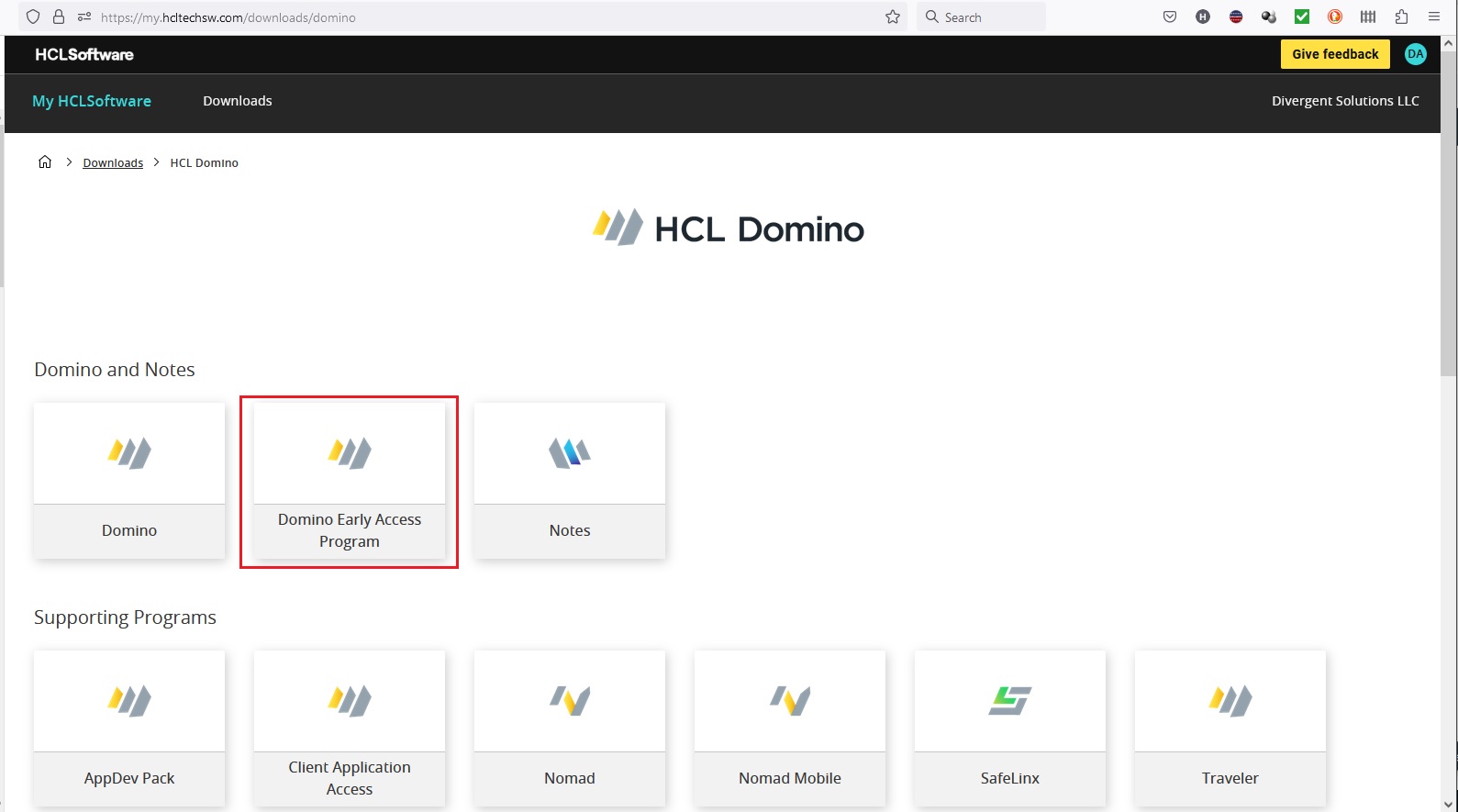
I will say this new website is a joy to work with. From here, it is easy to download the components you want to try out. Then be sure to give feedback on the product before it is released. Post your feedback here: https://registration.hclpartnerconnect.com/domino14forum.nsf/allDocuments.xsp
#LotusNotes #IBMNotes
Hot Press: HCL Announces Dates for End of Support for older versions of Notes/Domino. v12.0.2 coming soon.
HCL just announced the dates that v9.0.x and v10.0.x of HCL Notes and Domino (Lotus Notes) will no longer be available for download and the date when HCL will no longer offer technical support for them.
Dec 1, 2022 – End of Marketing (EOM) – HCL will remove the software downloads from Flexnet. If you want a copy of this software, you have just 5 months to download it.
Jun 1, 2024 – End of Support – HCL will not provide customer support after this date and there will be no option for extended support on it. But seriously, why are you running a 12-year-old version of software for mission critical apps anyway?
While we’re talking about software versions, HCL continues the hot pace of prolific software development. You can see the progress of version 12.0.2 right here. It also shows progress on the maintenance release 11.0.1 FP6.
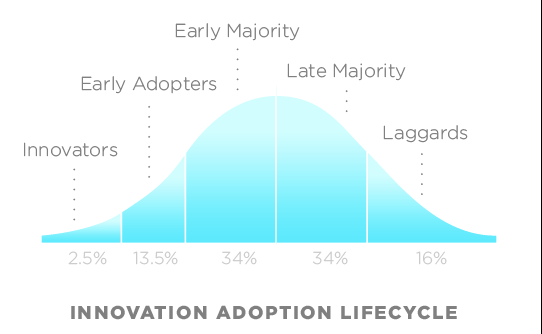
This is great news as it will push the laggards along on the Innovation Adoption curve. When organizations cling to an older version of software (imagine if you were still using Windows 8?), their employees develop an inaccurate, bad opinion of the software. That inaccurate publicity hurts the success of the software which feeds upon itself, causing the company leadership to think the problem is the software rather than their failed maintenance of it. So Kudos to HCL for driving customers to do the right thing and upgrade.
You can read more about their announcement at HCL’s blog.
You can read more about how versions are named, numbered, and supported here.

“It doesn’t matter, it’s in the past!”
HCL Notes & Domino V12.0.1 Beta 1: How to Download, How to Join the Forum, What’s New
The Beta 1 version of Notes and Domino V12.0.1 is now available on Flexnet. If you are licensed for Notes & Domino, this video shows how to download the beta. It also shows how to get to the HCL blog post with lots of details including what is new and how to participate in the beta forum with the developers.
Notes client doesn’t launch after upgrade: SOLVED
I like to share when I find a solution that hasn’t been previously documented in a technote. The short story is this: If you encounter the following error when trying to launch Notes: CWPA4003W: Failed to load application from url: nrpc:/….nsfname=…
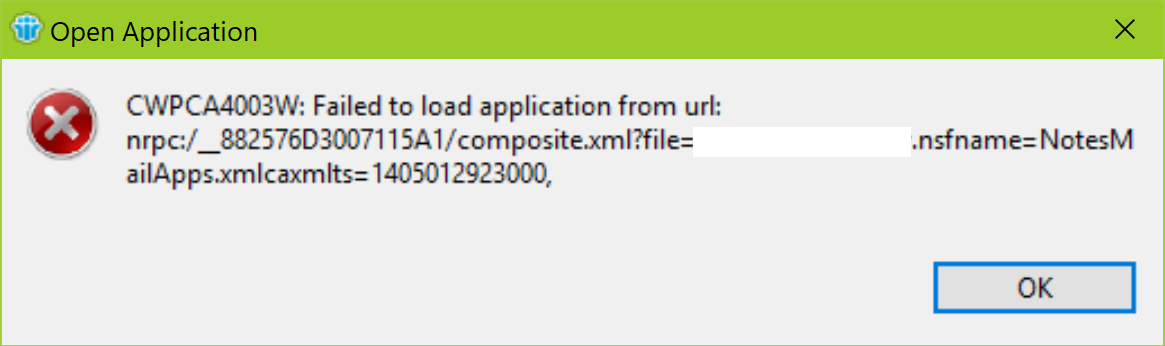
CWPA4003W: Failed to load application from url: nrpc:/….nsfname=…
Then start by doing traditional maintenance on the local databases, especially names.nsf
The details:
You may encounter this error after a variety of events. In this particular case Notes gave this error and would not launch after running the installer to upgrade from 9.0.1 FP10 to 9.0.1 FP10 SHF315. The error persisted even after uninstalling and re-installing Notes — the first indication it might not be a problem with the software. Also, Notes would launch in basic mode or if you right click and select Run As Administrator. That misguided my troubleshooting into thinking it was an issue with Eclipse or Java. There is a similar issue reported in this technote:
https://www-01.ibm.com/support/docview.wss?uid=swg1LO67058
Detailed steps to fix:
1. Edit the notes.ini and make sure it has the following line based on the version of Notes installed:
CREATE_R9_DATABASES=1
CREATE_R10_DATABASES=1
(If you have an earlier version, you have bigger problems and should be upgrading to the latest version, currently that is 10.0.1 FP3)
2. Launch a cmd prompt and change the path to the Notes program directory
3. enter these commands one at a time in this order:
nfixup names.nsf
nupdall names.nsf -R
ncompact names.nsf
(Note: it will prompt for the Notes password. When you type it in, nothing will appear to happen until you press enter.)
I highly recommend executing these commands on ALL of the local databases. To do so, just leave “names.nsf” out of the commands you enter.
IBM-Panagenda Partnership yields powerful FREE IBM Notes upgrade tool
Panagenda also has a free version of The software can be downloaded here:
Domino Mobile Apps for the iPad is Here!
A Notes client (sort of) for the iPad has just been released! This is the announcement. I’m looking forward to the next steps when they port this to the iPhone and Android phone. All the security, replication, workflow and offline functionality of Notes with the portability of a mobile device and no redundant develop to web-enable any apps. Nice job IBM and HCL.


|
Why Use Domino & Notes for collaborating among teams: A Customer Testimonial
My recap of CollabSphere is coming soon. Meanwhile, my friend Bernd Gewehr is featured on IBM’s website right now, and he does a great job of explaining the benefit of using Notes for app development for his company.
Small companies do big things with Notes apps.
Learn more about what is coming in Domino V10 in just a few months: https://www.ibm.com/collaboration/ibm-domino
Some tips are worth revisiting each year: Holidays in Dom Dir and Inbox Cleanup
Some topics are worth revisiting every year. Here are two of my favorites:
How to create holidays in the Domino Directory for importing into calendars
You asked. IBM responds: Interim Fix for Domino to support SHA-2 and TLS fix for POODLE attack.
All the information you need is in these two technotes:
http://www-01.ibm.com/support/docview.wss?uid=swg21418982
http://www-01.ibm.com/support/docview.wss?uid=swg21687167
Watch for the fix to be posted on Fix Central soon. Then this can be marked Completed in Greenhouse and IdeaJam.net
Note that one of these will only be supported on Domino 9.0.1. The 8.5 code can’t support SHA-2 encryption.
What does this mean? This addresses the issue that web browsers will soon no longer support connecting to websites that use the older encryption due to its weaker algorithms that can be broken with today’s faster computers. So Domino servers using https will need this update to allow web browsers to be able to connect after they drop support for the old security.
Quick Tip: Fix for unexplainable common crashes of Lotus Notes 8.x with Eclipse
Lotus Notes Version 8.x introduced the Eclipse-based extension with many new features and functions possible. But along with that came a world of new opportunities for software failures. The introduction of the Fault Reports database made it easier to gather crash information, but still doesn’t provide any tools for fixing the issues or identifying the cause of many errors in the Eclipse configuration information that is stored in the \Workspace directory located in the Notes data directory. It could present a variety of errors from the client closing as soon as it is launched to crashing whenever the user tries to send an email with an attachment. The first step is to identify if the problem is related to Eclipse. An easy test for this is to launch the Notes client in basic mode. This can be done two ways:
1. Add this line to the notes.ini: UseBasicNotes=1
I prefer not to use this method since this is only being used temporarily.
2. The preferred method for this use is to edit the properties of the icon used to launch Notes and append ” -sa” (without the quotes) to the end of the command line that has notes.exe so it looks like this:
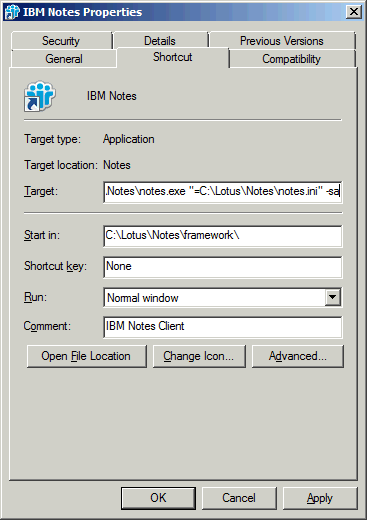
If you cannot reproduce the error while running in basic mode, the problem is probably due to an Eclipse configuration issue.
In such cases, the brute-force method of solving the problem would be to delete the \Workspace folder and cache.ndk and maybe even the bookmarks.nsf. This may work, but it also deletes many settings that have been customized for that client. A less drastic, but not publicly documented method is to launch the Notes client with parameters that will clear the Eclipse cache or reset the configuration.
1. Click the Windows Start button, type cmd and press enter. This will launch a command prompt.
2. Change the current path to the Notes Program directory.
3. Launch Notes using the following command:
> Notes -RPARAMS -clean
or to reset the configuration, Launch Notes using the following command:
> Notes -RPARAMS -resetconfig
Each of these commands has a specific impact on the Eclipse files. The full impact is not publicly documented, so you may want to make a backup of the \Workspace folder first and if you have access to IBM technical support, it is best to open a ticket with them before using these commands. But this is another tool to add to your Notes client repair kit.
For a related article describing an example of using the Fault Reports data to troubleshoot client crashes, check out my post titled: The Single biggest cause of Lotus Notes client crashes and how to avoid them


 The Notes Guy in Seattle