Blog Archives
SmartCloud Tip #01 Using the Notes admin client to compliment the SmartCloud web admin screens
This is my first in a series of tips regarding SmartCloud Hybrid Notes migrations and administering SmartCloud Hybrid Notes environments that aren’t always obvious.
First, as a user, I will say that the more I use SmartCloud Notes, the more I like it. Yes, when doing administration tasks I keep bumping into walls that, as an experienced administrator, I wish weren’t there. But I have seen the problems that a bad or malicious administrator can reek on a system given the opportunity and I am thankful for the excessively tight security. After all, one of the biggest reasons to go to SmartCloud is so you don’t have to administer mail servers, right?
Tip #01 – How to use the Notes Administrator client to compliment the SmartCloud Web administration screens:
As usual, the system administrators are the last ones to get a UI that makes sense. No surprise since there is only 1 administrator for every few thousand end users. The SmartCloud Web Administration screens aren’t very efficient and can be downright frustrating to use at times, especially when you are accustomed to using the Notes Administrator client.
For example, let’s say you have a mixture of mail templates in use and you need to move everyone using one template to a different one. There is no way to see what template is applied to each mail file via the web admin interface. At this time it simply can’t be done. But you can use your Notes Admin client to find them. While the SmartCloud servers won’t show up in the list of servers in your domain and you can’t view the directory in SmartCloud to add those servers in bulk, from the pulldown menu select File – Open Server and enter the server name to gain limited access to the server. The SmartCloud servers will even appear in the Open Server dialog list if you have opened mail files on them already. Be sure to bookmark your SmartCloud servers in your favorites too, so you don’t have to go through this process every time.
Now that you have the server open, you can go to the Files tab and see more details on your users’ mail files including the templates applied. The directory structure they use in SmartCloud is designed to accommodate a multi-tenant environment. So you will want to know where to find your mail files. It’s not too hard because you can’t see any databases you shouldn’t have access to. The directory structure works like this: In the root there will be the directories Data0, Data1, Data2, Data3. You can ignore the Data0 directory as no mail files are in there. Each of these directories contain the following subdirectories:
12345678 (your customer ID) – location of the mail files for users that have this server designated as their mail server
lost+found – used for maintenance
s\12345678 – location of mail files where this server is the user’s secondary server in the cluster
While there aren’t many actions you can take here, it does make it easier to do tasks like open mail files for troubleshooting, view the database properties, see who is approaching their quota, etc.
Preparing for IBM Connect 2013 (Lotusphere) and another “Outlook can’t do that” moment
As I review my flight itinerary, I’m looking forward to the Alaska Air non-stop from Seattle to Orlando, fondly known as…The Disney Flight. No lie. See the photo.

This time there will be no missing B.A.L.D. due to missed connections, flight cancellations or delays because of a storm blanketing the center of the country. Wuhoo!
As I added my IBM Connect (Lotusphere) Conference travel plans to my IBM Lotus Notes calendar, Alaska Airlines graciously pointed out on their website yet another limitation of Outlook. They have a handy “Add to Calendar” feature. When you click it, it gives the option to add each flight to the calendar as a separate entry with the stipulation: “(not compatible with Outlook)”. See below. Just more proof that popularity does not equate to quality. In a way, I’m thankful. If everyone used IBM Lotus Notes, that would be one less advantage my clients had over their competition.
See Y’all in Orlando! If you’re going, tweet me @davehabz and let me know so we can meet up!

Click Add to Calendar
- Click Add to Calendar
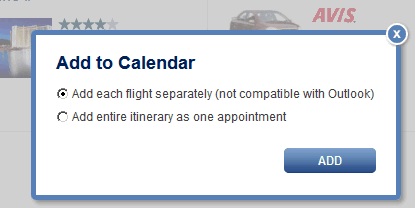
Too bad Outlook users…

But if you use IBM Lotus Notes…
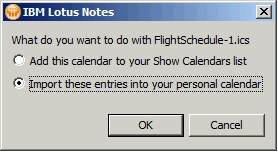
Import the entries so they are available when offline.

Voila’, individual entries for each flight.
_____________________________________________________________
The Single biggest cause of Lotus Notes client crashes and how to avoid them
(For a related article, see my post titled Quick Tip: Fix for unexplainable common crashes of Lotus Notes 8.x with Eclipse )
While reviewing an environment with about 3000 users, I discovered an extremely high number of fault reports occurring. On a daily basis there were from 100 to 200 faults reported. Some users were crashing every single day. Clearly this points to a systemic problem, probably due to some software conflict or other configuration issue widely used within this organization. Yet for all these crashes, the users were not reporting any problems. While they weren’t reporting problems, this was likely to lead to bigger problems from file corruption if it wasn’t already. I needed to find the cause. One catch though: I had limited access to the computers or contact with the users. This can make troubleshooting very difficult.
The first step was to examine the data submitted in the Fault Reports database. Unfortunately, the crashes were not reporting much, if any, useful data, including only partial .NSD files. Fewer than 10% of the crashes even reported a version, but of those that did, they were all either Release 8.5.2 or 8.5.3 with various Fix Packs. While we were only about half way through an upgrade from 7.0.x to 8.5.3, none of the crashes reported a version of 7.x. If all the crashes are 8.5.x, then that makes the fault rate even worse; about 10% per day for fifteen hundred 8.5.x users! Yet no one was reporting any problems. Quite the mystery.
The next logical step would be to run Fault Analyzer against the Fault Reports database to look for trends in the fault reports and to examine whatever is available in the .NSD files for any clues. The .NSD files were mostly empty and Fault Analyzer proved useless because there wasn’t enough data reported in the fault reports. For those crashes that did report some data, examining them manually, I found a common thread among some of the crashes:
Host Name : LAPTOP1234
User Name : SYSTEM
Date : Thu Oct 11 10:33:24 2012
Windows Dir : C:\Windows
Arguments : “C:\Program Files (x86)\IBM\Lotus\Notes\nsd.exe” -dumpandkill -termstatus 1 -dlgopts showwait -wctpid 5292 -wctexitcode 1073807364 -panicdirect -crashpid 3940 -crashtid 516 -runtime 300 -ini “C:\Program Files (x86)\IBM\Lotus\Notes\notes.ini” -svcreq 128
NSD Version : 8.5.23.1132 (Release 8.5.2FP3)
OS Version : Windows/7 6.1 [64-bit] (Build 7601), PlatID=2, Service Pack 1 (8 Processors)
Running as 32-bit Windows application on 64-bit Windows
Build time : Mon Jul 11 03:15:18 2011
Latest file mod : Fri May 13 09:03:31 2011
Notes Version : (32-bit client)
ERROR (79): the directory () does not exist – (22) Invalid argument
ERROR (44): unable to open file ‘C:\Program Files (x86)\IBM\Lotus\Notes\Data\formats.ini’ – (2) No such file or directory
This is an odd error, but searching the web I did find others who reported a similar problem and they solved it by getting a copy of the formats.ini file from a good installation and adding it to their computer. Could it be that our customized installation kit was missing this file? If so, it would be a straightforward fix, though it would have to be applied to all computers already upgraded. However, an inspection of one of the computers that had been crashing revealed the file is right where it should be. This was a dead end.
Finally I was able to work with one user on the issue. She had been crashing several times a week for the past few months though she never noticed. The crash reports were time stamped fairly consistently at around 7:30 AM correlating with the time she came in to work. The user did not report any unusual behavior when she started her computer, though occasionally Lotus Notes did “take a long time to start”. So one morning I watched her go through her morning routine of starting up and logging in. There was nothing unusual. No crash report posted either. Time to do more trend analysis.
I created several views in the Fault Reports database trying to identify any other trends using different categorized sorts: by date, by user, by hour of the day. When categorized by the hour of day, the crashes revealed a trend. The majority of crashes were in the afternoon between 1:00 PM and 5:00 PM (hours 13 – 16).

Fault Reports by Hour of Day
I sorted this view further by user. From this I noticed that, while the crashes were scattered throughout the afternoon, for any given person they were usually crashing in the same hour almost every time. I re-sorted the view so it was first categorized by user and then by hour and added a column with the exact time of crash. Now I could see all the crashes for one person grouped together and categorized by hour. Then scanning through the users with very high crash counts, I found the final clue: One user crashed at precisely 5:00 PM every single day. This user was crashing at precisely 5:00 PM every day and the crashes were being submitted consistently at 8:02 AM the next day.

Crashes occurring at 5:00 PM daily
This person happened to be the receptionist. Her work hours are precisely from 8 to 5. Looking more closely at the other users I could see the crashes were typically occurring about 8 hours after the previous crash report was submitted by each person. It is important to note here that the crash report is reported (Creation date/time) at the next restart of Notes. In other words, Notes would crash at the end of their day and they didn’t restart Notes until the next morning.
I called the receptionist and asked how she shuts down her computer at the end of the day. I expected to hear her say she just hits the power button, but that was not the case. It turns out she clicks the X in the top right corner of Notes to close the window, then clicks Log Off on the Start menu immediately after. Apparently Notes 8.5.x takes longer to close than 7.x and it was not able to close before the OS dumped it from memory during shutdown, thus causing it to not close cleanly.
With a bit of user training, this problem has been resolved. They were told to give Notes an extra minute to shut down before logging out or just lock or hibernate the computer instead of logging off.
I think this is a flaw in the interaction between the OS and Notes, but until that is fixed, this is a clean, simple work-around. What are your ideas and experiences with this?
Lotus Notes Quick Tip: Hold the Ctrl key while opening a different view to jump to the same document in that view
Mat Newman’s tip about a clever use of categories reminds me of another useful but little-known feature. First, put the focus on a document in a view (click once on it.) Now hold down the control key and click on another view or folder where that document also exists. The view will be opened with the focus on that same document rather than where it was the last time the view was opened. One example of how this is useful is if you want to see other documents that are related and appear near the document in the other view. For example, in your mail file, find a document in the All Documents view. Now hold down the control key and click on the folder where it is filed. Another valuable effect is that if the document doesn’t exist in the second view, the view will be opened in the same place it was when last opened, so you can tell that the document doesn’t exist in the view.
Another place that this used to be helpful was in the help files. If you found a topic in a search, you could switch to the Table of Contents view and it would jump to that same document so you could read all the related documents in the chapter. Unfortunately, that broke with the new navigation format of Help.
Microsoft hires Lotus Professionals for Cloud Computing at Office 365
That’s right. You read the headline correctly. I’m not the only Lotus professional working on the Office 365 project. My friend, a fellow Lotus professional just joined the team. Surprisingly, I didn’t know anything about it until a week before he started. Now you might be asking yourself: “What would Microsoft need Lotus professionals for?” No, it has nothing to do with things like mail migrations. It’s all about BlackBerry Enterprise Servers and messaging. I think this illustrates more than ever that if you have universal skills, like understanding the concepts of messaging or troubleshooting, you are highly marketable, regardless of the details of what product those skills are used on. It’s not about being a professional of a particular brand. It’s about being an expert of a process. Conceptual understanding transcends the syntactic details. Demonstrate that and you will display higher value (DHV).
Now for some quotes you might hear among us Lotus experts at the Microsoft:
“What do you mean, I can’t paste a screen shot in a Lync IM chat?”
“Where is the ‘Send and File’ feature?”
“You mean if I want to file a message into multiple folders, I have to make copies of it?”
“Why does everybody CC everyone on the team for every email? Don’t they have discussion Dbs for that?”
“What do you mean, we don’t have a knowledge base? How do we collaborate? Oh, CC everybody.”
“I’ll just Google that, uh, I mean Bing it.”
“I could do this so easy in a Notes app!”
“How do I create a reminder on my calendar?”
“Notepad++ ? Don’t let anyone see you using that.”
“Where is the workflow in this app?”
Yes, my friend, welcome to the team.
Grand Canyon Day 2: Jackass Creek to North Canyon
Next Post: Day 3
Previous Post: Day 1
(If you’re just checking in for the first time, I am posting my daily journal entries from my month-long rafting trip leading 16 friends down the Grand Canyon. You may want to go back and start at the first post of the series and work your way forward.)
An exciting day! I got up around 5:30 AM, just before sunrise. Around 6:30 AM the wind suddenly picked up, gusting over 20 mph. Then the rain came and it poured. Ariel put on her drysuit before she even got out of the tent. Best rain gear you could have! It’s a good thing I had packed the gear back in the drybags before going to bed. A few people left stuff outside and it’s soaked. David C. didn’t fair so well. Yesterday evening his tent blew down the hill in a wind gust like a tumbleweed. Someone recovered it just before it went into the river, but it got torn up a bit. He’s gonna get wet if we get more rain on this trip. It’s a good thing everything dries so quickly in the Canyon.
We packed up camp in the wind and rain and were ready to go by 9:00. Then the rain and wind suddenly stopped. This is so much like those Florida summer rain showers. The big difference is you can’t see what’s coming because the Canyon walls block the view of most of the sky. You don’t know what’s coming until it is right over you. Then just as we prepared to push off from shore, red-brown water started flowing down the far bank of the river in the main current.

Watching the river turn brown as we prepare to depart Jackass Camp
It gradually started filling in the eddy where we were parked, then finally filling in the middle of the river until it all ran brown. A flash flood had come pouring down the Badger Canyon just across the river from us. Amazing how the muddy water shows how the water flows within the river like smoke does in a wind tunnel.

Muddy water coming in from the Badger Canyon
Fortunately breakfast didn’t require any cooking. I stuffed myself last night on stir-fry dinner, so I just had a bagel. We skipped lunch because we were so close to the intended camp that we thought we would just push on and do lunch at camp.
This afternoon we ran our first class 7 rapid of the trip: House Rock.

Scouting House Rock Rapid at river mile 17
I thought I was far enough right as I entered at the top, but I still got drawn into the big wave-hole at the bottom on the left. the current really pushes hard into the left wall. As I hit the last wave just before the wave-hole, I lost my grip on one oar and ended up hitting it sideways! As vertical as we got, I’m not sure how we didn’t flip.

Commodore running House Rock Rapid
The grips on these oars are just a bit too fat. I’ll try rowing without the gloves and see how that goes. We reached our target camp at Upper North Canyon by 2:30 PM, River mile 20.8. Some people rushed off to set up their own gear before the rafts were unloaded. In the end it worked out OK. I know they were anxious to get things dried out from the rain this morning. Before dinner we all hiked up the side canyon. I remember doing this hike at lunchtime last time I was here. A big group of us did the hike. I got a group photo at the upper end.
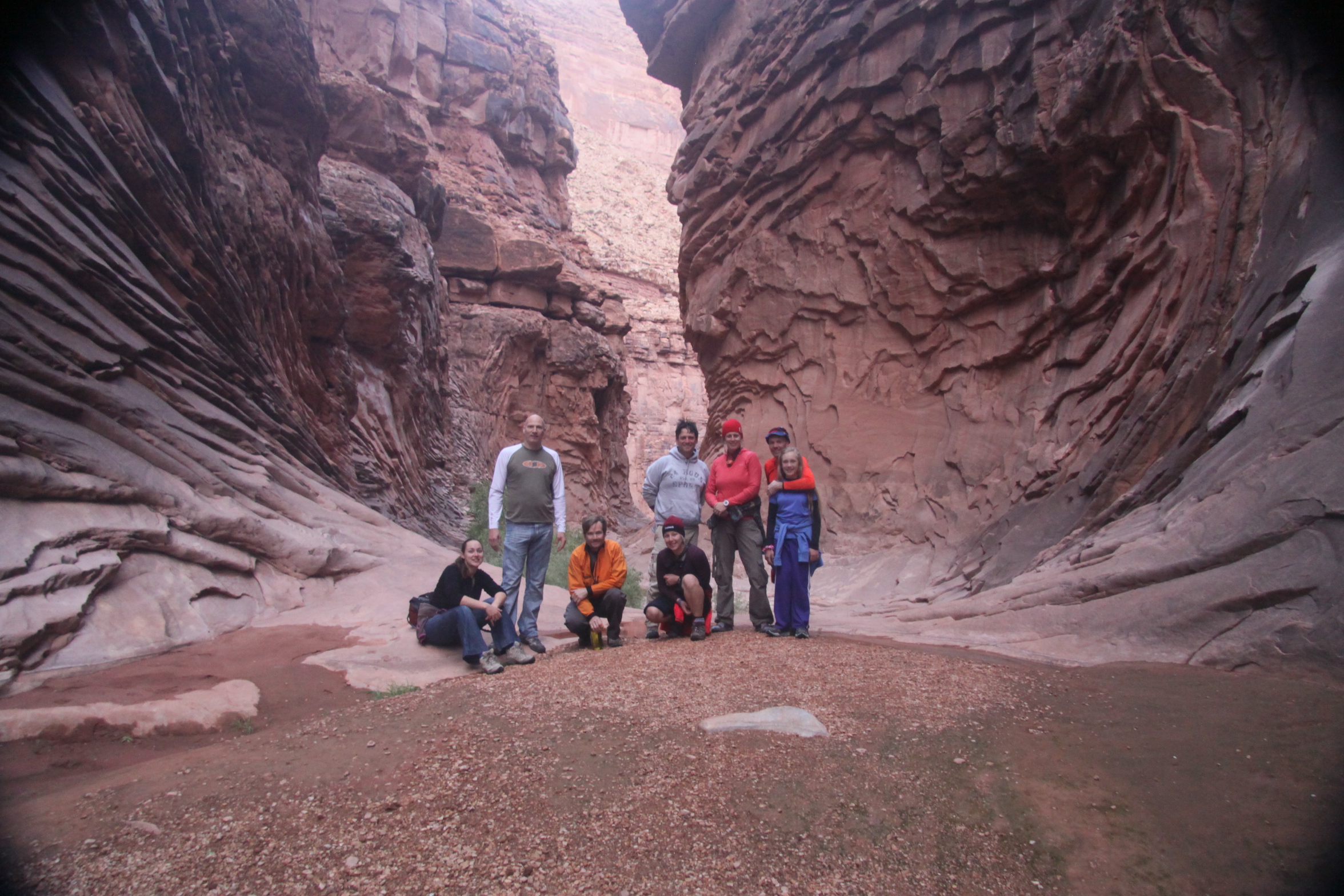
Hiking North Canyon - r to l: Lucy, Gary, Craig, Kika, Kevin, Captain Natalia, Ariel, & Commodore Dave

North Canyon
Dinner was at 6:00 PM, just as it got dark. I want to eat earlier so we aren’t eating and cleaning up in the dark. After a dinner of salmon and salad, we had a campfire and some guitar music. I have been having a meeting in the evening for everyone to share stories about the day and talk about what we want to do the next day. The veterans tell me they like the AM & PM meetings. Good to know. I am finding my Toastmasters skills quite useful too.
Last night I woke up when it rained briefly around 3:30 AM. Never really got to sleep after that. It’s not quite 9:00 PM and I’m falling asleep while writing. Good night.
A sneak peek into the upcoming announcement about the Lotus brand and IBM’s 100-year philosophy
Is Lotus Notes the next Selectric Typewriter? This USAToday article about IBM turning 100 reveals some clues into the motivations that drive IBM which might tell us about their plans for the future.
“Don’t make the mistake of thinking IBM is a corporate old-timer that just watched technology evolve. It has remained at the forefront through the decades and tops several of its whippersnapper rivals in some regards. “
Of course we’re talking about the same company that totally missed some opportunities like the operating system for their personal computers that has gone on to become their nemesis. We’re talking about a company that has taken the once-famous brand of Lotus and made it disappear from the public eye better than a Harry Houdini magic act.
“This isn’t like the auto industry, where the combustible engine still exists, or oil, where many parts of the business are the same,” Iwata says. “We have to let go of what we have invented. We stopped making typewriters, punch-card machines, PCs. We had to move on.”
Hmm. Is this foreshadowing? When I was 8 years old I saw the movie “Old Yeller”. In spite of all the clues, I did not did not see that coming. I thought that dog would live forever. Have I gotten any better at reading the clues? Probably not. But here’s another one:
“•Ability to move into new businesses without abandoning core tenets. IBM is a classic example of a company that had to get into entirely new businesses, without turning its back on what got it to where it is, Collins says. If you consider what IBM’s mission is, it’s not about computers or technology. It’s about allowing its individual employees to create ways for its customers to solve operational problems, Collins says. Whether that’s a task best done with scales, typewriters or computers doesn’t matter; what matters is that customers’ needs are answered, Collins says. “
I don’t know how this movie will end. Maybe we’ll learn more on the Greenhouse webcast about the future of the Lotus brand June 28 at 10:00AM ET.
Meeanwhile, let’s get some popcorn and watch a few movie trailers.
Japan Disaster strikes home for me. (This has nothing to do with Lotus Notes..or does it?)
I want to share with you a Facebook post from my friend’s wife. I have known his family for 20 years. We were neighbors when I lived in Greenville, South Carolina. Growing up, he and his brother spent many hours exercising my black lab. They are now grown and married and have children of their own. Jessie lives in East Lansing, MI. Gabe lives in a small coastal village with his wife and daughter. The village is Ofunato, Japan. A Detroit TV station picked up this story. Check out the video: http://www.clickondetroit.com/video/27212569/index.html
Here is her post:
Stephanie Craft~ Monday March 14, 2011
On Friday afternoon as you all know an 8.8 magnitude earthquake shook the country of Japan. Gabe was at school across the bay and I was home in Jinomori with Violet. When the earthquake started I ran outside with Violet. We had no shoes or coats on as it happened so suddenly. I struggled to make it down the street to where my some of my neighbors were standing and holding on to some steel poles. They held out their arms to me and then we all wrapped our arms around Violet. She began to cry and the shaking became more and more severe and also probably because my heart was beating out of my chest. There was an explosion at the power plant that we could see from where we were standing and we all screamed out loud as the sparks flew. Finally the shaking subsided and we all stood around waiting to hear the announcement to follow. Violet was screaming so loudly that I could not hear the announcement at all. I stood there as long as I could but we were both getting cold so I started to walk back in to my house thinking it was all ok. Just as I arrived at my house my dear friend Junko Mino drove past and shouted out my name. I was so happy to see her and she immediately said there is a big tsunami coming please get in my car. I ran to the door of my house and was able to grab shoes for me and Violet and our coats. They were by the door so I didn’t even have to go inside but I did see everything in my kitchen on the ground. I had my cell phone and ran back to the car and we drove away. I tried to call Gabe several times but everyone was doing the same thing. I could not get a connection. Finally just before the service cut out we connected and I said where are you? He told me his location and I told him I was going to the hospital because it is the highest place in our town. Junko dropped me off there and then went to meet with her family. I went inside and they were setting up triage in the entry ways. I stood there in the entry as the aftershocks continued to shake the earth. A former student of Gabe’s and her mother arrived with her 1 month old twin baby girls. And we waited together to meet out husbands. After 1 hour passed I was really getting sick. Someone came in and said where is Gabe and I told them. Their eyes told me everything I did not want to know. They said the wave came and I just felt my whole world shatter. I didn’t even know the wave had come. So I stood there trying to hold it together for our baby girl. Another 45 min past and I was really hanging by a thread of hope that I would see my beloved’s face one more time. I was thinking of all the things I had said the night before and that morning. What could I have said different. Then a familiar face appeared. It was my neighbor and she shouted out that Gabe was there. I didn’t believe her though. She left and running through the doors 3 minutes later was my beautiful husband. It was the most beautiful embrace of my life. My husband my friend and love was with me again. Then we waited for news of other loved ones. That night we were told to stay in the gym of the hospital with other survivors. It was amazing to experience such kindness and grace under so much distress. We are safe and very blessed. The next day we moved to another evacuation area to make room for incoming elderly and injured. There was no lack of water or medicine but we knew the night would be another rough sleep. We decided to journey to the town where our friend Mark and his aforementioned wife, Junko, live. As we were about to leave Mark came in the room. We all embraced in tears of relief and thankfulness. Mark took us to his home and we ate and slept well. There is so much more to tell… But, we must go at this time.
We give thanks to all of you who have kept us in your thoughts and prayers. We have each other but we have lost our home, car and possessions. Many have asked how they can help. So, given the cost of shipping anything these days and that we can buy what we need here the best way to help us is to send a check or money order payable to *************** ( If you want to help this family, contact me directly or give to World Vision http://www.worldvision.org/ )
We love you all and thank you so much for all of your thoughts and prayers.
We are continuing a vigil of hope for friends not yet contacted.
Peace, Blessings & Love, Gabe, Steph & Violet
For perspective, unless someone gave them some clothes, they are still wearing what they wore last Friday.
So how does all of this tie into Lotus Notes? World Vision is the charity organization to which IBM gave half of Watson’s winnings from his victory on Jeopardy. World Vision is also a Lotus Notes shop based in the Seattle area.
The Lotus Forgot series: An alternative to a full Designer client on Mac or Linux and lesson on who develops applications
We don’t need a Designer client for the Mac or Linux. We need one for the people.
I understand the effort to create a full new instance of the designer client on a different platform is a daunting task. And in the end, who might use it? Developers. Some of those developers will use Macs at work. Some will be college and high school students. Some will be computer-savvy small business owners and entrepreneurs who serve as the CEO, CIO, developer, and user all in one. From IBM’s perspective, this may seem a rather small niche to dedicate the resources. It’s about ROI. So I propose a solution that would reach a much larger market and have a broader impact in enabling people to serve their own simple development needs:
Add basic development functionality back into the Notes client.
Yes, make the Notes client as it once was in the days before R5 when the ability to create applications was an integral part of the Notes client. What would it include? View development (which is already there), Formula language (which is already there in some capacity), and form development. Some agent development probably too. Provide people with enough to be able to serve their own basic needs without overwhelming them with complexity.
Why do this? Simple. Empower the people. Power users have always existed. They were what made the early versions of Notes so successful. It was easy for them to create their own tools in Notes and they loved it. LOVED IT! I can recall many times in the R3/R4 days when users came to me with a database that they had created or made a copy and modified it and wanted to share it with other people on their team. I took it, maybe cleaned it up a bit, and put it on the server where their whole team benefited. This was the root meaning of collaboration: Not just sharing data, but sharing solutions. By the users, for the users. It was truly Rapid Application Development (RAD). Before they had Notes, people were doing this in 1-2-3, Access, FoxPro, etc. It is no coincidence that the Notes client began losing favor among end users as soon as they lost their ability to explore what Notes can do by creating their own applications. The greatest advocates of Lotus Notes are those who can create applications in it.
People did not stop creating their own applications when the designer code was removed from Notes. But now they just do it in other tools like Access and Excel. Sure, there is also Sharepoint and Quickr, but those do not provide for PERSONAL tools. People will not “play” there they way they do with other software. Sadly, while users today are far more computer-savvy than they were in the 1990’s, they are being denied the opportunity to apply those skills to their job, at least where Notes is concerned. As a result, Notes has lost its appeal. Users have been driven away to other tools and no longer know (and have no motivation to learn) what could be done in Lotus Notes. To them it is no longer a PERSONAL productivity tool. Now the only way to get an application in Notes is to request it from the gatekeepers of I.T. It’s like building a Lego kit and giving it to a kid and then saying they have to bring it to you if they want to build something different with the pieces. Sure, the designer client is “free”, but it is not given to employees and for the most part they don’t even know it exists or how to get it.
If we are sincere in our belief that the power of collaboration and Open Source is truly for the benefit of all, then it should be made accessible to all. It should not be hoarded by the professional Domino developers of the world. It should not be locked out by the administrator who doesn’t want the additional work to manage the applications nor the I.T. director who doesn’t want to deal with losing control of application development process and his feeling of importance. Do not waste time defending this practice with the “good ol’ boy” mentality claims like “But the users don’t know how to create good applications.” or “their rights must be restricted for their own good or for the good of the company.” This is Social Business. This is the definition of Web 2.0. (See video)
Eliminate the hierarchy, eliminate the red tape. Empower the people. The more you empower the people around you, the more successful you will be. The more they must depend on you, the less you will be able to achieve. It’s the axiom of good leadership.
IBM may never feel justified in creating a full-blown designer client for Mac OS or Linux. They may never go back to having the simple developer client for the masses that was so successful. So while you wait for IBM to decide what to do, I suggest this: Let your people know the designer client exists. Make the designer client available to anyone who asks for it. I would even encourage them. If you have any programmers in the company that code in other software, be sure to give it to them.
Notes was founded on the principle of giving people the ability to create their own custom applications. (The History of Lotus Notes) That principle has clearly been forgotten.
If you agree, please vote for this idea at IdeaJam
Quick Tips: displaying filenames on Workspace icons
Perhaps long-forgotten, this is an age-old tip that I have used forever without thinking about it until someone saw me do it and asked.
First, go to the Workspace. That’s the page everyone uses for their homepage, that looks like an iPhone screen and that IBM doesn’t want us to use because it’s “the old look” of Notes.
Now click on the View menu. If Show Server Names is selected, deselect it and click on the View menu again.
Now that it is unselected, hold down the Shift+Ctrl keys and select Show Server Names.
OK, trivial. But handy when trying to clean up a user’s workspace with a mess of replicas and copies of databases. In dire cases, you may want to also unstack the icons.


 The Notes Guy in Seattle